MC4WP is a popular Mailchimp WordPress plugin for adding subscribers from common forms and plugins. But when your business needs more than basic subscriber collection, the limits start to show.
You may want to send Mailchimp tags, manage segments, apply conditional logic, or connect data from LMS, eCommerce, booking, membership, and other WordPress plugins. That is where Bit Integrations becomes a stronger MC4WP alternative. With 335+ integrations, Bit Integrations helps you automate Mailchimp from almost any WordPress plugin, without limiting your workflow to a small set of supported tools.
The standard Mailchimp plugin workflow is straightforward: a user submits a form, the plugin pushes that lead to Mailchimp, and the contact lands in your audience. For sites with a single lead source, that works fine.
But most content and service-based WordPress sites collect data from multiple touchpoints, none of which involve a form submission:
These are high-intent events. A course completion signals more engagement than a newsletter opt-in.
A membership purchase carries more commercial weight than a contact form inquiry. Yet with a form-only connector, none of this data reaches Mailchimp unless you build manual workarounds.
Before evaluating any plugin, it helps to define the actual requirements:
Most dedicated Mailchimp plugins, including MC4WP and MailOptin, handle forms and audience subscriptions well. They are not designed for the event-based triggers described above. That is not a flaw in those tools; it is simply outside their scope.
Bit Integrations uses a trigger-action model: something happens in WordPress, and data is sent to Mailchimp. Bit Integrations supports three Mailchimp action modules.
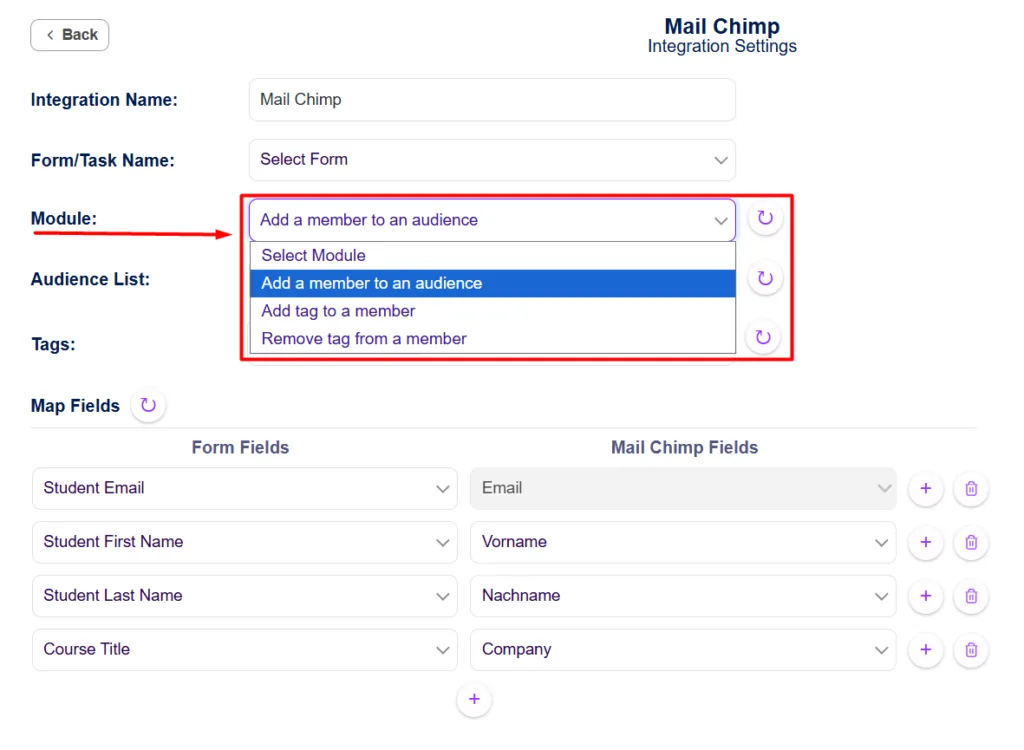
All three modules support voorwaardelijke logica at the free level. You can subscribe a user only if they checked a consent checkbox, or apply a tag only if an order exceeds a set value.
This is the main difference from a form-only connector. Bit Integrations supports 160+ triggers with tousand+ trigger events, covering:
| Trigger Category | Supported Plugins |
| Formulierenbouwers | Contact Form 7, WPForms, Gravity Forms, Fluent Forms, Elementor Forms, Ninja Forms, and 45+ others |
| LMS | LearnDash, Tutor LMS, LifterLMS, MasterStudy LMS, Academy LMS, and more |
| Lidmaatschap | MemberPress, Paid Memberships Pro, WishList Member, SureMembers, and more |
| E-commerce | WooCommerce, Surecart, Dokan, Easy Digital Downloads, and more |
| Booking | Amelia, FluentBooking, WP Travel Engine, and more |
| Community | BuddyPress, BuddyBoss, bbPress, and more |
| Andere | GiveWP, AffiliateWP, incoming webhooks, Advanced Custom Fields, and others. |
Bit Integrations is a practical MC4WP alternative for WordPress sites that need more than basic Mailchimp signup forms. MC4WP is useful when you mainly want to collect subscribers from forms, but many businesses also need to send user activity, purchase data, course progress, booking details, membership updates, and other WordPress events to MailChimp.
That is where Bit Integrations fits better. It lets you connect Mailchimp with 335+ WordPress plugins and platforms, including form builders, E-commerce, LMS tools, booking plugins, membership plugins, donation tools, CRM's, webhooks, and custom fields. Instead of limiting your Mailchimp workflow to a few form sources, you can send data from the tools your site already uses.
For example, you can add a subscriber to Mailchimp when someone buys a WooCommerce product, completes a course, joins a membership plan, submits a form, books an appointment, or triggers another supported WordPress event. You can also map fields, apply tags, use conditional logic, and decide when specific data should or should not be sent to Mailchimp.
This makes Bit Integrations more suitable for Mailchimp automation in WordPress, especially when you want better control over subscriber data, tags, segments, and event-based actions. It is not just a Mailchimp form connector. It works as a broader WordPress Mailchimp integration plugin for businesses that want to connect real user behavior with their email marketing.
MC4WP can still be a good choice for simple Mailchimp signup forms. But if your goal is to automate Mailchimp from WooCommerce, LMS plugins, booking tools, membership sites, webhooks, or other WordPress plugins, Bit Integrations gives you more room to build the workflow you actually need.
The real issue is not any specific plugin. It is the assumption that subscriber data and user behavior are two separate things.
What your users purchase, complete, book, or cancel is behavioral data that should inform how you communicate with them. When it stays inside WordPress and never reaches Mailchimp, your segmentation and automation are working with an incomplete picture.
Closing that gap starts with being deliberate about which events are worth tracking.
If you are still mapping out which tools belong in your stack, this overview of marketing automation tools for small businesses covers the broader landscape. The tooling follows from that decision, not the other way around.
A single Mailchimp connector plugin is enough when your leads come from one place. But when your site offers courses, memberships, bookings, or a store, you need Mailchimp to see it all.
Bit Integrations connects those events to Mailchimp without adding a third-party automation service to your stack. Check the Mailchimp integration documentation to see the full setup for each trigger.
It connects directly using Mailchimp’s Marketing API v3. You authenticate by entering your Mailchimp API key inside the plugin settings. No third-party service sits between your WordPress site and Mailchimp.
All conditional logic runs server-side inside WordPress at the point the trigger fires. It does not depend on JavaScript or the user’s browser state, so it works reliably regardless of how the event is generated.
Yes. The field mapping interface lets you pull data from any available field the trigger plugin exposes, including custom user meta, order meta, and Advanced Custom Fields values, and map them to any merge field you have set up in your Mailchimp audience.
Bit Integrations logs failed integration attempts inside the WordPress dashboard under its integration log. You can review failures, see the error response from Mailchimp’s API, and manually retry or investigate from there.
No. Bit Integrations connects to Mailchimp through its API, which is available on free and paid Mailchimp plans. However, some advanced Mailchimp features, like certain segmentation options, may require a higher Mailchimp tier regardless of which connector you use.
The “Add a Member to an Audience” module includes an update-existing-subscriber toggle. When enabled, it updates the existing contact’s merge fields and tags rather than creating a duplicate entry.



 NL
NL  EN
EN  ES
ES  DE
DE  FR
FR