Salta al contenuto principale
Esclusivo Offerta Scontata
fino-al-50-di-sconto
L'offerta termina il:
00

giorni giorno

00

ore ora

00

Minuti Min

00

Secondi Secondi

Richiedi la tua offerta

Logica condizionale Advanced logic; Simple Setup

Send your data exactly where it needs to go. With conditional logic, you decide the rules; Bit Integrations does the rest.
Start Building Smarter Workflows
conditional logic on Bit Integrations
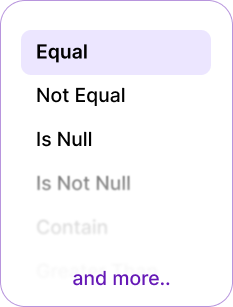
bit integrations all logic list

What is conditional logic in Bit Integrations?

Conditional logic is like setting rules for your integrations. Instead of running every time, Bit Integrations checks: Does this match my condition? If yes → it runs. If no → it skips or follows another path. It’s like telling your automation: only do this when it makes sense. Like traffic lights: green = go, red = stop.
bit integrations conditional logic process

 Why is Conditional logic important?

Conditional logic allows you to automate processes based on specific triggers and criteria, saving time and ensuring more efficient workflows.
Why is Conditional logic important 1
  • Prevents sending unnecessary or incorrect data.
  • Saves time by automatically filtering data.
  • Keeps CRM, email, and spreadsheets neat & clean.
  • Works even when multiple conditions apply.
  • Reduces errors caused by manual sorting.
  • Ensures only relevant information reaches each integration.
  • Protects system resources by avoiding unwanted triggers.

The 6 Pair Conditional Logic Options in Bit Integrations

Bit Integrations has a total of 12 powerful integration conditions, offering flexible options to automate tasks and enhance WordPress workflows.

Equal / Not Equal:

Works like an exact match filter. Send data only if a field equals (or doesn’t equal) a specific value.

For example:
If form fields equal “USA” → Send form entries to the USA-specific sheet or the USA-specific CRM list.
If form fields do not equal “USA” → Skip sending data to Sheets.
Conditional login equal or not equal

Contain / Not contain

Works like a keyword filter. Send form entries only if they mention a keyword.

For example:
If the form contains “Refund,” → Send form entries directly to the billing team via Telegram message.
If the form does not contain “Refund,” → Skip sending data to the billing team.
login contain or not contain

Is Null / Is Not Null

Checks if a field is empty or filled. Perfect for skipping incomplete entries.

For example: 
Is Null = Send data only when the field is left empty.
Is Not Null = Send data only when the field is filled.
login is null or is not null

Greater than (number) / Less than (number)

Works like a number filter, checks if a value is bigger or smaller than what you set.

For example: 
When an order amount is greater than $500, the customer’s details are automatically added to the VIP customer list in the CRM for follow-up.
logic greater than or less than

Greater than Equal (number) / Less than Equal (number)

Checks numbers with equality, helping you set precise
minimum or maximum limits.

For example: 
If a student’s quiz score is greater than or equal (80) → the system can send them A “congratulations, you passed!” email and add them to the next course.
If a student’s quiz score is less than or equal (50) → the system can send them a “Don’t worry, keep practicing,” the email, along with some extra study materials.
logic greater than equal or less than equal

Start With / End With

Works like a text filter, checks if a value begins or ends with what you set.

For example: 
When a phone number starts with “+44”, the contact details are automatically added to the UK customer list in the CRM.
When an email ends with “@edu”, the contact details are added to the student list in the LMS.
logic start with or end with

Try Some Effective Use Cases with Conditional Logic

With Conditional Logic, you can set automation rules for WordPress Forms, WooCommerce, LMS, and more, triggering actions when specific conditions are met.
WooCommerce order filtering
If the order value is greater $500, send the customer details to your Premium customer CRM lists.
woocommerce order filtering
Service Request Routing Based on Location
If someone fills out a form requesting service and their location is Florida, the form submission is automatically routed to the Florida-specific team. The team is notified via Telegram, and the form submission details are automatically added to Google Sheets for easy tracking.
serivce request routing
Order Follow-Up Based on Delivery Location
If an order is placed and the delivery location is Los Angeles, the order details are automatically routed to the Los Angeles Delivery Team. The team is notified via Telegram, and the order details are added to a Google Sheet for tracking and follow-up.
Order Follow-Up Based on Delivery Location
Service Confirmation Based on Appointment Type
If a customer fills out a form to confirm their service appointment and selects "Same-Day Service", the submission is automatically routed to the Emergency Service Team. The team is notified via Telegram, and the service details are added to Google Sheets for quick reference and scheduling.
Service Confirmation Based on Appointment Type
Send Discount Coupon After Purchase
If a customer places an order greater than $500, they automatically receive a thank-you email with a discount coupon for their next purchase.
Send Discount Coupon After Purchase

Tab Content

This is a basic text element.
Read more about Conditional Logic

Cosa dicono i clienti di Bit Integrations

Scopri perché gli utenti di WordPress adorano Bit Integrations! I nostri clienti sono entusiasti della facilità con cui è possibile automatizzare le attività, collegare le app e ottimizzare i flussi di lavoro. Scopri come Bit Integrations ha trasformato la loro esperienza con WordPress grazie a un’automazione perfetta e a una flessibilità senza pari.
attraversaterra
Attraversaterra
Questo che è integrato in WP è esattamente ciò di cui ho bisogno. Ci sono molti strumenti di automazione e integrazione maturi là fuori, ma esserne uno con WP è decisamente un vantaggio. Il processo per creare azioni e trigger è simile ad altri strumenti. È fluido e veloce. Essendo uno sviluppatore e un drogato dell'automazione, questo è un dono dal cielo. Ho usato la versione gratuita ma non è bastata, quindi ho preso subito la Pro. Ci sono stati alcuni problemi nell'attivazione dei miei acquisti, ma il supporto è stato veloce nel diagnosticare e risolvere. Che ne pensate?! Hanno anche altri prodotti WP sul loro sito. Prova a dare un'occhiata.
Nel complesso consiglio vivamente questo plugin. È un'ottima aggiunta a qualsiasi sito web WordPress.
conalla
conalla
Ho scoperto Bit Integrations qualche tempo fa, ma all’epoca utilizzavo Zapier, di cui sappiamo che il costo aumenta all’aumentare delle attività. Ho utilizzato anche altri servizi concorrenti.
73wa
73wa
Bit Integrations è un potente plugin che semplifica notevolmente l'integrazione di vari strumenti in WordPress. L'interfaccia intuitiva ne facilita l'installazione e l'utilizzo e mantiene la promessa di integrazioni impeccabili.
shraban2023
shraban2023
Come esperto di automazione e sviluppatore web, stavo cercando una soluzione per connettere più strumenti tra loro. Era difficile e complesso per me farlo. Ma quando ho visto Bit Integration, ho ritrovato la speranza. Prima ho provato la versione gratuita dal repository di WordPress, poi ho deciso di passare al piano pro.

Sta davvero risparmiando energia cerebrale ora, e creando molta automazione con il solo aiuto di Bit Integration.
Se ami connettere strumenti e unire funzionalità, allora consiglio vivamente il plugin.
imprenditore online
Imprenditore web
Ora posso integrare i plug-in delle mie app in qualsiasi momento con facilità, con pochi clic, e risparmiare denaro senza pagare costose app di terze parti per semplici integrazioni, inviando dati dove voglio e quando voglio in automatico.
73wa
Dashatp
Il plugin è fantastico. Uso la versione pro e le possibilità sono illimitate. Il supporto è eccezionale e sono entusiasta di averlo sul mio sito web. È facile da usare e ci sono tutorial per ogni integrazione.
attraversaterra
i00co
Questo plugin ha realizzato i miei desideri, poiché stavo cercando di integrare WPForms con Zoho CRM. Esiste una versione gratuita che può svolgere questo compito, ma volevo quella ”pro” per ottenere il GCLID da Google Ads e registrarlo nel mio CRM. All'inizio ho riscontrato un problema nel far funzionare tutto, ma ho contacted il team di supporto e mi hanno aiutato anche durante un giorno festivo nel fine settimana. Lo sviluppatore "Ovi" mi ha aiutato tramite AnyDesk per più di 2 ore di lavoro e ha risolto il problema con il suo talento.
Consiglio questo plugin a chiunque voglia integrare qualcosa con qualcos'altro...
Paullacey
Paullacey
Avevo la necessità di collegare GiveWP a MailerLite e sono rimasto sorpreso nel constatare che non esistesse un'integrazione nativa. Non volevo usare Zapier poiché i prezzi sembravano aumentare e non volevo rimanere bloccato lì.
Gesù Pernas
Gesù Pernas
Nel mio caso l'ho acquistato per collegare i moduli di Elementor alla mia piattaforma di email marketing (nel mio caso Acumbamail), ma la verità è che hanno moltissime automazioni compatibili che lo rendono uno strumento indispensabile.

Ciao!!

Come possiamo aiutarti?

Documentazione
Scopri come utilizzare Bit Integrations
Tutorial di YouTube
Scopri come utilizzare Bit Integrations
Supporto amichevole
Hai domande o hai bisogno di aiuto?

Domande Frequenti

Alcune integrazioni sono disponibili per il download gratuito da WordPress.org. La versione Pro include più funzionalità e integrazioni. È totalmente facoltativo acquistare la versione Pro o pagarci per qualsiasi cosa.

Abbiamo un post/sondaggio in Facebook, puoi aggiungere la tua richiesta di integrazione in quel post/sondaggio.

Sì, abbiamo un programma di affiliazione/rivendita che ti permette di guadagnare una commissione 30% su ogni vendita. La commissione è a vita, il che significa che ogni volta che il cliente effettua un upgrade dell'abbonamento, tu guadagnerai una commissione. Qualsiasi sviluppatore, blogger, youtuber e libero professionista può candidare.

Utilizza la nostra assistenza tramite chat dal vivo o inviaci un'e-mail a support@bitapps.pro. Puoi anche unirti alla nostra gruppo facebook e fai tutte le domande.

No, non devi scrivere una riga di codice. Abbiamo collegato tutte le API e gli hook per le integrazioni, devi solo connettere/autenticare con i tuoi plugin e applicazioni.

Logo a piè di pagina Bit Integrations
Integrazione più rapida con più di 363 piattaforme
elenco loghi