Gravity Forms is one of the most popular form builders for WordPress, trusted by thousands of site owners to create professional contact forms and lead capture forms.
Even on the Basic plan at just $59 per year, you can build unlimited forms and connect them to several popular email marketing tools right out of the box.
However, there’s a smarter way to integrate Gravity Forms without upgrading your plan. By adding Bit Integrations, an affordable automation plugin priced at only $35 per year.
You can unlock real-time Google Sheets synchronization, a much wider range of CRMs, additional email marketing platforms, spreadsheets, messaging apps, project management tools, webhooks, and many more integrations.
This approach gives you extensive integration coverage for just $94 per year; far more cost-effective than moving to the Pro plan ($159) or Elite plan ($259).
Upgrading Gravity Forms isn’t necessary to get more integrations. Pairing the Gravity Forms Basic plan ($59/year) with Bit Integrations ($35/year) unlocks 335+ platform connections. CRMs, Google Sheets, email tools, messaging apps, and more, all for just $94/year. This approach is more affordable than the Pro ($159) or Elite ($259) plans. No coding required.
Bit Integrations offers a clean, no-code setup that works directly inside your WordPress dashboard. Most users complete their first integration in under 5 minutes.
Install the plugin Bit Integrations from the WordPress plugin directory or upload the pro version. Activate it on your site where Gravity Forms is already installed.
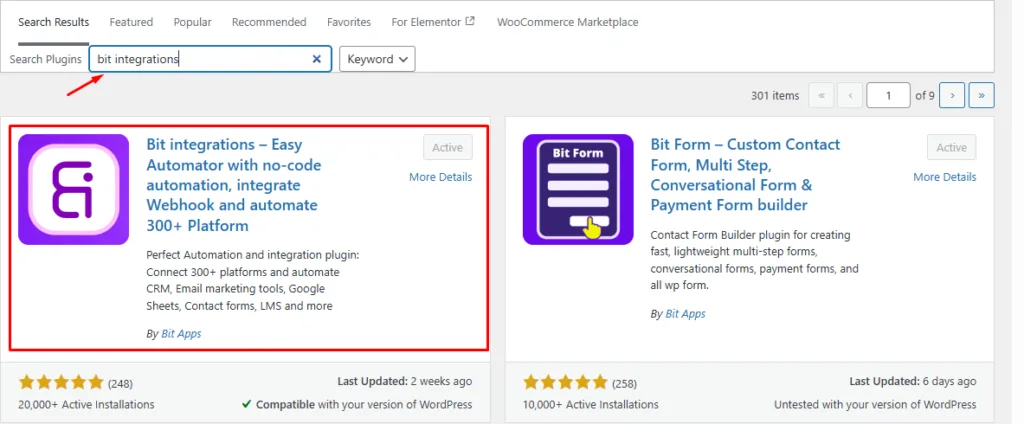
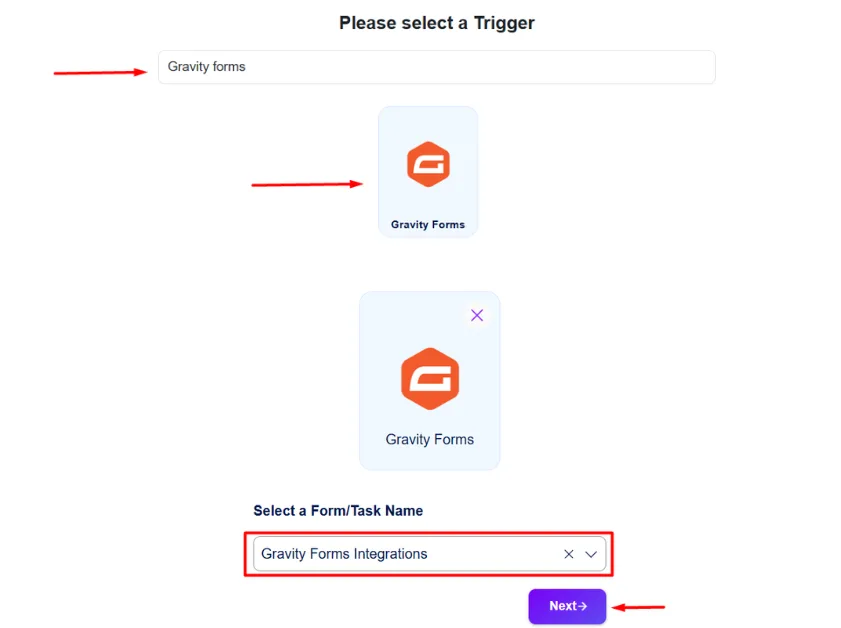
Go to the Bit Integrations dashboard → Create Integration. Search & select Formulaires Gravity as the trigger. Choose the specific form you want to connect from the dropdown list.
Search and select the destination platform (CRM, Google Sheets, email tool, messaging app, etc.). Authorize the account once by following the simple on-screen instructions for that service.
You can find setup and authentication instructions for each external app in the Bit Integrations documentation.

Select a specific list or worksheet in the external app, then map the Gravity Forms fields to the corresponding fields in your target platform. You can also add logique conditionnelle if needed. Now click next to save and finish.
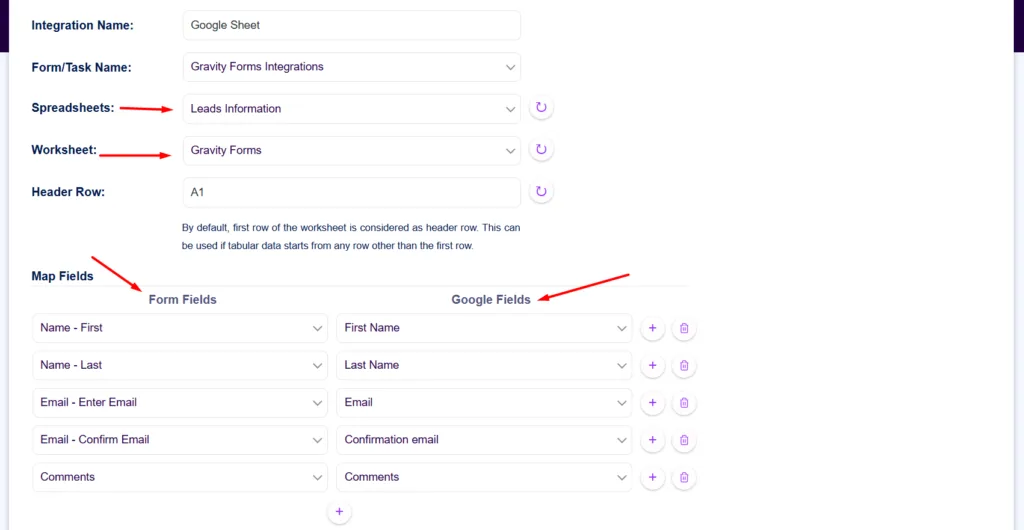
That’s it. No complex coding or extra tools required. You can create multiple feeds for the same form to send data to several platforms at once.
This straightforward process lets you start automating right away while keeping full control inside Gravity Forms.
Use this setup if you already use Gravity Forms Basic and mainly need more ways to send form data to external apps.
It is a good fit for site owners, marketers, agencies, and small businesses that want to connect Gravity Forms with tools like Google Sheets, CRMs, email marketing platforms, Slack, Telegram, or project management apps without moving to a higher Gravity Forms plan.
This setup is best when your main goal is third-party app integration, not access to advanced official Gravity Forms add-ons such as payments, surveys, polls, or coupons.
Choosing the right Gravity Forms plan can be tricky, especially when essential integrations require paid add-ons. This comparison shows the annual cost of each plan versus using the Basic plan with Bit Integrations, a more flexible, cost-effective way to connect to 335+ platforms.
| Plan | Annual Price | Key Integreations |
| Gravity Forms Basic | $59 | Limited Integrations |
| Gravity Forms Pro | $159 | + Payments gateway & more add-ons |
| Gravity Forms Elite | $259 | All official add-ons |
| Gravity Forms Basic + Bit Integrations | $59 + $35 = $94 | 326+ platforms Integrations (CRMs, Sheets, Slack, etc.) |
Pricing verified April 2026 from official Gravity Forms and Bit Integrations websites.
Many users only need broader platform integrations. In that case, upgrading your plan is not required.
If you are seeking a more cost-effective form builder with integrated payment gateways and access to over 50 built-in platform integrations, you may consider Bit Form.
Bit Integrations supports over 335 platforms across multiple categories of integrations, including CRMs, email marketing tools, spreadsheets, messaging apps, project management tools, support tools, sales funnels, webhooks, and more.
Connect Gravity Forms to a wide range of popular and niche CRMs. Send leads automatically for better lead management and follow-up. Including popular CRMs such as Salesforce, HubSpot, Zoho CRM, Pipedrive, ActiveCampaign, GoHighlevel, and Nutshell CRM, and more.
Go beyond the built-in options in the Gravity Forms Basic plan. Add more email marketing platforms for advanced subscriber automation and campaign management. Popular marketing automation tools, such as Klaviyo, Brevo, MailChimp, MailerLite, Omnisend, OptinMonster, Kit, and more.
Enjoy real-time sync with Google Sheets, Airtable, Zoho Sheets, and Ninja tables. The plugin also supports other spreadsheet tools for easy data organization and reporting.
Send instant lead alerts to Slack, Telegram, WhatsApp Business, Discord, and similar apps whenever a form is submitted.
Integrate with project management tools like Asana, ClickUp, Notion and Trello. Use webhooks for custom automation and connect to additional platforms as needed.
If your Gravity Forms setup requires advanced payment gateway integrations, upgrading to a higher Gravity Forms plan may be necessary.
However, if you primarily need to connect Gravity Forms with external platforms such as Google Sheets and other third-party services, you can continue using the Gravity Forms Basic plan.
In such cases, combining Gravity Forms Basic with Bit Integrations gives you a lower-cost way to connect form submissions with 170+ platforms and manage the automation directly inside WordPress.
Yes. You can use Gravity Forms Basic with Bit Integrations to connect form submissions with 170+ external platforms.
Most integrations can be set up in under 5-10 minutes using a no-code interface inside the WordPress dashboard.
Yes. You can create multiple integrations for the same form and send submission data to CRMs, Google Sheets, email tools, messaging apps, and other platforms.
Yes. When a form is submitted, Bit Integrations can process the data and send it to the connected platform, such as Google Sheets, a CRM, Slack, or Telegram.
The Basic plan offers limited email integrations. The Pro and Elite plans add payment gateways and more official add-ons. For broad third-party platform connections, the Basic plan is often sufficient.
Yes. You can map Gravity Forms fields to the target app fields and use conditional logic to control when the integration should run.
The Basic plan does not include official payment gateways. However, for lead capture, spreadsheet syncing, notifications, and most external platform integrations, it works effectively when paired with an automation plugin.



 FR
FR  EN
EN  ES
ES  DE
DE  NL
NL