Many WordPress site owners search for Zapier for WordPress when manual work starts piling up. Form entries need to go to spreadsheets. WooCommerce orders need to reach a CRM.
New leads need follow-up emails. Zapier can handle many of these tasks, but it is not always the simplest or most cost-friendly option for WordPress users.
Before you commit time and budget to setting it up, it is worth understanding how Zapier actually works with WordPress, where it fits well, and where a native WordPress automation plugin might serve you better.
Zapier connects WordPress to thousands of external apps and handles cross-platform automation well. However, it has monthly task limits and ongoing subscription costs. For site-focused workflows, WordPress-native plugins like Bit Integrations offer an alternative that runs inside the dashboard with unlimited flows and no extra costs like Zapier. The right choice depends on where your automation starts.
In essence, Zapier is an automation tool that connects your WordPress site or other saas with other apps you already use. Tasks can be completed automatiquement rather than manually.
As explained earlier, a trigger in Zapier could be an event such as a form submission or order, which then leads to an action like sending the data to Google Sheets or a CRM.
It works using a simple idea: a Zap has two main parts:
For instance, when a form is submitted on your site (trigger), Zapier automatically sends the data to Google Sheets and adds a contact to your CRM (actions).
You are not limited to a single action either. With multi-step automation, one trigger can set off a chain of actions. For example, a form submission could simultaneously send data to Google Sheets, create a contact in your CRM, and notify your team in Slack.
Zapier has also begun adding AI-powered features, including AI agents and integrations with tools such as OpenAI.
This means your workflows can go beyond simple data transfer. You can:
It’s not just about moving data anymore; it’s about adding a layer of decision-making inside your l'automatisation.
In short, Zapier acts as a connector between your site and various apps, helping you connect WordPress to apps, reduce manual work, and build automated systems that run quietly in the background.

The search usually starts with a small problem. A few form submissions to track. Some WooCommerce orders to log. A handful of follow-up emails to send. Over time, those small tasks repeat daily, and manual handling becomes unreliable.
A small site may manage a few entries by hand. But once leads, orders, and user registrations come in every day, manual follow-up creates gaps. A missed CRM entry or delayed confirmation email can affect sales, support, and reporting.
Three core needs drive most searches pour Zapier WordPress l'intégration:
Form submissions, WooCommerce orders, and user registrations all generate data. Without automation, that data sits in WordPress until someone copies it into another tool. Zapier removes this step by sending data to the right destination as soon as an event occurs.
Most websites do not run on WordPress alone. There is usually an email platform, a CRM, a chat tool, and sometimes multiple systems working in parallel. Zapier acts as the connector, allowing events on your WordPress site to trigger actions in external tools without any manual intervention.
Every time someone fills out a form, makes a purchase, or signs up, a follow-up action is needed. Automatisation handles this reliably at any volume, whether that means sending a confirmation, updating a record, or alerting a team member.
Zapier automation doesn’t live directly inside WordPress. Instead, it acts as a bridge, connecting WordPress with other apps. To make this connection work, WordPress needs a way to send data out and receive responses.
Think of it as a middleman, Zapier listens for events from your WordPress site and then triggers actions in other apps, automatically handling the workflow.
Many WordPress integrations rely on plugins that can send data to external services, and a lot of these plugins support Zapier either directly or via webhooks.
Popular tools like form builders, eCommerce plugins, and membership management tools often come with built-in Zapier integration, or they allow you to set up webhooks.
For example, when a user submits a form, the plugin collects the data and passes it to Zapier.
Then, Zapier processes the information and sends it to another platform, like Google Sheets or your CRM.
This setup is common because it gives even non-technical users the ability to connect their tools without needing to write any code.
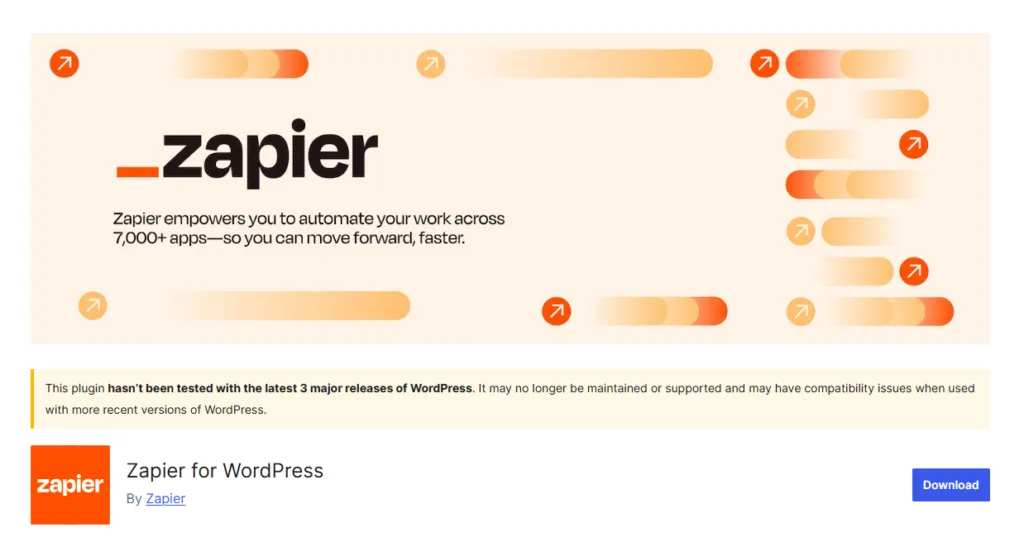
Zapier also offers a native WordPress plugin, which allows anyone to easily connect their WordPress site to Zapier. This plugin simplifies the process and can be a great option for users who prefer a more direct integration.
However, there’s a significant drawback to this plugin. It hasn’t been updated in over eight months and is no longer tested with the latest major WordPress releases. So, it may not support your WordPress site.
According to the plugin’s page, “This plugin hasn’t been tested with the latest 3 major releases of WordPress. It may no longer be maintained or supported and may have compatibility issues when used with more recent versions of WordPress.”
This is an important consideration, as using outdated plugins can lead to security issues or compatibility problems, especially as WordPress continues to evolve.
If you’re relying on this plugin, make sure to check the current state of your WordPress version and whether it’s still compatible with the plugin, or explore alternatives.
If your site doesn’t support the Zapier for WordPress plugin but you still want to send WordPress data to Zapier, you can use the Bit Integrations plugin. It offers built-in Zapier integrations with over 335+ external platform connections.
Webhooks are another popular way to connect WordPress with Zapier. Think of a webhook like a custom URL that “listens” for a specific event, such as a form submission, and then automatically sends the data into Zapier.
For instance, let’s say a form is submitted on your WordPress site. That action triggers a webhook. WordPress sends the form data to Zapier through that webhook. Then, Zapier processes the data and sends it to an app of your choice, like a CRM or an email tool.
This method is highly flexible and works with many plugins, making it an effective option for setting up workflow automations within WordPress.
These are some of the most commonly used connections between WordPress and external apps:
Sending form submissions or WooCommerce data to Google Sheets is one of the most common use cases. It supports lead tracking, order reporting, and data backup without manual exports.

Platforms like HubSpot, Zoho, Salesforce, and more CRMs can receive data directly from WordPress forms or orders. This keeps contact records current and reduces the risk of missed follow-ups.

Email marketing depends on timely subscriber data. By connecting WordPress forms or registrations to tools like Mailchimp or Brevo, new contacts can be added automatically, allowing campaigns and follow-ups to begin without delay.

For e-commerce sites, automation helps manage orders and customer information more efficiently. WooCommerce can be connected to accounting tools, CRMs, or other platforms to sync data and trigger actions such as notifications or updates.

Teams often rely on real-time updates. Connecting WordPress to tools like Slack allows events such as form submissions, new orders, or user registrations to trigger instant notifications, keeping everyone informed without checking the dashboard repeatedly.

These integrations show how Zapier pour WordPress is commonly used to automate everyday tasks. However, for users who prefer managing these workflows directly within their website, there are WordPress-based options available.
Tools like Bit Integrations allow similar connections to be handled from inside the WordPress dashboard, which some users find more practical for site-focused automation.
Zapier is a capable tool, but there are real constraints to be aware of as your automation needs grow.
Each Zapier plan includes a monthly task quota. As you add more workflows or your site grows, you may reach those limits and need to upgrade to a higher-tier plan. This can happen sooner than expected on busy sites.
Monthly fees may not be practical for every user, especially petites entreprises or sites with heavy automation needs. The cost scales with usage, so what starts as a manageable expense can increase significantly over time.
Because Zapier is cloud-based, your automation depends on an external platform. For users who prioritize data privacy or prefer keeping workflows self-contained, this is a meaningful consideration. Any downtime or service change on Zapier’s end affects your workflows directly.
If you are looking for a self-hosted automation tool that actually works with your own server, you can use Bit Integrations. Through Bit Integrations, you can connect your one platform to another easily, like connecting forms to CRM, CRM to LMS, forms to Google Sheets, email platform and more.
For many WordPress users, Zapier may work well at first. However, as automation scales and more tasks are triggered, the limitations of task quotas, monthly costs, and reliance on external services can become challenging.
As a result, many users begin to consider alternatives that provide greater control, more flexible pricing, and easier management of their growing automation needs.
Before you set up Zapier for your site, work through these questions. They will help you avoid investing time in a setup that does not fit your actual needs.
WordPress-native automation tools let you automate tasks from inside your site, without routing data through a separate cloud platform first. These plugins connect forms, WooCommerce, CRMs, spreadsheets, and other tools directly within the WordPress dashboard.
The main advantages are local control, simpler management, and reduced dependency on external services. For users whose workflows are primarily tied to WordPress, a native tool can be more practical than building and maintaining connections through a third-party platform.
Now, as WordPress-native automation tools continue to grow in popularity, one of the standout options is Bit Integrations. This WordPress automation plugin provides easy integration and automation between WordPress and over 335 applications.
It’s a suitable Zapier alternative if you’re looking for a self-hosted, simple automation solution for WordPress.
Bit Integrations allow WordPress users to connect their website with hundreds of external apps directly.
It is more useful when your automation starts inside WordPress. For example, you can send Contact Form 7 leads to Google Sheets, move WooCommerce order data to a CRM, or notify your team when a new LMS enrollment happens.
These workflows can be managed from the WordPress dashboard, so you do not need to build every connection through a separate cloud automation platform.
Unlike Zapier, Bit Integrations runs as a self-hosted plugin. This means your data stays within your own WordPress environment, and you are not subject to monthly task quotas tied to a third-party subscription.
When evaluating automation options for WordPress, comparing different tools can help clarify which solution is best suited for your needs. Here’s a quick breakdown of how Zapier stacks up against WordPress-native automation plugins comme Bit Integrations.
| Factor | Zapier | Bit Integrations |
| Meilleur pour | Cross-app automation across many SaaS tools | WordPress-first automation from forms, WooCommerce, LMS, and plugins |
| Where workflows run | Zapier cloud | A l'intérieur de WordPress |
| Setup experience | External Zapier dashboard | WordPress dashboard |
| Task limits | Based on the Zapier plan | Illimité |
| Extra Cost per Task | Yes, after finishing limit | Non |
| Flux de données | WordPress sends data to Zapier first | Data can move from WordPress to selected apps directly |
| Good fit for | Big Budget and those who want to send data outside WordPress | Small businesses, start-ups, and those who want to automate data between wordpress plugins. |
| Main tradeoff | The monthly cost can grow with usage | Depends on WordPress hosting and plugin compatibility |
Your site needs to connect with a wide range of external SaaS tools, and you are comfortable managing automation from a separate platform. Zapier supports over 9,000 apps, making it a strong choice for businesses that rely heavily on tools outside the WordPress ecosystem.
Your workflows are primarily tied to WordPress, such as form submissions, WooCommerce orders, LMS enrollments, or user registrations. A native plugin runs directly on your server, keeps management inside the dashboard, and avoids recurring subscription costs tied to task volume.
Consider the complexity of your workflows, the tools you use most often, and how much you expect your automation needs to grow. If most of your workflows start and end with WordPress data, a native plugin is a practical starting point. If your business runs across many external platforms, Zapier is still worth considering.
Zapier is a good option for connecting WordPress with thousands of external apps. It is flexible, widely supported, and useful for cross-platform workflows, especially for teams that rely on many SaaS tools alongside their WordPress site.
Pour Automatisation de WordPress, a native plugin may be a better fit. Bit Integrations keep setup within the dashboard, reduce dependence on external automation platforms, and are more practical for form, WooCommerce, LMS, and plugin-based workflows.
The right choice depends on where your automation starts. If most workflows begin and end around WordPress data, start with a WordPress-native option. If your business runs across many external tools, Zapier remains worth considering.
No! Zapier is not a 100% free automation tool. It’s a freemium automation tool, offering a free tier.
Yes, Zapier limits the number of tasks you can run each month based on your plan. If you exceed the limit, you need to upgrade your subscription.
Zapier has a free plan, but it comes with limited tasks and features. Most growing websites eventually need a paid plan.
These are plugins that allow you to automate tasks directly inside WordPress without relying on external services. They connect your forms, WooCommerce, and other tools within your site.
Yes, if your site does not support the Zapier plugin, you can use tools like Bit Integrations to send WordPress data to Zapier directly through built-in integrations.
If your WordPress version is newer, the plugin may face compatibility issues. It has not been tested with the latest major releases, which can cause errors or missing features.
Some of the best alternatives to Zapier for WordPress automation include Bit Integrations, AutomatorWP, WP Fusion, and Integromat (now Make). These tools offer WordPress-specific integrations and more flexible pricing options.
Yes, Zapier can integrate with WordPress, allowing you to automate tasks between your WordPress site and other external apps.




 FR
FR  EN
EN  ES
ES  DE
DE  NL
NL