NL
NL  EN
EN  ES
ES  DE
DE  FR
FR  PT
PT  IT
IT  JA
JA Integreer Gravity Forms met Honderden Populaire Platforms Zonder je Abonnement te Upgraden
Gravity Forms is een van de populairste formulierbouwers voor WordPress, waar miljoenen gebruikers op vertrouwen duizenden sitebeheerders om professionele contactformulieren en lead capture-formulieren te maken.
Zelfs in het basisabonnement, al voor $59 per jaar, je kunt onbeperkt formulieren bouwen en ze direct koppelen aan verschillende populaire e-mailmarketingtools.
Echter, er is een slimmere manier om Gravity Forms te integreren zonder uw abonnement te upgraden. Door toe te voegen Bit Integrations, een betaalbare automatisering plugin voor slechts $35 per jaar.
Je kunt ontgrendelen realtime Google Synchronisatie van werkbladen, een veel breder scala aan CRM-systemen, extra e-mailmarketingplatforms, spreadsheets, berichtenapps, projectmanagementtools, webhooks en nog veel meer integraties.
Deze aanpak geeft u uitgebreide integratie dekking voor slechts $94 per jaar; veel voordeliger dan overstappen naar het Pro-abonnement ($159) of het Elite-abonnement ($259).
TL;DR
Je hoeft Gravity Forms niet te upgraden om toegang te krijgen tot meer integraties. Door het Gravity Forms Basic-abonnement ($59/jaar) te combineren met Bit Integrations ($35/jaar) krijg je toegang tot meer dan 378 platformkoppelingen. CRM-systemen, Google Sheets, e-mailtools, berichtenapps en nog veel meer, allemaal voor slechts $94/jaar. Deze aanpak is voordeliger dan de Pro- ($159) of Elite- ($259) abonnementen. Je hoeft niet te programmeren.
Hoe je Gravity Forms kunt integreren met tientallen externe platforms (stap voor stap)
Bit Integrations biedt een overzichtelijke, codevrije installatie die rechtstreeks vanuit je WordPress-dashboard werkt. De meeste gebruikers voltooien hun eerste integratie in minder dan 5 minuten.
Stap 1: Plug-ins installeren en activeren
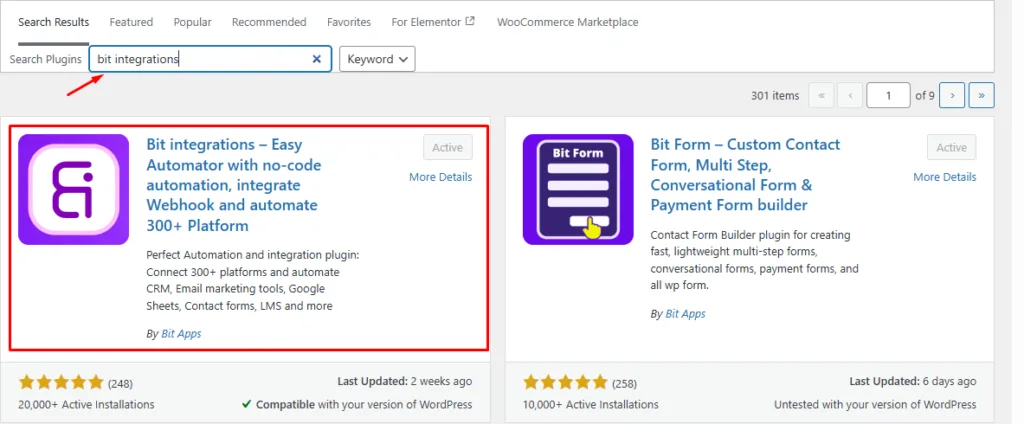
Installeer de Bit Integrations invoegtoepassing uit de WordPress-plug-inbibliotheek of upload de pro-versie. Activeer deze op je site waar Gravity Forms al is geïnstalleerd.
Stap 2: Maak een nieuwe integratie
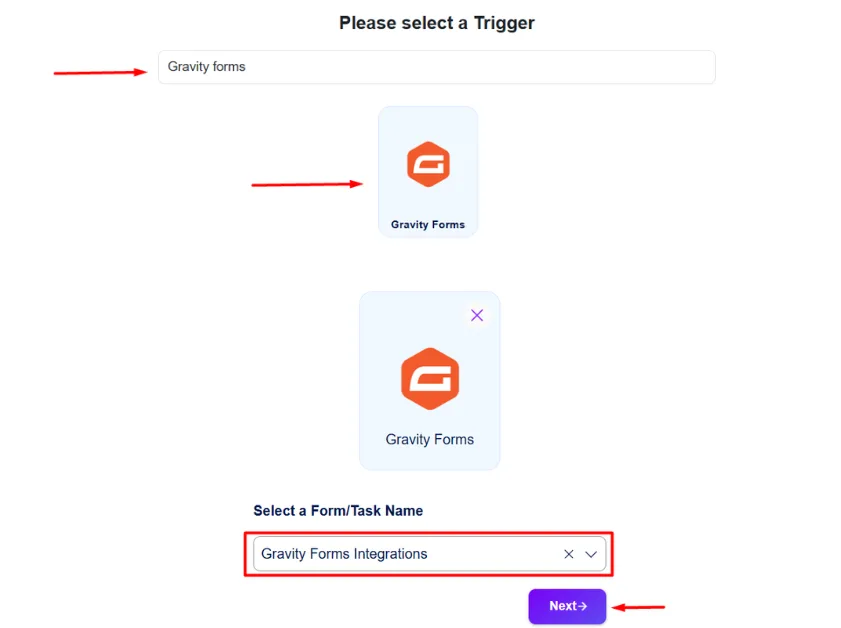
Ga naar de Bit Integrations-dashboard → Integratie aanmaken. Zoeken & selecteren Zwaartekracht Formulieren als de trigger. Kies de specifieke vorm die je wilt verbinden uit de vervolgkeuzelijst.
Stap 3: Kies je actie
Zoek en selecteer het bestemmingsplatform (CRM, Google Sheets, e-mailtool, berichtenapp, enz.). Autoriseer het account één keer door de eenvoudige instructies op het scherm te volgen voor die service.
Je vindt instructies voor het instellen en authenticeren van elke externe app in de Bit Integrations-documentatie.

Stap 4: De velden toewijzen
Selecteer een specifieke lijst of werkblad in de externe app en koppel vervolgens de velden van Gravity Forms aan de overeenkomstige velden in je doelplatform. Je kunt ook voorwaardelijke logica indien nodig. Klik nu op ‘Volgende’ om op te slaan en af te ronden.
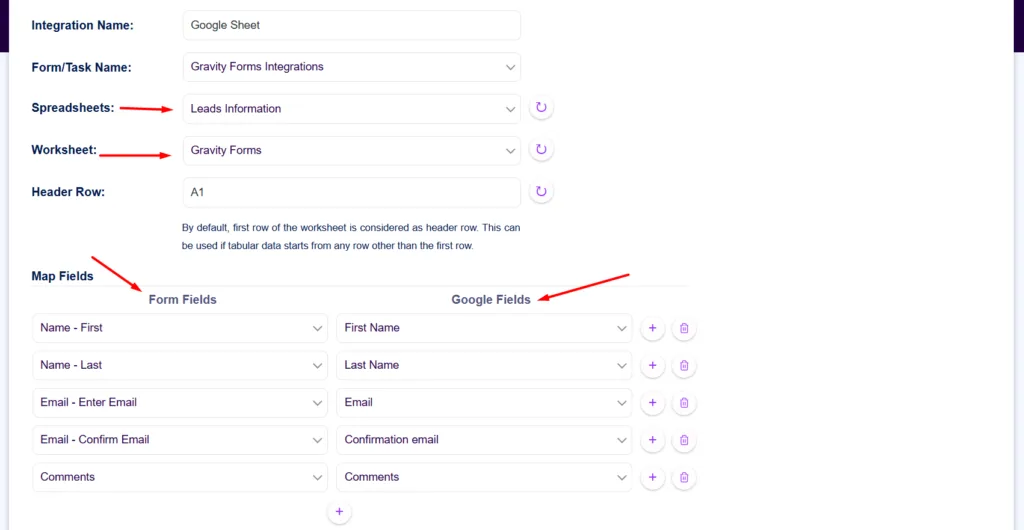
Dat is alles. Er is geen ingewikkelde code of extra tools nodig. Je kunt meerdere feeds voor hetzelfde formulier aanmaken om gegevens tegelijk naar verschillende platforms te verzenden.
Dankzij dit eenvoudige proces kun je meteen aan de slag met automatisering, terwijl je de volledige controle behoudt binnen Gravity Forms.
Voor wie is deze opstelling bedoeld?
Gebruik deze configuratie als je al gebruikmaakt van Gravity Forms Basic en hebben vooral behoefte aan meer manieren om formuliergegevens naar externe apps te verzenden.
Het is een uitstekende keuze voor website-eigenaren, marketeers, bureaus en kleine bedrijven die Gravity Forms willen koppelen aan tools zoals Google Spreadsheets, CRM's, e-mailmarketingplatforms, Slack, Telegram of projectmanagementapps zonder over te stappen naar een duurder Gravity Forms-abonnement.
Deze opzet is het meest geschikt wanneer je belangrijkste doel is integratie van apps van derden, geen toegang tot geavanceerde officiële Gravity Forms add-ons zoals betalingen, enquêtes, polls of kortingsbonnen.
Praktische toepassingen
- Lead capture-formulieren die direct contacten aanmaken in uw CRM en rijen in Google Sheets.
- Nieuwsbriefaanmeldingen die abonnees tegelijkertijd naar meerdere e-mailmarketingplatforms sturen.
- Formulierinzendingen die directe meldingen in Slack of Telegram activeren voor uw team.
Kostenvergelijkingstabel
Het kiezen van het juiste Gravity Forms-abonnement kan lastig zijn, vooral wanneer voor essentiële integraties betaalde add-ons nodig zijn. Deze vergelijking toont de jaarlijkse kosten van elk abonnement ten opzichte van het Basic-abonnement in combinatie met Bit Integrations, een flexibelere en voordeligere manier om verbinding te maken met meer dan 378 platforms.
| Plan | Jaarlijkse prijs | Belangrijke integraties |
| Gravity Forms Basic | $59 | Beperkte integraties |
| Gravity Forms Pro | $159 | + Betaalpoort en meer add-ons |
| Gravity Forms Elite | $259 | Alle officiële uitbreidingen |
| Gravity Forms Basic + Bit Integrations | $59 + $35 = $94 | 378+ platformintegraties (CRMs, Sheets, Slack, enz.) |
Prijzen gecontroleerd in april 2026 op de officiële websites van Gravity Forms en Bit Integrations.
Veel gebruikers hebben enkel bredere platformintegraties nodig. In dat geval is het upgraden van uw abonnement niet vereist.
Als je op zoek bent naar een meer kosteneffectieve form builder met geïntegreerde betalingsgateways en toegang tot meer dan 50 ingebouwde platformintegraties, zou u kunnen overwegen om Bit Form.
Wat je kunt aansluiten met Bit Integrations
Bit Integrations ondersteunt meer dan 378 platforms over meerdere categorieën integraties, waaronder CRM's, e-mailmarketingtools, spreadsheets, berichtenapps, projectmanagementtools, ondersteuningstools, verkoopfunnels, webhooks en meer.
1️⃣ CRM's
Koppel Gravity Forms aan een breed scala aan populaire en gespecialiseerde CRM-systemen. Stuur leads automatisch door voor een beter leadbeheer en een betere opvolging. Waaronder populaire CRM-systemen zoals Salesforce, HubSpot, Zoho CRM, Pipedrive, ActiveCampaign, GoHighlevel, Koper CRM-integratie, en Nutshell CRM, en meer.
2️⃣ E-mailmarketingtools
Ga verder dan de standaardopties van het Gravity Forms Basic-abonnement. Voeg meer e-mailmarketingplatforms toe voor geavanceerde automatisering van abonneebeheer en campagnebeheer. Populaire tools voor marketingautomatisering, zoals Klaviyo, Brevo, MailChimp, MailerLite, Omnisend, OptinMonster, Kit, en meer.
3️⃣ Spreadsheets
Geniet van realtime synchronisatie met Google formulieren, Luchttafel, Zoho Sheets en Ninja Tables. De plug-in ondersteunt ook andere spreadsheetprogramma’s, waarmee je gegevens eenvoudig kunt ordenen en rapporten kunt maken.
4️⃣ Berichten & Meldingen
Stuur direct leadmeldingen naar Slack, Telegram, WhatsApp Business, Discord, en vergelijkbare apps telkens als een formulier wordt ingediend.
5️⃣ Projectmanagement
Integreer met projectmanagementtools zoals Asana, ClickUp, Notion en Trello. Gebruik webhooks voor aangepaste automatisering en maak verbinding met aanvullende platforms indien nodig.
Conclusie
Als je Gravity Forms-setup geavanceerde integraties van betalingsgateways, dan kan het nodig zijn om over te stappen naar een hoger Gravity Forms-abonnement.
Als je echter vooral moet Gravity Forms verbinden met externe platforms zoals Google Sheets en andere diensten van derden, kun je het Gravity Forms Basic-abonnement blijven gebruiken.
In dergelijke gevallen biedt de combinatie van Gravity Forms Basic en Bit Integrations een voordelige manier om ingevulde formulieren te koppelen aan meer dan 378 platforms en de automatisering rechtstreeks vanuit WordPress te beheren.
Veelgestelde vragen
Kan ik Gravity Forms integreren met externe platforms op het Basic-abonnement?
Ja. Je kunt Gravity Forms Basic samen met Bit Integrations gebruiken om ingevulde formulieren te koppelen aan meer dan 378 externe platforms.
Hoe lang duurt het om een Gravity Forms-integratie in te stellen?
De meeste integraties kunnen in minder dan 5-10 minuten worden ingesteld met behulp van een no-code interface binnen het WordPress-dashboard.
Kan één Gravity Forms-inzending gegevens naar meerdere platforms tegelijk sturen?
Ja. Je kunt meerdere integraties maken voor hetzelfde formulier en inzendinggegevens sturen naar CRM's, Google Sheets, e-mailtools, berichtenapps en andere platforms.
Is de integratie met externe platforms real-time?
Ja. Wanneer een formulier wordt verzonden, kan Bit Integrations de gegevens verwerken en doorsturen naar het gekoppelde platform, zoals Google Sheets, een CRM, Slack of Telegram.
Wat zijn de belangrijkste verschillen tussen de plannen van Gravity Forms voor integraties?
Het Basis plan biedt beperkte e-mailintegraties. De Pro en Elite plannen voegen betaalpoorten en meer officiële add-ons toe. Voor brede verbindingen met platforms van derden is het Basis plan vaak voldoende.
Werken veldtoewijzing en voorwaardelijke logica met Bit Integrations?
Ja. Je kunt Gravity Forms-velden koppelen aan de velden van de doel-app en voorwaardelijke logica gebruiken om te bepalen wanneer de integratie moet worden uitgevoerd.
Wat zijn de beperkingen bij het gebruik van Gravity Forms Basic in combinatie met Bit Integrations?
Het Basisplan bevat geen officiële betaalgateways. Echter, voor lead capture, synchronisatie met spreadsheets, meldingen en de meeste integraties met externe platforms, werkt het effectief in combinatie met een automatiseringsplugin.


Verwante blog

Beste gratis WPForms e-mailmarketing-integratietools die werken met WPForms Lite

WPForms Integratiegids: Gratis Methoden, Betaalde Add-ons en Betere Alternatieven