メインコンテンツにスキップ
独占 割引セール
最大50%オフ
キャンペーン終了まで:
00

日数

00

時間 時間

00

ミン みん

00

SEC

お得なオファーを受け取ろう

条件分岐 Advanced logic; Simple Setup

Send your data exactly where it needs to go. With conditional logic, you decide the rules; Bit Integrations does the rest.
Start Building Smarter Workflows
conditional logic on Bit Integrations
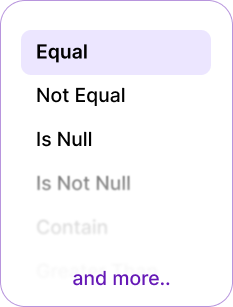
bit integrations all logic list

What is conditional logic in Bit Integrations?

Conditional logic is like setting rules for your integrations. Instead of running every time, Bit Integrations checks: Does this match my condition? If yes → it runs. If no → it skips or follows another path. It’s like telling your automation: only do this when it makes sense. Like traffic lights: green = go, red = stop.
bit integrations conditional logic process

 Why is Conditional logic important?

Conditional logic allows you to automate processes based on specific triggers and criteria, saving time and ensuring more efficient workflows.
Why is Conditional logic important 1
  • Prevents sending unnecessary or incorrect data.
  • Saves time by automatically filtering data.
  • Keeps CRM, email, and spreadsheets neat & clean.
  • Works even when multiple conditions apply.
  • Reduces errors caused by manual sorting.
  • Ensures only relevant information reaches each integration.
  • Protects system resources by avoiding unwanted triggers.

The 6 Pair Conditional Logic Options in Bit Integrations

Bit Integrations has a total of 12 powerful integration conditions, offering flexible options to automate tasks and enhance WordPress workflows.

Equal / Not Equal:

Works like an exact match filter. Send data only if a field equals (or doesn’t equal) a specific value.

For example:
If form fields equal “USA” → Send form entries to the USA-specific sheet or the USA-specific CRM list.
If form fields do not equal “USA” → Skip sending data to Sheets.
Conditional login equal or not equal

Contain / Not contain

Works like a keyword filter. Send form entries only if they mention a keyword.

For example:
If the form contains “Refund,” → Send form entries directly to the billing team via Telegram message.
If the form does not contain “Refund,” → Skip sending data to the billing team.
login contain or not contain

Is Null / Is Not Null

Checks if a field is empty or filled. Perfect for skipping incomplete entries.

For example: 
Is Null = Send data only when the field is left empty.
Is Not Null = Send data only when the field is filled.
login is null or is not null

Greater than (number) / Less than (number)

Works like a number filter, checks if a value is bigger or smaller than what you set.

For example: 
When an order amount is greater than $500, the customer’s details are automatically added to the VIP customer list in the CRM for follow-up.
logic greater than or less than

Greater than Equal (number) / Less than Equal (number)

Checks numbers with equality, helping you set precise
minimum or maximum limits.

For example: 
If a student’s quiz score is greater than or equal (80) → the system can send them A “congratulations, you passed!” email and add them to the next course.
If a student’s quiz score is less than or equal (50) → the system can send them a “Don’t worry, keep practicing,” the email, along with some extra study materials.
logic greater than equal or less than equal

Start With / End With

Works like a text filter, checks if a value begins or ends with what you set.

For example: 
When a phone number starts with “+44”, the contact details are automatically added to the UK customer list in the CRM.
When an email ends with “@edu”, the contact details are added to the student list in the LMS.
logic start with or end with

Try Some Effective Use Cases with Conditional Logic

With Conditional Logic, you can set automation rules for WordPress Forms, WooCommerce, LMS, and more, triggering actions when specific conditions are met.
WooCommerce order filtering
If the order value is greater $500, send the customer details to your Premium customer CRM lists.
woocommerce order filtering
Service Request Routing Based on Location
If someone fills out a form requesting service and their location is Florida, the form submission is automatically routed to the Florida-specific team. The team is notified via Telegram, and the form submission details are automatically added to Google Sheets for easy tracking.
serivce request routing
Order Follow-Up Based on Delivery Location
If an order is placed and the delivery location is Los Angeles, the order details are automatically routed to the Los Angeles Delivery Team. The team is notified via Telegram, and the order details are added to a Google Sheet for tracking and follow-up.
Order Follow-Up Based on Delivery Location
Service Confirmation Based on Appointment Type
If a customer fills out a form to confirm their service appointment and selects "Same-Day Service", the submission is automatically routed to the Emergency Service Team. The team is notified via Telegram, and the service details are added to Google Sheets for quick reference and scheduling.
Service Confirmation Based on Appointment Type
Send Discount Coupon After Purchase
If a customer places an order greater than $500, they automatically receive a thank-you email with a discount coupon for their next purchase.
Send Discount Coupon After Purchase

Tab Content

This is a basic text element.
Read more about Conditional Logic

Bit Integrationsに対するお客様の声

WordPressユーザーがBit Integrationsを愛用する理由をご覧ください!当社のクライアントからは、タスクの自動化、アプリの連携、ワークフローの効率化が簡単に行える点について、絶賛の声が寄せられています。シームレスな自動化と比類なき柔軟性により、Bit Integrationsがどのように彼らのWordPress体験を一変させたか、ぜひご覧ください。.
アースクロッサー
アースクロッサー
WordPressに統合されているこのツールはまさに求めていたものです。世の中には成熟した自動化・連携ツールがたくさんありますが、WordPressと一体になっているのは間違いなくプラスです。アクションやトリガーの作成プロセスは、他のツールと似ています。シームレスで迅速です。開発者であり、自動化中毒者である私にとって、これは天からの授かりものです。無料版を使用しましたが、十分ではなかったので、すぐにPro版を入手しました。購入の有効化にいくつかの問題がありましたが、サポートは迅速に診断・修正してくれました。どうでしょう?!彼らのサイトには、他のWordPress製品もあります。ぜひ見てみてください。.
全体としては、このプラグインを強くお勧めします。WordPressウェブサイトに最適な追加機能です。.
コナラ
コナラ
少し前にBit Integrationsを知りましたが、当時はZapierを使っていました。Zapierはタスクが増えるにつれてコストも上がっていくことは周知の通りです。他にも競合他社のサービスを利用したことがあります。.
73話
73話
Bit Integrationsは、さまざまなツールをWordPressに簡単に統合できる強力なプラグインです。ユーザーフレンドリーなインターフェースにより、インストールや使用が簡単で、完璧な統合を実現するというその約束を確実に果たしてくれます。.
シュラバン2023
シュラバン2023
自動化の専門家でありWeb開発者でもある私は、より多くのツールを連携させるためのソリューションを探していました。それを実現するのは困難で複雑でした。しかし、Bit Integrationを見たとき、希望が見えました。まず、WordPressリポジトリから無料版を試しましたが、その後、プロプランに移行することを決めました。.

ビットインテグレーションの助けを借りるだけで、今、本当に脳のエネルギーを節約でき、多くの自動化を生み出しています。.
ツールを接続したり、機能を統合したりするのが好きなら、このプラグインを強くお勧めします。.
ウェブ・ルネー
Webreneur
これからは、数回のクリックで簡単にアプリのプラグインを統合し、高価なサードパーティ製アプリにお金を払って簡単な統合や、必要な時に必要な場所へのデータ送信を自動で行う手間を省き、節約できるようになりました。.
73話
ダシャトプ
このプラグインは素晴らしいです。プロ版を使用していますが、可能性は無限大です。サポートも素晴らしく、このプラグインを私のウェブサイトで利用できることに興奮しています。使いやすく、あらゆる連携のためのチュートリアルがあります。.
アースクロッサー
アイオーゼロシーオー
このプラグインは、WPFormsとZoho CRMを連携させたいという私の願いを叶えてくれました。連携できる無料版もありますが、Google広告のGCLIDを取得してCRMに参照させたくてPro版を選びました。当初、それを実現するために問題に直面しましたが、サポートチームに連絡したところ、週末の祝日でも手助けしてくれました。開発者の「Ovi」さんがAnyDeskを使って2時間以上も対応してくれ、その才能で問題を解決してくれました。.
あらゆるものをあらゆるものと連携させたいすべての人に、このプラグインをおすすめします。.
ポール・レイシー
ポール・レイシー
GiveWPとMailerLiteを連携させる必要があったのですが、ネイティブな連携機能がないことに驚きました。Zapierは料金が値上がりしているようだったので使いたくありませんでしたし、そこに縛られたくもなかったのです。.
ヘスス・ペルナス
ヘスス・ペルナス
私はElementorフォームと私のEメールマーケティングプラットフォーム(私の場合はAcumbamail)を連携させるために購入しましたが、実際には多くの自動化に対応しているので、不可欠なツールとなっています。.

Hello!!

How Can We Help You?

ドキュメンテーション
Learn how to use Bit Integrations
YouTube Tutorials
Learn how to use Bit Integrations
Friendly Support
Have questions or need help?

Frequently Ask Questions

A few Integrations are available for free to download from WordPress.org. The Pro version includes more features and integrations. It is totally optional to buy the Pro version or pay us for anything.

We have a post/poll in フェイスブック, you can add your integration request on that post/poll.

Yes, we have affiliate/reseller program where you can earn a 30% commission from every sale. The commission will be for lifetime which means whenever the client upgrades the subscription you will earn a commission. Any developer, blogger, youtuber & freelancer can apply.

Please use our live chat support or email us at support@bitapps.pro. You can also join our facebook group and ask any questions.

No, you don’t need to write single line of code. We have connected all the API and hooks for integrations, you just need to connect/authenticate with your plugins and applications.

Bit Integrations フッターロゴ
374以上のプラットフォームとの最速統合
ロゴ一覧