JA
JA  EN
EN  ES
ES  DE
DE  NL
NL  FR
FR  PT
PT  IT
IT 
WPForms連携 let you send form submissions to CRMs, email marketing tools, Google Sheets, automation platforms, and other apps. But for many WPForms Lite users, the challenge is finding the right way to connect their forms without paying for expensive upgrades or extra automation costs.
A form submission is only useful when the data reaches the right place. Without integrations, you may have to manually export entries, copy customer details, or miss important follow-ups.
WPForms offers native integrations, but many are locked behind paid plans. Depending on your workflow, a WordPress automation plugin, connector plugin, Zapier, Make, or webhook solution may be a better fit.
In this WPForms Integrations Guide, we will compare every available method, explain the costs and limitations, and help you choose the best way to automate WPForms entries.
Quick answer
- WPForms has 5 ways to connect to external platforms: native add-ons, WordPress automation plugins, single-purpose connector plugins, cloud automation platforms (Zapier/Make), and webhooks/custom code.
- Native WPForms add-ons — 30 integrations across 4 paid plans, zero free option. Email marketing starts at Plus, Google Sheets/automation at Pro, and CRM at Elite.
- WPForms Lite has no native third-party integrations at all — only Stripe/Square/PayPal payments, plus a 3% platform fee.
- WordPress 自動化プラグイン (Bit Integrations, AutomatorWP, OttoKit, and Bit Flows) run on your own server with no per-task billing. Bit Integrations connects WPForms for free to all supported destinations, with no task cap.
- Single-purpose connector plugins (e.g., GSheetConnector for WPForms) handle one destination each; free tiers are often feature-limited. Tested free GSheetConnector only synced the email field, not the name or message.
- Zapier/Make meters by task or credit, not workflow. Zapier free tier: 100 tasks/month, 2-step workflow cap; Make a free tier: 1,000 credits/month, 2 scenarios.
- Webhooks/custom code — only the free route on any plan (including Lite) is a self-built PHP snippet; WPForms’ own Webhooks add-on requires Elite.
- Upgrade WPForms only if you process real payment volume (Pro removes the 3% fee, break-even ~$3,333/year), need built-in form features (Calculations, Signatures, etc.), or want one vendor for support.
- 要するに Your required WPForms plan is set by the single most expensive integration on your list, not the total count. Bit Integrations covers most destinations for free with no per-destination cost scaling.
WPForms Integrations Guide: Five ways to connect WPForms to external platforms
Every route falls into one of five categories. They differ in where the workflow runs, what you are billed for, and how they behave when something breaks.
| 方法 | Where it runs | Free route | Billed by | limitation |
|---|---|---|---|---|
| 1. Native WPForms addons | Your site, inside WPForms | なし | Annual license tier | Every third-party integration needs a paid plan |
| 2. WordPress automation plugins | Your server | Yes, scope-limited | Annual and LTD license, not usage | Need webhooks when trigger is outside of WordPress |
| 3. Single-purpose connector plugins | Your server | Yes, feature-limited | Per plugin, per year | One destination per plugin |
| 4. Cloud automation platforms | The vendor’s servers | Yes, volume-limited | Per task or per credit | Cost scales with steps multiplied by submissions |
| 5. Webhooks and custom code | Wherever you send it | Custom code only | License tier or developer time | No managed error handling |
Method 1: Native WPForms add-ons
The connection is built by WPForms and lives inside the WPForms interface. You install the addon, connect your account for that service, then map form fields to fields on the other side.
- What you get: one vendor, one support channel, conditional logic inside the form builder, and tight coupling with entry management.
- What it costs: depends on the plan tier the addon sits on.
- Free option: none. Every native third-party integration requires a paid license.
Method 2: WordPress automation plugins
These run inside WordPress. The workflow executes on your own server, so no external service meters your usage and no third-party cloud sits in the data path.
The established options are Bit Integrations, AutomatorWP, Ottokit, and Bit Flows. The catalogs differ enough that the right answer depends on your specific destination list rather than on headline integration counts, so check your destinations against each catalog before choosing.
- What you get: no per-task billing, unlimited workflow runs on most free tiers, and form data that never leaves your server.
- What it costs: varies. Several have free versions; paid tiers typically unlock premium destinations or advanced logic.
- Free option: yes, and the scope differs by plugin. Bit Integrations includes WPForms among its free triggers, and its free version connects those triggers to all supported action platforms with no task limit and no cap on active integrations.
Method 3: Single-purpose connector plugins
The WordPress repository is full of plugins that each connect forms to one destination. Many are built for a single form builder, so you will find a Google Sheets connector made specifically for WPForms and separate ones for Contact Form 7 and Gravity Forms.
GSheetConnector for WPForms is a typical example. It sends WPForms entries to Google Sheets and nothing else.
- What you get: a focused tool that usually handles its one destination well, often with deeper settings for that platform than a general-purpose plugin offers.
- What it costs: GSheetConnector for WPForms is listed at $39 per year for one site on annual billing. Other connector plugins sit in a similar range.
- Free option: yes, though the scope varies sharply and is worth testing before you commit. See the testing section below for what we found.
- The tradeoff: cost and maintenance scale with destinations. Four destinations mean four plugins, four licenses, and four things to check after every WordPress update. Coverage is uneven, since popular platforms have several connectors while less common ones have none.
Method 4: Cloud automation platforms
Zapier and Make sit between your site and the destination. Your form sends data to their servers, and their servers pass it along.
How the billing works. Both charge by unit of work, not by workflow. Zapier counts a task each time an action step completes successfully; triggers are free, as are built-in tools including Filters, Paths, Formatter, Tables, and Forms.
Make counts one credit per module call, and rename this unit from “operations” to “credits” on 27 August 2025, converting existing balances at a one-to-one ratio.
Zapier pricing. The free plan is $0 with 100 tasks per month, and workflows are capped at two steps, meaning one trigger plus one action. Paid plans unlock multi-step workflows, webhooks, and premium apps, starting around $19.99 per month billed annually, for 750 tasks and rising with the task allowance.
Make pricing. The free plan is $0 with 1,000 credits per month, two active scenarios, and a 15-minute minimum scheduling interval. Core is the entry-level paid tier at roughly $9 to $16 per month, billed annually for 10,000 credits and unlimited scenarios, depending on which figure is current when you check.
- Free option: yes, both have real free tiers. The limits are volume and concurrency rather than features, and they run out quickly on multi-step workflows.
- What they do that nothing else does: connect services that have nothing to do with WordPress. If you need Airtable talking to Slack independently of your site, this is the only category that handles it.
- The tradeoff: forecasting cost is harder than it looks, because the unit is the step and not the workflow.
Method 5: Webhooks and custom code
WPForms can send raw submission data to an endpoint you control, and you decide what happens next. Three sub-routes exist, and they are not equally accessible.
- The WPForms Webhooks addon requires the Elite plan.
- The WPForms n8n add-on requires Pro or higher and WPForms 1.9.8.1 or newer. n8n itself is open source and free to self-host, so the cost here is a WPForms license plus a server you maintain.
- A custom PHP snippet hooked to the form-submission action is free on any plan, including Lite, but requires a developer and ongoing maintenance.
- What you get: complete control over payload shape, retry behavior, and error handling.
- Free option: only the custom-code route, and free there means no license fee rather than no cost.
- The tradeoff: nothing is managed. When the endpoint returns an error, you are the one who has to notice.
Which WPForms plan includes which integration
WPForms ships 30 native integration entries across its four paid plans. Twenty-eight are connections to third-party services; the remaining two are Authorize.Net, a payment gateway, and Webhooks, a developer tool.
The plan you need is set by the single most expensive item on your list, not by how many items are on it.
Every native integration and its minimum plan
| 統合 | カテゴリ | Minimum plan |
|---|---|---|
| コンスタントコンタクト | Email marketing | Basic (see note) |
| メールチンプ | Email marketing | Plus |
| MailPoet | Email marketing | Plus |
| AWeber | Email marketing | Plus |
| ゲットレスポンス | Email marketing | Plus |
| ブレボ | Email marketing | Plus |
| キャンペーンモニター | Email marketing | Plus |
| ConvertKit (Kit) | Email marketing | Plus |
| 滴 | Email marketing | Plus |
| クラビヨ | Email marketing | Plus |
| メーラーライト | Email marketing | Plus |
| SendGrid | Email marketing | Plus |
| Slack | Team communication | Plus |
| Twilio | SMS and WhatsApp | Plus |
| ノーション | Project management | Plus |
| Google スプレッドシート | スプレッドシート | プロ |
| Googleドライブ | Cloud storage | プロ |
| Googleカレンダー | Scheduling | プロ |
| ドロップボックス | Cloud storage | プロ |
| Zapier | Automation platform | プロ |
| 作る | Automation platform | プロ |
| n8n | Automation platform | プロ |
| セールスフォース | CRM | エリート |
| ハブスポット | CRM | エリート |
| Zoho CRM | CRM | エリート |
| パイプドライブ | CRM | エリート |
| アクティブキャンペーン | CRM | エリート |
| Airtable | Database | エリート |
| Authorize.Net | Payments | エリート |
| Webhook | 開発者 | エリート |
Note on Constant Contact. The Plus plan card on the WPForms pricing page lists Constant Contact among its marketing integrations, while the detailed feature comparison table further down the same page shows a checkmark at Basic.
Third-party reviews disagree with each other for the same reason. As of August 2026, the inconsistency is still live. If Constant Contact is the reason you are buying, confirm it at checkout.
What each plan costs
| 計画 | First year | 更新 | サイト | What it unlocks that lower tiers do not |
|---|---|---|---|---|
| 基本 | $49.50 | $99 | 1 | コンスタントコンタクト |
| Plus | $99.50 | $199 | 3 | 11 further email marketing tools, Slack, Twilio, Notion |
| プロ | $199.50 | $399 | 5 | Google Sheets, Drive, Calendar, Dropbox, Zapier, Make, n8n. Removes the 3% payment fee |
| エリート | $299.50 | $599 | 無制限 | Salesforce, HubSpot, Zoho CRM, Pipedrive, ActiveCampaign, Airtable, Authorize.Net, Webhooks |
The first-year figures are promotional. WPForms renews at full price, roughly double, so the renewal column is the number to budget against. Every cost comparison in this guide shows both.
What WPForms Lite includes
WPForms Lite is the free version on WordPress.org. It gives you the form builder, entry notifications by email, spam protection, and payment collection through Stripe, Square, and PayPal Commerce.
It includes no native third-party integrations. Form entries stay in your WordPress dashboard unless you connect something else.
Integrations versus form features
Two things sit side by side on the WPForms pricing page and get confused constantly.
- 統合 connect WPForms to an outside service. Google Sheets, Slack, and Mailchimp are integrations.
- Form features change how the form itself behaves. Geolocation, digital signatures, calculations, and conversational forms are features. They are part of the form builder rather than a data destination.
This distinction decides whether an automation plugin can help you at all. No external connector replaces a form feature, because there is nothing to connect to.
The 3% payment fee and a documentation conflict worth knowing about
Payments work on every plan, including Lite, but the cost differs.
WPForms’ own comparison pages state that a 3% WPForms platform fee applies to each transaction on Lite, Basic, and Plus, on top of whatever the payment processor charges, and that the Stripe Pro, Square Pro and PayPal Commerce Pro addons remove it. All three require a Pro license or higher.
Stripe’s own rate starts at 2.9% plus $0.30 per successful card charge in the United States and differs by country. On Lite, Basic, or Plus, the combined cost on a US card payment therefore lands near 5.9% plus $0.30.
The conflict. WPForms’ Stripe Pro add-on documentation and its pricing page both describe the 3% fee as applying when a license is inactive or when using the free version. Read literally, that wording implies any active paid license removes it, including Basic.
WPForms’ own Lite-versus-Pro comparison page says the opposite: the fee applies to Basic Plus and is removed only at Pro. Both pages are published on wpforms.com, and as of August 2026, we have not been able to resolve which is authoritative from published documentation alone.
What to do about it? If you plan to take payments on Basic or Plus, get the fee treatment confirmed by WPForms support in writing before you buy. This guide assumes the pro-removes-it reading, because it appears on the page that directly addresses the question and it is the more conservative assumption for budgeting.
What we tested
Free versions of connector plugins advertise the destination, not the ceiling. The only way to find where the ceiling sits is to install one and push real data through it. Here is what we ran and what came back.
GSheetConnector for WPForms, free version
| Field | Detail |
|---|---|
| Tested on | August 2026 |
| Environment | WordPress 7.0.2, PHP 8.5 |
| Plugins | WPForms Lite, GSheetConnector for WPForms free version, WPFroms pro with Zapier free version |
| Form fields | First name, last name, email address, message |
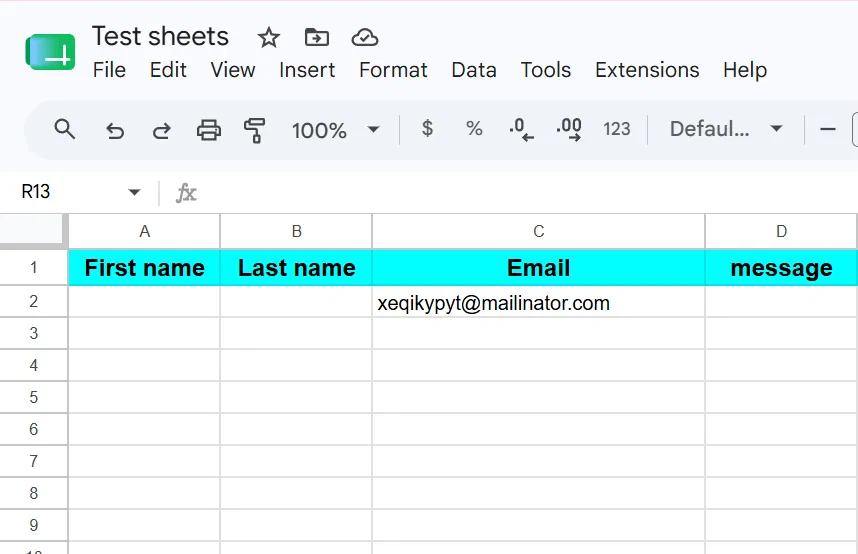
| Submissions sent | Only Email |
Result. Only the email address reached the sheet. The first name, last name, and message columns stayed empty across every submission. The Select Fields to Sync panel, which controls which fields are transmitted, is a Pro feature, and Smart Tags are Pro as well.
What the paid version adds. Field selection and mapping, conditional logic, import and export, and multiple sheets per form. GSheetConnector for WPForms is listed at $39 per year for one site on an annual plan, with a promotional discount often applied at checkout.

What does this mean in practice? The free version is a workable email-capture route and nothing more. If you need the rest of the form data in the spreadsheet, the free version is not a free route; it is a trial. That distinction is invisible from the plugin listing and only appears once data starts arriving.
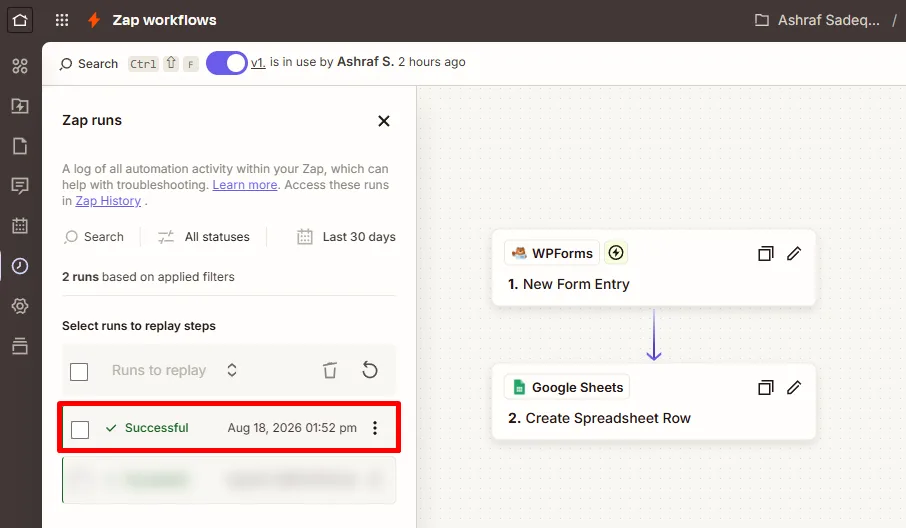
Zapier free tier, with WPForms Pro
Result: All four fields arrived intact: first name, last name, email, and message. Every run completed successfully. Unlike GSheetConnector’s free version, nothing was silently dropped.
What it costs in tasks: Zapier counts a task per successful action step. The trigger is free, so this two-step Zap spends exactly one task per submission, and the free plan’s 100 tasks translate to 100 form submissions per month.
That one-to-one ratio only holds for a single action. Add a second destination and the same 100 tasks cover 50 submissions. Four destinations, and it is 25. The free tier’s real ceiling is 100 divided by the number of actions, not 100 submissions.

Free routes by category
This table shows what each category costs natively and what a free WordPress automation plugin reaches instead. Categories are ordered from most expensive natively to least, because that is the order in which the free route saves you the most.
| カテゴリ | Native minimum plan | Reachable free via Bit Integrations |
|---|---|---|
| CRM | エリート | Salesforce, HubSpot, Zoho CRM, Pipedrive, ActiveCampaign, Zendesk Sell, Keap, Insightly, Freshsales, Copper CRM, Salesmate, Capsule CRM, Nutshell CRM, Agiled CRM, Monday CRM, and other CRMs |
| Databases | Elite (Airtable) | Airtable, Zoho Sheet, Ninja Tables, wpDataTables |
| スプレッドシート | Pro (Google Sheets) | Google スプレッドシート |
| Cloud storage | Pro (Drive, Dropbox) | Google Drive, Dropbox, OneDrive, pCloud |
| Email marketing | Plus | Mailchimp, Brevo, MailerLite, Kit, Klaviyo, GetResponse, Campaign Monitor, Drip, SendGrid, MailPoet, plus Moosend, Sendy, SendPulse, SendFox, Mailjet, MailUp, Acumbamail, Elastic Email, Omnisend, Mautic, and other email tools |
| Team communication | Plus (Slack, Twilio) | Slack, Discord, Telegram, WhatsApp, Line |
| Project management | Plus (Notion only) | Notion, Trello, Asana, ClickUp, SmartSuite, Flowlu, Zoho Recruit |
| Customer support | No native addon | Zendesk Support, Zoho Desk, Freshdesk, Fluent Support |
| Webinars and events | No native addon | Zoom Meeting, Zoom Webinar, Demio, Livestorm |
| Learning management | No native addon | LearnDash, LifterLMS, Tutor LMS, Sensei, LearnPress, Masteriyo, MasterStudy, Academy LMS, WP Courseware, and more LMSs. |
| WordPress and other | Not applicable | WooCommerce customers, membership levels, affiliate registration, WordPress posts, custom webhook or API calls |
Three categories deserve more than a table row.
CRM is where the gap is widest
Salesforce, HubSpot, Zoho CRM, Pipedrive, and ActiveCampaign all require Elite, which means a single CRM requirement sets your WPForms bill at $299.50 in year one and $599 on renewal, regardless of what else you need.
This is also the category where Zapier’s free tier does not help, because HubSpot and Salesforce are premium apps that require a paid Zapier plan.
Google Sheets is the most requested and the most contested
Google Sheets requires Pro natively. Three free routes reach it: GSheetConnector’s free version (email field only, per our testing above), Make’s or Zapier’s free tier, and a free WordPress automation plugin like Bit Integrations. If Google Sheets is genuinely the only thing you need, all three work.
What WPForms integrations actually cost
Scenario one: you need Google Sheets only
| 方法 | Year one | 更新 | ノート |
|---|---|---|---|
| WPForms Pro upgrade | $199.50 | $399 | Also unlocks Drive, Dropbox, Calendar, Zapier, Make, n8n and fee-free payments |
| GSheetConnector free | $0 | $0 | Email field only, per our testing |
| GSheetConnector Pro | $39 list | $39 | One site. Adds field mapping, conditional logic |
| Zapier Free | $0 | $0 | 100 tasks per month, one trigger plus one action |
| Make Free | $0 | $0 | 1,000 credits per month, two active scenarios, 15-minute minimum interval |
| Bit Integrations free | $0 | $0 | No task limit, no cap on active integrations, Custom Field mapping, with advanced Conditional logic |
For one destination at low volume, several free options work. There is no strong argument for spending money here unless you want the other Pro features.
Scenario two: you need Google Sheets, Mailchimp, Slack and HubSpot
Assume 200 submissions per month and one destination per submission across all four services, which is four action steps.
| 方法 | Year one | 更新 | ノート |
|---|---|---|---|
| WPForms Elite upgrade | $299.50 | $599 | HubSpot forces Elite, the highest tier, regardless of the other three |
| Connector plugins | Varies | Varies | Four separate plugins and licenses. Some destinations have no connector at all |
| Zapier | See note | See note | HubSpot is a premium app, so the free tier does not apply. Four actions at 200 submissions is roughly 800 tasks per month, above the 750-task entry tier, so budget for the next tier up or per-task overage |
| Make Core | ~$108 to $192 | ~$108 to $192 | Roughly 800 credits per month fits inside 10,000, but the free tier’s two-scenario cap makes Core the realistic floor |
| Bit Integrations free | $0 | $0 | All four destinations are in the catalog |
The pattern holds across most real setups. One destination at low volume has plenty of free answers. Four destinations is where the methods diverge sharply, mostly because native pricing is set by the single most expensive integration on your list rather than by how many you use.
How to estimate metered costs
If you are considering Zapier or Make, run this calculation before committing. Multiply your monthly form submissions by the number of action steps in the workflow, then find the pricing tier that covers that number rather than reading the headline price.
Worked example: 200 submissions per month into a workflow with four actions is 800 tasks or credits per month, not 200. The common error is counting workflows instead of steps, which understates the true figure by exactly the number of actions in the workflow.
The payment-fee break-even, in one line. Upgrading from Plus to Pro purely to remove the 3% platform fee pays for itself at $3,333 in annual payment volume during year one, when the price gap is $100, and at $6,667 from renewal onward, when the gap widens to $200.
Below those thresholds, paying the fee costs less than the upgrade. Above them, you are paying more in fees than the upgrade would have cost.
WPForms workflows you can build for free
Each of these runs on WPForms Lite with a free connection layer.
- Log every lead to a spreadsheet. A contact form submission adds a row to Google Sheets with the name, email, message, and timestamp.
- Add subscribers conditionally. A form with a newsletter checkbox adds the person to your email list only when the box is ticked. Conditional logic in the connection layer handles the “only when” part.
- Send one entry to several places at once. A quote request creates a CRM contact, posts to your team channel, and adds a spreadsheet row. One submission, three destinations.
- Create a support ticket automatically. A support form generates a ticket in Zendesk or Freshdesk with the form contents attached, so nothing waits in an inbox.
- Route entries by field value. A department dropdown sends sales inquiries to one destination and support requests to another, based on what the person selects.
What the comparison tables do not show
Price and catalog size are the easy things to compare, which is why every guide compares them. Four things matter as much and appear on no pricing page.
What happens when an integration fails
An API returns a 500. The destination is down. A field the other side expects is missing. What happens to the entry?
Cloud platforms are strongest here. Zapier and Make both record the failed run, surface it in an error dashboard, and let you replay it once the destination recovers.
Self-hosted plugins vary considerably: some queue and retry, some log the failure quietly, and some fail silently. Native WPForms addons keep the entry in your dashboard regardless, so the data survives even when the delivery does not.
The practical test before you commit to any route: submit a form with the destination deliberately disconnected, then check whether you can tell that it failed and whether you can resend it. Do this in staging, not in production.
Where your form data goes
Self-hosted routes keep submission data on your own server. Cloud platforms add a data processor to your processing records, which matters for GDPR documentation, for data-residency requirements, and for anyone whose forms collect health, financial, or identity information.
This cuts both ways. Self-hosting means API credentials for every connected service live in your WordPress database, and a compromised site exposes all of them at once.
Cloud platforms hold those credentials on their infrastructure instead, which is a different risk with a different mitigation. Neither is universally safer; they fail differently.
Setup difficulty and ongoing maintenance
Native add-ons are the shortest path because field mapping happens inside the form builder you already know. Connector plugins are usually next, since they only have one destination to configure.
General-purpose automation plugins and cloud platforms both require you to learn a mapping interface, and cloud platforms add authentication steps for every service.
Maintenance scales differently. One automation plugin is one thing to update. Four connector plugins are four things to update, four changelogs to read, and four potential conflicts after every WordPress core release.
Performance impact
This is where self-hosted routes carry a real cost that pricing pages never mention. A WordPress automation plugin runs its actions during the form submission request, so a slow third-party API can hold the submission open and delay the confirmation the visitor sees. Cloud platforms move that work off your server entirely, at the cost of a short delay before the data arrives at its destination.
The question to ask any self-hosted plugin, including ours, is whether it dispatches actions in the background or inline with the request. On a form receiving a handful of submissions a day, the difference is invisible. On a high-traffic form with four destinations, it is not.
When upgrading WPForms is the better choice
Free routes cover data connections well. Four situations make paying the more sensible decision.
You take payments through your forms
The 3% platform fee applies to Lite, Basic, and Plus. Removing it requires Pro. The break-even sits at $3,333 in annual payment volume in year one and $6,667 from renewal onward, as calculated above. No automation plugin changes this, because the fee attaches to the payment processing itself rather than to the data connection.
You need advanced form features rather than data connections
Calculations, Surveys and Polls, Conversational Forms, Save and Resume, Form Abandonment, Digital Signatures, Geolocation and User Journey Reports all live inside the form builder. No external connector substitutes for any of them. If your requirement is a multi-step quote calculator rather than a data connection, the upgrade is the answer, and this entire guide is beside the point.
You want one vendor and one support channel
When a workflow breaks and two vendors are involved, diagnosing it takes longer, and each side can reasonably point at the other. Agencies managing client sites often prefer to keep everything under one license and one support desk. That is a reasonable reason to pay even when a free route exists.
You are already on Pro or Elite
If you already hold a Pro or Elite license, the native integrations are paid for. Adding another tool only makes sense for destinations the native add-ons do not cover, which mostly means project management, customer support, learning management, and messaging platforms.
Which option fits your situation
| Your situation | Reasonable starting point | Why | Watch out for |
|---|---|---|---|
| One destination, low volume | Any free tier | Free options genuinely cover this | Volume caps on cloud tiers |
| One destination, high volume | Bit Integrations | No per-task metering | Feature depth varies; check the destination is fully supported |
| Several destinations | Bit Integrations | Cost does not scale per destination | Triggers only fire on WordPress events |
| Taking payments | WPForms Pro | Removes the 3% platform fee | Only worth it above $3,333 in year one, $6,667 on renewal |
| Need advanced form features | WPForms Pro or Elite | No alternative exists | Check which tier holds your specific feature |
| Connecting non-WordPress apps | Zapier or Make | The only category that does this | Estimate task usage as steps multiplied by submissions |
| Failure visibility matters most | Zapier or Make | Strongest error dashboards and replay | Cost scales with steps |
| Data must stay on your server | A self-hosted route | No third-party processor in the path | Credentials concentrate in your database |
| Already on Pro or Elite | Native addons | Already paid for | Fill gaps with another tool if needed |
結論
Your WPForms plan is set by the single most expensive integration on your list, not by how many you use. Email marketing starts at Plus, Google Sheets at Pro, and CRM platforms at Elite.
Free routes reach nearly every category, but each one caps you somewhere different. Cloud platforms cap volume. Connector plugins cap features, sometimes harder than the listing suggests.
WordPress automation plugins cap scope, since they only fire on WordPress events. Within that limit, Bit Integrations covers WPForms with no task cap.
Paying WPForms still wins if you process real payment volume, need form features rather than data connections, or want one vendor accountable for the stack.
List your destinations and your monthly submission volume. Those two numbers answer the question faster than any comparison table.
よくある質問
How many integrations does WPForms have?
WPForms offers 30 native integration entries across its four paid plans as of August 2026. Twenty-eight connect to third-party services across email marketing, CRM, spreadsheets, cloud storage, messaging, and automation platforms. The other two are Authorize.Net, a payment gateway, and Webhooks, a developer tool.
Does WPForms Lite have any integrations?
WPForms Lite includes no native third-party integrations. It supports payment collection through Stripe, Square, and PayPal Commerce, with a 3% WPForms platform fee applied to each transaction. Connecting Lite to other services requires a free or paid third-party connection tool.
Which WPForms plan includes Google Sheets?
The Google Sheets add-on requires WPForms Pro, listed at $399 per year and offered at $199.50 for the first year. Google Drive, Google Calendar, Dropbox, and the Zapier, Make, and n8n add-ons sit on the same tier. Basic Plus does not include Google Sheets.
Which WPForms plan do I need for HubSpot or Salesforce?
Both require Elite, listed at $599 per year and offered at $299.50 for the first year. Zoho CRM, Pipedrive, ActiveCampaign, and Airtable are on the same tier, so any one of them sets your plan requirement at Elite.
Can I connect WPForms to a CRM without buying Elite?
Yes. Free WordPress automation plugins and paid cloud automation platforms both connect WPForms entries to CRM platforms without a WPForms upgrade. Note that Zapier’s free tier does not cover this, because HubSpot and Salesforce are premium apps requiring a paid Zapier plan. But Bit Integrations offers full flexibility for WPForms integration.
Can I send one WPForms entry to multiple platforms at once?
Yes, with all five methods. Native add-ons let you configure several integrations on one form. Automation platforms and WordPress automation plugins let one trigger fan out to multiple destinations, though the exact setup differs by tool.
Can I use WPForms Lite and a third-party connector at the same time?
Yes. Third-party connectors read WPForms submission events, and most support both Lite and the paid versions. Check the plugin’s compatibility notes, since some features depend on data that only the paid WPForms versions expose.


関連ブログ

WPForms Liteに対応する最高の無料WPFormsメールマーケティング連携ツール