

| Disclosure: This blog was published by Bit Integrations, a WordPress integration plugin that sends data from form builders, LMS plugins, and WooCommerce stores to ClickUp and Notion. |
ClickUp and Notion both offer one workspace for a team’s work, and they start from opposite ends.
ClickUp starts from the task: subtasks, Gantt charts, time tracking, sprints, and dashboards are part of the product, with Docs beside them.
Notion starts from the page: you write documents and build databases, then shape those databases into the project tracker you need.
Choose ClickUp if your team runs on deadlines, assignments, and status reports.
Choose Notion if your team runs on documents, wikis, and connected records, and someone on the team will build and maintain the project setup.
We built the same blog content pipeline in both tools on their free plans, gave both AI assistants the same setup prompt, tested each free plan’s limits, and sent a WordPress form submission into each one.
Prices and plan limits come from the ClickUp pricing page, the Notion pricing page, and each vendor’s help center. Findings from our own tests are labeled as tested.
長文要約
- 次のような場合は、ClickUpをお選びください your work is task-first: deadlines, assignees, dependencies, time tracking, and dashboards ready on day one. Unlimited costs $7 per user/month billed yearly ($10 billed monthly); ClickUp’s new AI-included Core plan costs $9 per user/month billed yearly.
- Choose Notion if your work is page-first: docs, wikis, and linked databases, with project tracking you build to fit. Plus costs $10 per user/month billed yearly, or $12 billed monthly.
- Free plans: ClickUp Free Forever allows unlimited members with 60MB of storage and 5 Spaces. Notion Free has no block limit for one person, limits blocks once a workspace has 2 or more members, and caps uploads at 5MB per file.
- AI: On ClickUp’s Unlimited and Business plans, AI is an add-on, with Brain AI at $9 per user/month billed yearly. ClickUp’s new plans include AI credits, with premium models from the new Business plan at $17 per user/month billed yearly. Notion includes Notion Agent on Business at $20 per user/month billed yearly; Free and Plus get a limited trial.
- ClickUp shows two price lists: its main pricing table lists Unlimited ($7) and Business ($12) with AI add-ons, and its new AI-included plans list Core ($9), Business ($17), Enterprise, and Max ($100). All prices are per user/month billed yearly. ClickUp offers the new plans to new workspaces, all Free Forever workspaces, and a small number of paid workspaces.
- 一番の違い: ClickUp organizes work as tasks in a fixed hierarchy. Notion organizes work as pages and databases you link together.
検証方法
Both tools ran on their free plans. We used the same sample project in each: a Blog Content Pipeline with five stages (Ideas, Drafting, Editing, Scheduled, Published), eight articles, and the same dates, authors, and word counts.
- Project tracking: we built the pipeline as a board, added subtasks and a checklist to one article, and linked a dependency between two articles.
- Docs and data: we built an Editorial Guidelines wiki with three subpages in both tools. In Notion, we also connected the articles to an Authors database with a relation and a rollup.
- AI: we gave Notion AI and ClickUp Brain the same board-building prompt.
- Automation, forms, and limits: we tried Notion’s automations, buttons, forms, charts, and file uploads on its free plan and recorded each upgrade prompt.
- Migration: we checked Notion’s import sources and export settings.
- WordPress intake: we sent WPForms test submissions to both tools through Bit Integrations using their API keys.
Our ClickUp workspace was created before ClickUp introduced its current price list. The free plan’s storage, Space, form, wiki, and automation limits are the same in both of ClickUp’s price lists, so our free-plan results apply to new workspaces too.
We didn’t test paid-plan features, Notion’s Custom Agents, guest sharing, or performance on large databases.
We also didn’t run ClickUp’s Notion importer because our free ClickUp workspace was at its 5-Space limit; the importer details below come from ClickUp’s help center.
ClickUp vs Notion at a glance
| 属性 | クリックアップ | ノーション |
|---|---|---|
| Starts from | The task | The page |
| Structure | Workspace > Space > Folder > List > Task | Pages and databases you nest and link |
| Project features | Built-in: Gantt, time tracking, workload, sprints, dashboards | Built from databases: board, timeline, calendar, sub-items, dependencies; sprints through a template |
| Docs and wiki | Unlimited Docs on every plan; 1 Doc wiki below Enterprise | Core of the product: nested pages and linked database views |
| 無料プラン | Unlimited members, 60MB storage, 5 Spaces | No block limit for one person; block limit for 2+ members; 5MB per upload |
| Entry paid plan | Unlimited: $7/m billed yearly, $10/m billed monthly. New AI-included Core: $9/m billed yearly | Plus: $10/m if billed yearly, $ 12/m if billed/m if billed monthly |
| Next tier | Business: $12/m billed yearly, $ 19/m if billed monthly. New AI-included Business: $17/m if billed yearly | Business: $20/m if billed yearly, $ 24/m if billed monthly |
| AI | Credits on every paid plan; premium models from Business | Limited trial on Free and Plus; Notion Agent on Business; Custom Agents billed in credits |
| Built-in time tracking | From Core (trial on Free) | Not listed on Notion’s plans |
| Automation on the free plan | 5 active rules, 100 actions per month | Buttons; database automations need Plus |
| Guests | Full access on Free; limited and view-only guests from Core | Free of charge; 10 on Free, unlimited on paid plans; access to shared pages only |
| Official MCP server | Yes (100 to 1,000 calls per day below Enterprise) | はい |
| Import from the other tool | Built-in Notion importer | No ClickUp importer listed; CSV and Markdown import |
The real decision: is your work task-first or page-first?
Feature lists make these tools look alike. Start instead with where your team’s work begins and what people open first each morning.
- Your work starts as a request with an owner and a deadline. ClickUp fits: the task is the unit, and views, reminders, time logs, and reports all attach to it.
- Your work starts as a document: a brief, a spec, meeting notes, or a policy. Notion fits: the page is the unit, and tasks can live inside or beside it.
- Someone on your team enjoys designing systems. Notion rewards that person. ClickUp hands you a system and lets you adjust it.
- Leadership asks whether projects are on time. ClickUp answers with Gantt charts, workload views, and dashboards. In Notion, you build those views from your databases.
You may not need to pick one. Some teams run ClickUp for projects and Notion for the wiki; the section on using both covers the cost.
Who uses each tool, and what they value
ClickUp’s built-in features serve teams that manage delivery: agencies, operations teams, product and engineering teams, and marketing teams with campaign deadlines.
These teams look for views, time tracking, workload planning, automations, and dashboards that work without assembly, plus a free plan that admits the whole team.
Notion serves teams and individuals whose work lives in writing: documentation, specs, meeting notes, wikis, and personal systems.
These users value the editor, databases they can shape to their process, and Notion’s template marketplace. Notion also offers its Plus plan free to students and educators, limited to one member.
| Where they overlap | Where they differ |
|---|---|
| Board, calendar, and timeline views of tasks | The unit of work: a task in ClickUp, a page in Notion |
| Subtasks and dependencies | Built-in time tracking and workload: listed on ClickUp’s plans, not on Notion’s |
| Docs, comments, and mentions | Data model: Notion’s relations and rollups against ClickUp’s custom fields and relationships |
| AI assistants, forms, dashboards, APIs, and MCP servers | AI packaging: credits built into ClickUp’s paid plans; Notion Agent bundled into Notion Business |
Project management: what ClickUp includes and what you build in Notion
ClickUp ships project features as part of the product. In Notion, the same features come from databases: you add properties, define statuses, and create the views yourself.
The table shows where each capability comes from and which plan unlocks it.
| Capability | クリックアップ | ノーション |
|---|---|---|
| Board, list, calendar, and table views | Every plan | Database views, every plan |
| Timeline or Gantt | Gantt: trial on Free, included from Core. Timeline view: from Business | Timeline view (tested on Free) |
| Subtasks | Subtasks with their own status, assignee, and dates (tested) | Sub-items: database pages with their own properties (tested) |
| Dependencies | Relationships and dependencies on every plan; the Gantt draws the link (tested) | Blocking and Blocked by properties; moving a blocker shifts dependent dates (tested) |
| Sprints | Every plan; sprint points from Business | Projects, tasks, and sprints template |
| Time tracking | Trial on Free, included from Core; timesheets from Business | Not listed; no time-tracking property type |
| Workload view | Trial on Free and Core, included from Business | Not listed |
| Charts and dashboards | Dashboards: trial on Free and Core, included from Business | Charts: 1 on Free (tested), unlimited from Plus |
| フォーム | 1 on Free, unlimited from Core; conditional logic on Enterprise | Basic on Free, custom on Plus, conditional logic on Business |
The same pipeline in both tools
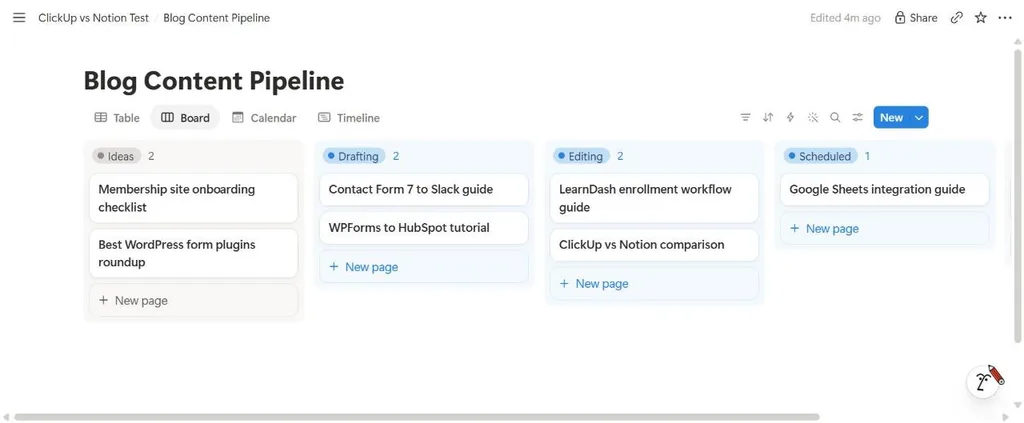
As boards, the two pipelines look close. In Notion, the board is a view of a database with a Status property. In ClickUp, the board is a view of a List, and the statuses belong to that List.

Inside an item
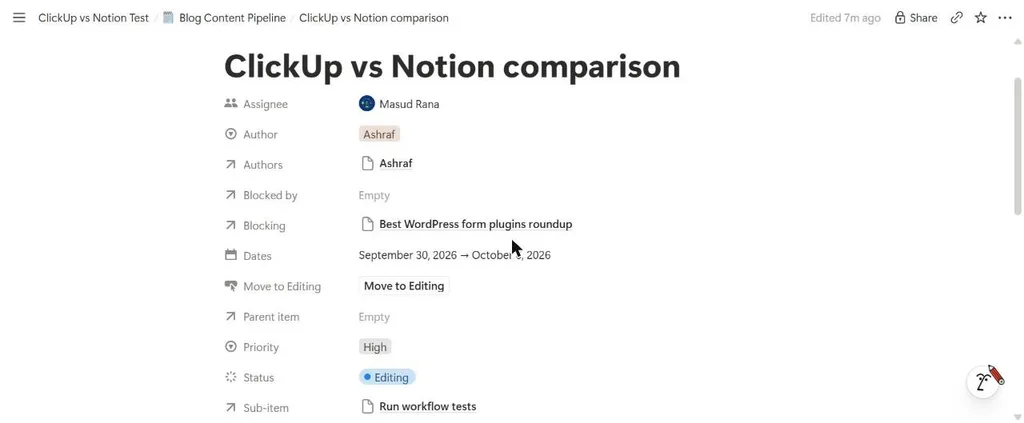
Notion stores each article as a page. Its properties hold the assignee, author, dates, priority, status, and the dependency, and each sub-item is a page with properties of its own.
ClickUp stores each article as a task and lists its subtasks in a table that shows each one’s assignee and due date.

Timelines and dependencies
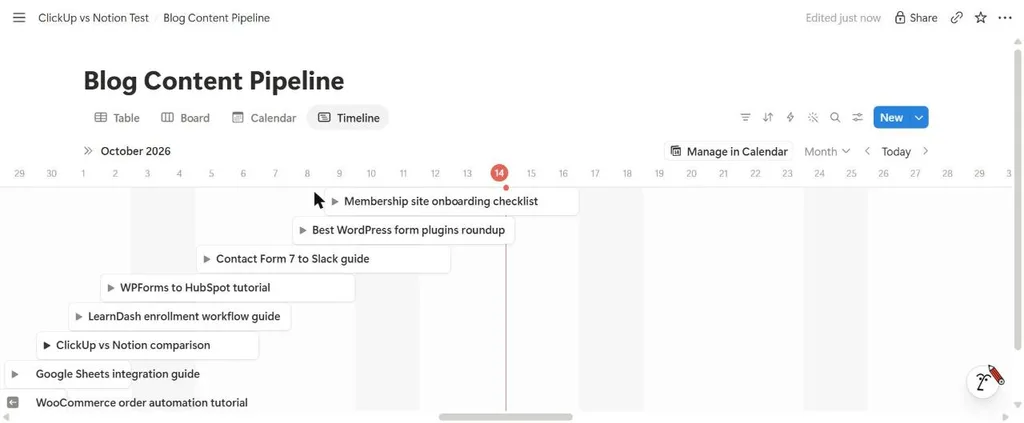
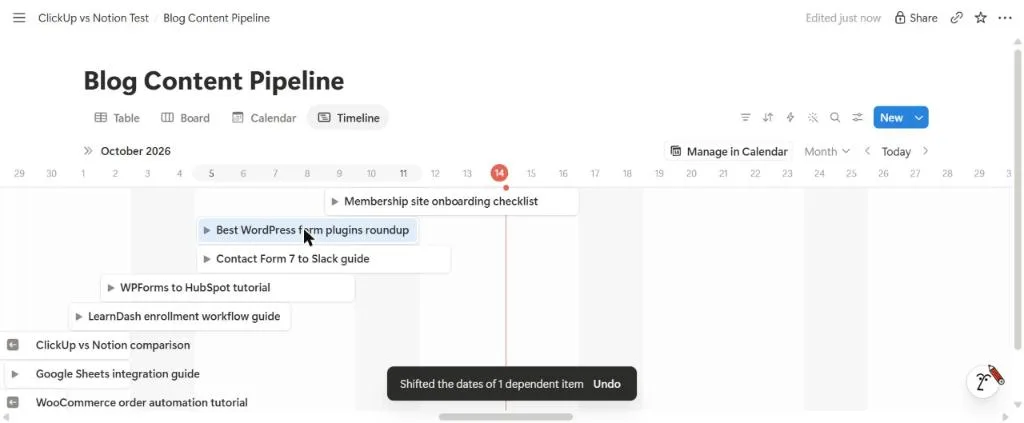
Both tools let you mark one item as blocking another. In Notion, the link lives in Blocking and Blocked by properties.
We moved an item that another item depended on, and Notion shifted the dependent item’s dates and offered to undo the change.
ClickUp’s Gantt view drew an arrow between the blocking task and the task it blocks.

要するに If you want project features ready on day one, ClickUp has them. If you want to decide which properties and views your projects need, Notion lets you build that.
Docs and wiki: Notion pages vs ClickUp Docs
Writing is Notion’s core. Pages nest inside pages; any page can hold a live view of a database, and comments and @mentions sit inline.
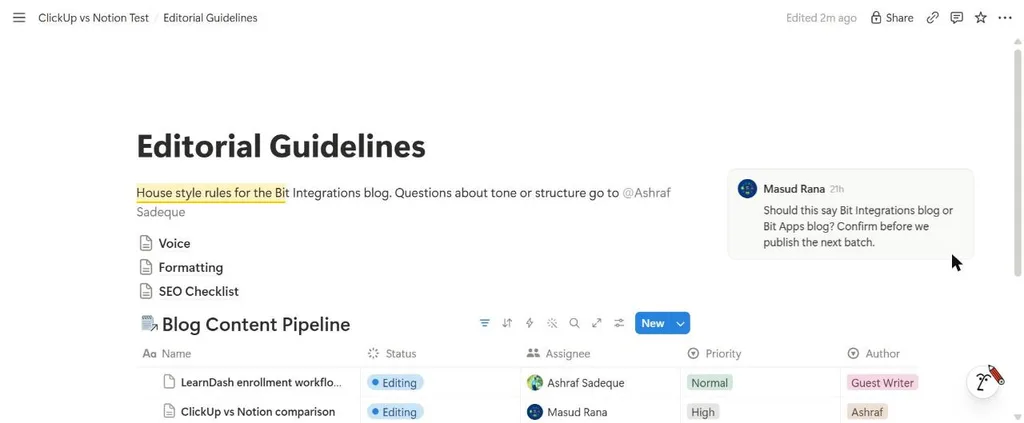
Our Notion Editorial Guidelines page held three subpages, a mention, a comment, and a view of the pipeline filtered to articles in Editing.
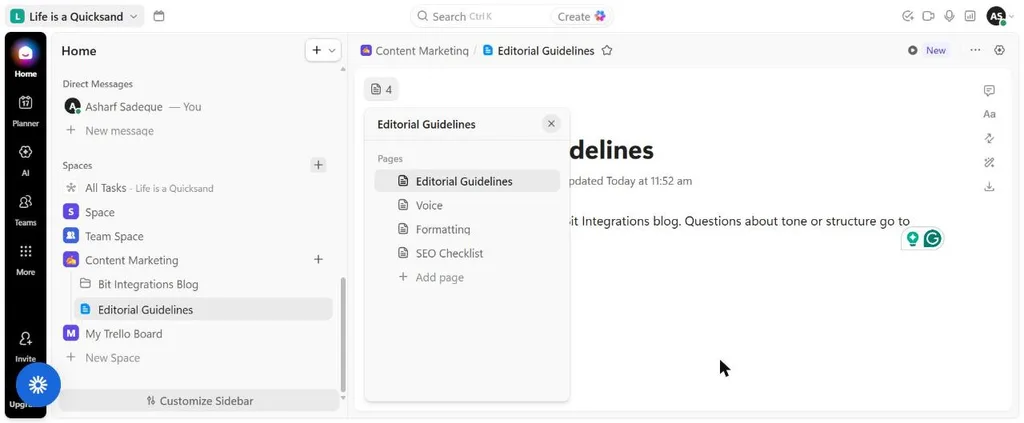
ClickUp Docs come with every plan, without a cap on the number of Docs. Each Doc holds nested pages, and we built the same Editorial Guidelines Doc with Voice, Formatting, and SEO Checklist pages inside our Content Marketing Space.
Two plan details matter for wiki-heavy teams: ClickUp allows one Doc wiki on Free, Core, and Business, with unlimited wikis on Enterprise, and private Docs start on Business.
要するに Teams that write and maintain a large knowledge base get more room in Notion, which has no wiki limit. Teams that want docs attached to their projects can keep them in ClickUp, within its one-wiki limit below Enterprise.
Databases and the data model
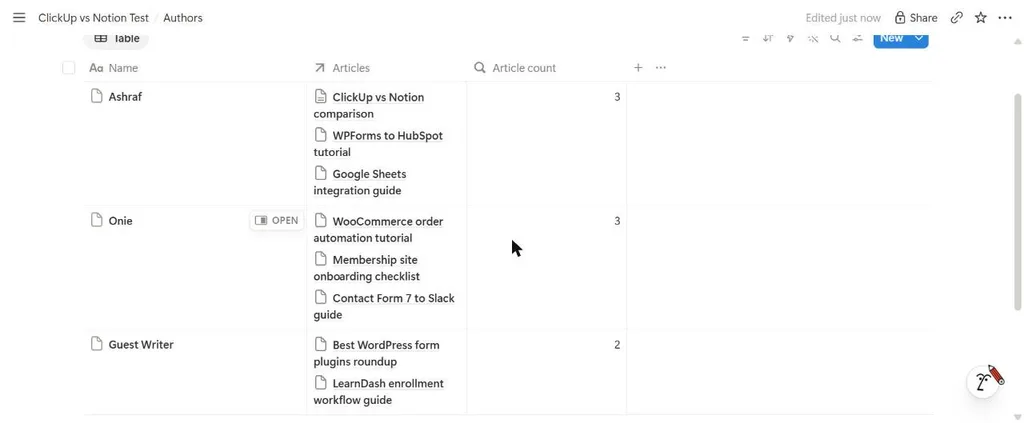
Notion databases connect to each other. We created an Authors database, linked each article to its author with a two-way relation, and added a rollup that counts each author’s articles. The relation and rollup both worked on the free plan.
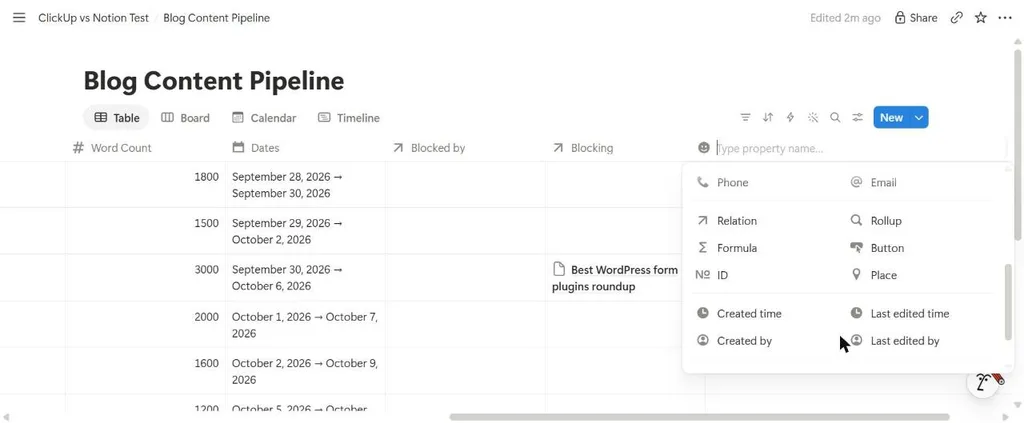
Notion’s property menu also offers AI Autofill properties, Summarize and Translate, labeled Basic in our free workspace.
ClickUp structures data through custom fields, task relationships, and dependencies. Custom fields run as a trial on Free and come with Core.
ClickUp’s help center lists Custom Field rollups among the features added in its current plans. In our test, ClickUp Brain skipped the custom fields we requested because the Custom Fields feature was switched off in our workspace.
要するに If your information connects across databases, such as articles to authors or clients to projects, Notion’s relations and rollups model that structure on every plan.
Setup and maintenance
Building the pipeline in Notion meant creating the database, adding five properties, defining the status options, creating four views, and turning on sub-items and dependencies.
ClickUp Lists come with default statuses and views that you adjust, and you switch optional features on or off through settings called ClickApps.
| Build step | Estimated time for a first-time user |
|---|---|
| Notion: pipeline database with properties and four views | 25 to 40 minutes |
| Notion: sub-items, checklist, and dependency | 5 to 10 minutes |
| Notion: Authors relation and rollup | 8 to 12 minutes |
| Notion: wiki page with linked view | 10 to 15 minutes |
Maintenance follows the same split. In Notion, changing your process means editing the databases and views you built. In ClickUp, many changes are settings, such as adding a status or switching on a ClickApp.
AI: Notion AI vs ClickUp Brain on the same prompt
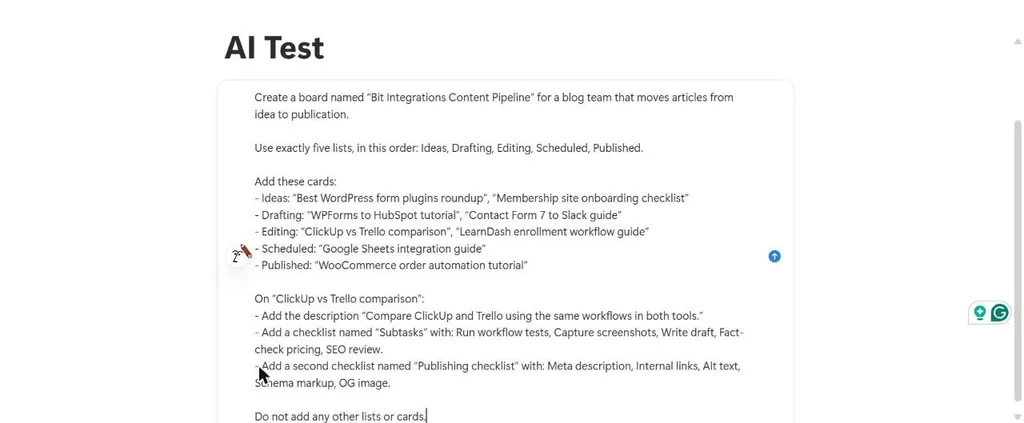
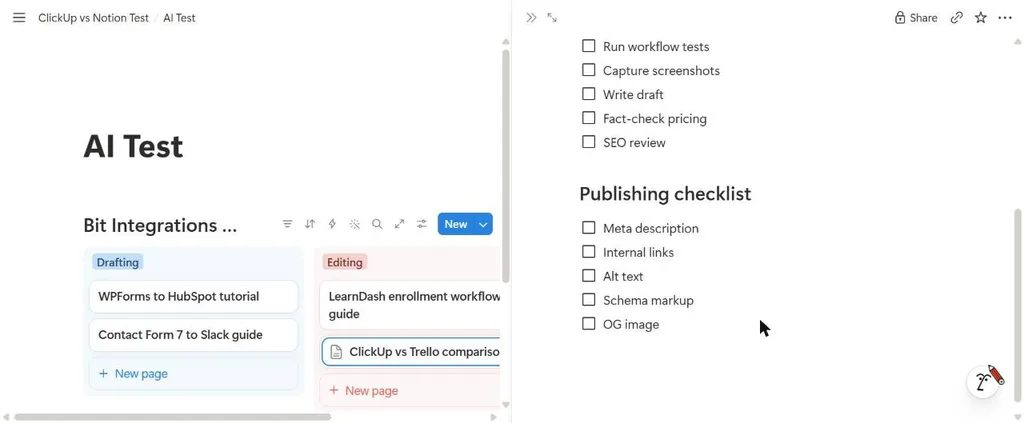
We gave both assistants the same prompt: build a board named Bit Integrations Content Pipeline with five lists in a set order, eight named cards, and two checklists on one card, and add nothing else. Both tools ran on their free plans.
Notion AI
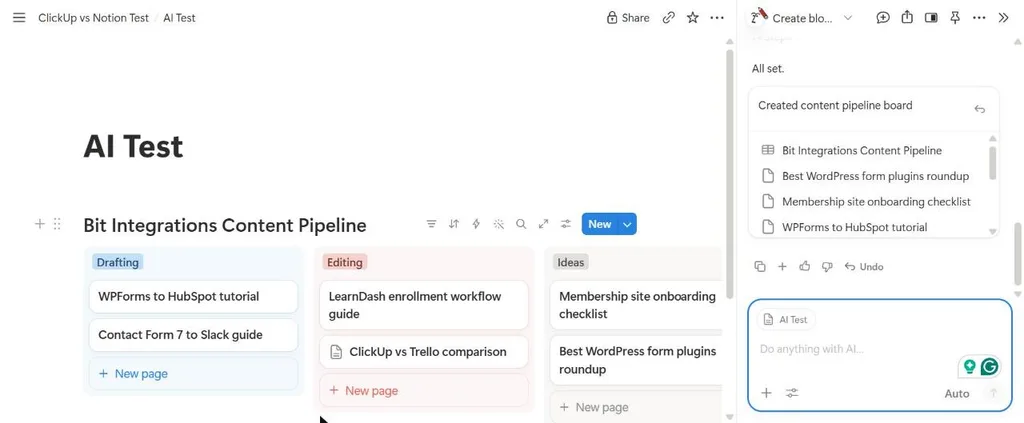
Notion AI created the database inside our page and placed the eight cards in their stages. The comparison card received both checklists.
The first three columns appeared as Drafting, Editing, and Ideas, which differs from the order in the prompt.
ClickUp Brain
ClickUp Brain read the same prompt as a request for a new Space with five Lists. It asked us to confirm the plan, then stopped: our free workspace had reached ClickUp’s 5-Space limit, so it created nothing.
That result reflects the free plan’s Space cap rather than what Brain can build.
With a longer ClickUp-specific prompt, run earlier while the workspace still had a free Space slot, Brain created the Space, Folder, List, a private Doc, eight tasks, five subtasks, a checklist, a tag, a dependency, and six views.
It skipped custom fields, which were switched off in our workspace, and it couldn’t create the automation rule.

AI Features by plan
| 計画 | クリックアップ | ノーション |
| 無料 | Limited AI use (main pricing table); Brain² trial with 500 credits per Workspace (new plans) | Limited trial of Notion Agent and AI Meeting Notes |
| Entry paid | Unlimited: AI add-ons available. Core (new): Brain² trial and 1,000 pooled credits per user per month | Plus: limited trial |
| Business tier | Business ($12/m): AI add-ons available. Business (new, $17/m): Brain² with premium models and 1,500 pooled credits per user | Business: Notion Agent, AI Meeting Notes, Enterprise Search (beta) |
| AI add-ons | Brain AI $9 and Everything AI $28 per user/month billed yearly, for the main-table plans | None; AI comes with Business |
| Top tiers | Enterprise (new): 3,000 credits per user. Max: 10,000 credits per user plus unlimited AI fields, notetaker, and image generation | Enterprise: zero data retention with AI providers |
| Autonomous agents | Super Agents use AI credits | Custom Agents use Notion credits at $10 per 1,000 (Business and Enterprise) |
ClickUp’s new plans include AI credits instead of selling AI as add-ons, according to its help center. On Unlimited and Business, you add Brain AI or Everything AI per user.
- Outside assistants: both tools publish official MCP servers, ノーション そして クリックアップ, so assistants such as Claude or ChatGPT can work with your pages or tasks. On its new plans, ClickUp caps MCP calls per day: 100 on Free, 300 on Core, and 1,000 on Business. We didn’t test either server.
要するに For AI across a whole team, ClickUp Business costs $17/m per user billed yearly, and Notion Business costs $20/m. Compare what each includes: ClickUp counts usage in pooled credits, and Notion bundles Notion Agent with SAML SSO and private teamspaces.
Automation: Notion buttons and database automations vs ClickUp automations
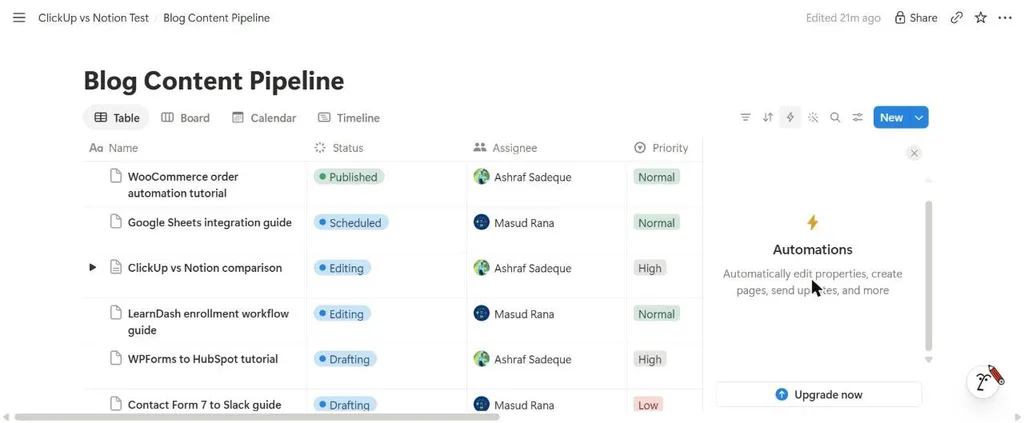
On Notion’s free plan, the database Automations panel showed an upgrade prompt. Notion’s help center says database automations run on paid plans.
Free users can create Slack notification automations, and one automation can’t trigger another, though a button can trigger a database automation.
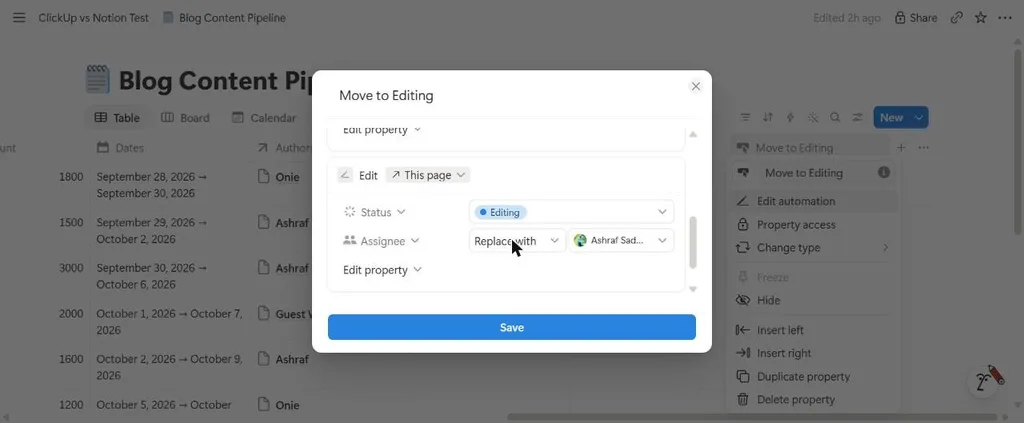
Buttons worked on the free plan. We built a Move to Editing button that sets Status to Editing and replaces the Assignee, and it ran in our free workspace.
Three button actions carried a Plus label: Send mail, Send webhook, and Send Slack notification.
ClickUp’s automation builder pairs a trigger with optional conditions and a stack of actions. On ClickUp’s current price list, Free allows 5 active rules and 100 automation actions per Workspace per month.
Core allows unlimited rules and 1,000 actions, and Business allows 10,000 actions and adds webhooks, email, SMS, and integration actions.

要するに On free plans, ClickUp gives you rule-based automation with a monthly action cap, and Notion gives you buttons. Notion’s database automations start on Plus.
Forms and intake
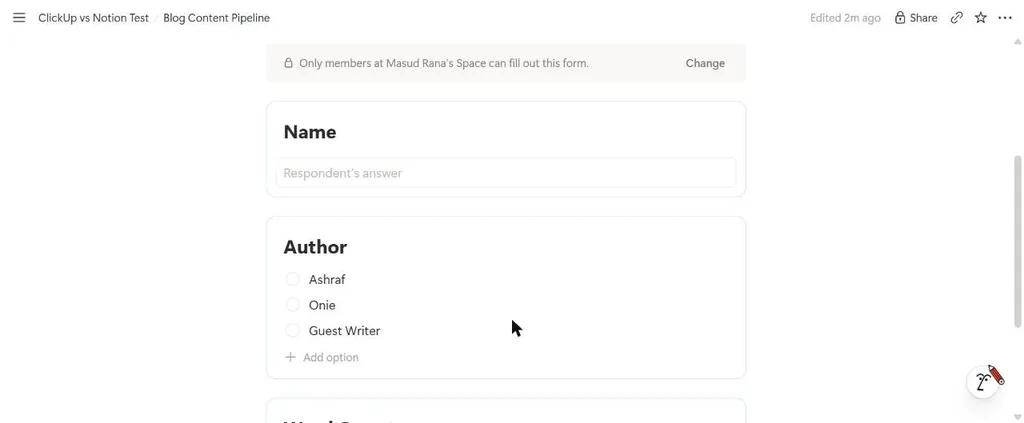
Notion builds forms as a view of a database, so each response becomes a row. Our test response landed in the pipeline with Status set to Ideas and the Author and Word Count we entered.
New forms default to members-only access, and the custom submit screen setting carries a Plus label.
ClickUp includes one form on Free and unlimited forms on Core, with conditional form logic on Enterprise; Notion offers conditional logic on Business.
Collaboration, guests, and client access
Both tools keep comments and mentions beside the work. ClickUp adds Chat, with unlimited messages from Core and a trial with 90 days of history on Free, plus SyncUps video calls on every plan. Notion includes Notion Calendar on every plan.
Guest access follows different models. Notion guests are free and can open only the pages you share with them: 10 guests on Free and unlimited on paid plans, with private teamspaces and row-level database permissions on Business.
ClickUp’s free plan gives guests full access, and Core adds limited-access and view-only guests. We didn’t test guest invitations.
要するに For sharing a few pages with clients, Notion’s free guest model works. For giving clients controlled access to projects, ClickUp Core covers it.
ClickUp vs Notion pricing
ClickUp’s pricing page shows two price lists. Its main pricing table lists Free Forever, Unlimited, Business, and Enterprise, with AI sold as add-ons.
The same page also lists new plans with AI included: Free, Core, Business, Enterprise, and Max.
ClickUpの help center says the new plans are offered to workspaces created after their launch, all Free Forever workspaces, and a small number of paid workspaces.
Existing paid workspaces keep their current plan and price, and ClickUp doesn’t move them automatically.
ClickUp: main pricing table
| ClickUp plan | Billed yearly | Billed monthly | What it adds |
| 永久無料 | $0 | $0 | Unlimited members, 60MB storage, 5 Spaces, 1 form, 100 automation runs per month |
| 無制限 | $7 | $10 | Unlimited storage, Spaces, Gantt charts, integrations, and custom fields; time tracking; guests with permission control; 1,000 automation runs |
| ビジネス | $12 | $19 | Unlimited dashboards and Timeline views, webhooks in automations, 5,000 automation runs, Google SSO, sprint points and reporting |
| エンタープライズ | カスタム | カスタム | SAML SSO and SCIM, audit log, HIPAA available, data residency, 250,000 automation runs |
On these plans, AI is an add-on: Brain AI costs $9 and Everything AI costs $28 per user/month billed yearly. ClickUp advertises savings of up to 20% on AI with yearly billing.
ClickUp: new AI-included plans
| ClickUp plan | Billed yearly | 通常価格表示 | What it adds |
| 無料 | $0 | 該当なし | Unlimited members, 60MB storage, 5 Spaces, 1 form, 100 automation actions per month, 500 AI credits per Workspace |
| Core | $9 | $12 | Unlimited storage and Spaces, custom fields, Gantt charts, time tracking, guest permissions, 1,000 automation actions, 1,000 AI credits per user |
| ビジネス | $17 | $25 | Premium AI models, advanced dashboards, Timeline and Workload views, webhooks, 10,000 automation actions, Google SSO, timesheets, 1,500 AI credits per user |
| エンタープライズ | カスタム | Not shown | SAML SSO and SCIM, audit logs, HIPAA, data residency, conditional forms, unlimited wikis, 3,000 AI credits per user |
| Max | $100 | $120 | Everything in Enterprise, maximum premium model usage, unlimited AI fields, notetaker, and image generation, 10,000 AI credits per user |
ノーション
| Notion plan | Billed yearly | Billed monthly | What it adds |
| 無料 | $0 | $0 | No block limit for one person; block limit for 2+ members; 5MB uploads; 7-day page history; 10 guests; 1 chart |
| プラス | $10 | $12 | Unlimited blocks and uploads (about 5GB per file), 30-day history, unlimited guests, custom forms, unlimited charts, database automations |
| ビジネス | $20 | $24 | Notion Agent, AI Meeting Notes, Enterprise Search, SAML SSO, private teamspaces, granular database permissions, conditional forms, 90-day history |
| エンタープライズ | カスタム | カスタム | SCIM, audit log, advanced security controls, zero data retention with AI providers, unlimited page history |
Affordable plan that unlocks each capability
| You need | ClickUp main table | ClickUp new plans | ノーション |
| A team on a free plan without a block limit | 無料 | 無料 | Plus, $10 |
| Unlimited file storage | Unlimited, $7 | Core, $9 | Plus, $10 (about 5GB per file) |
| A timeline or Gantt view | Unlimited, $7 (Gantt) | Core, $9 (Gantt) | Free (Timeline view) |
| Rule-based or database automations | Free (100 runs per month) | Free (100 actions per month) | Plus, $10 |
| Built-in time tracking | Unlimited, $7 | Core, $9 | Not listed |
| Guests with limited access | Unlimited, $7 | Core, $9 | Free (page-level access, 10 guests) |
| Unlimited dashboards or charts | Business, $12 | Business, $17 | Plus, $10 (charts) |
| A full AI assistant for the team | Unlimited plus Brain AI, $17 | Business, $17 | Business, $20 |
| SAML single sign-on | エンタープライズ | エンタープライズ | Business, $20 |
| More than one wiki | エンタープライズ | エンタープライズ | No wiki limit listed |
Monthly cost by team size
| Team size | ClickUp Unlimited | ClickUp Unlimited + Brain AI | ClickUp Core (new) | ClickUp Business (new) | Notion Plus | Notion Business |
| 5 people | $35 | $80 | $45 | $85 | $50 | $100 |
| 10 people | $70 | $160 | $90 | $170 | $100 | $200 |
| 25 people | $175 | $400 | $225 | $425 | $250 | $500 |
Figures use yearly list prices and exclude taxes, extra AI credits, and Notion credits for Custom Agents. On monthly billing, ClickUp Core and Notion Plus both cost $12 per user.
要するに At the entry tier, the two tools cost almost the same: $9 for ClickUp Core and $10 for Notion Plus on yearly billing, and $12 each on monthly billing. For team-wide AI, ClickUp Business ($17) costs less per seat than Notion Business ($20), and Notion Business includes SAML SSO, which ClickUp reserves for Enterprise.
Free plans: what you hit first
| Limit | ClickUp Free Forever | Notion Free |
| People | Unlimited members | Unlimited, with a block limit once 2+ members join |
| Structure | 5 Spaces (we hit this limit) | Unlimited pages for one person |
| Storage and files | 60MB total | 5MB per file (we hit this limit) |
| 自動化 | 5 active rules, 100 automation runs per month | Buttons; database automations need Plus |
| Charts and dashboards | Dashboards as a trial | 1 chart (we hit this limit) |
| Wiki | 1 Doc wiki | No wiki limit listed |
| Guests | Full access only | 10 guests, page-level access |
| AI | Limited AI use, or a Brain² trial with 500 credits per Workspace on the new plans | Limited trial |
Notion’s pricing page says the free plan has no block limit for one person and a limited number of blocks once a workspace has two or more members.
At the limit, members can still read, edit, and organize existing content but can’t add new blocks. Our workspace had two members, and its settings didn’t show a block usage figure, so the exact number isn’t part of this test.
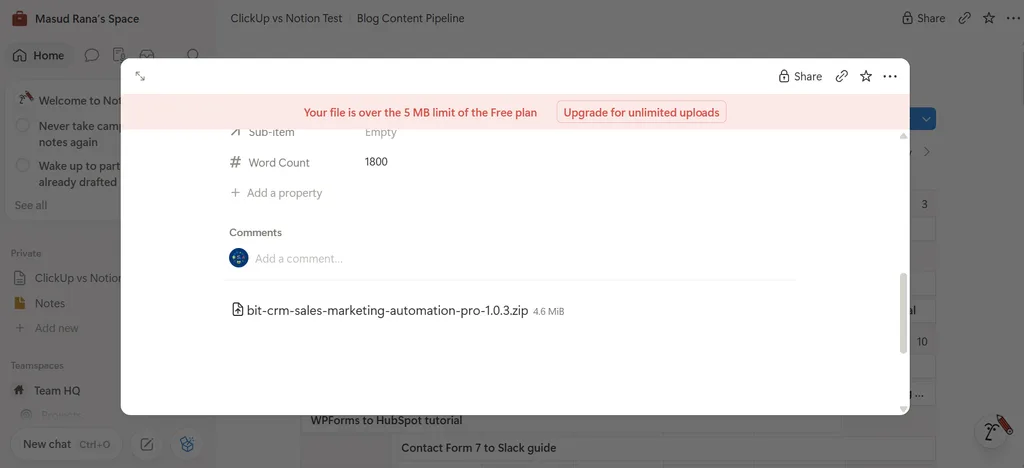
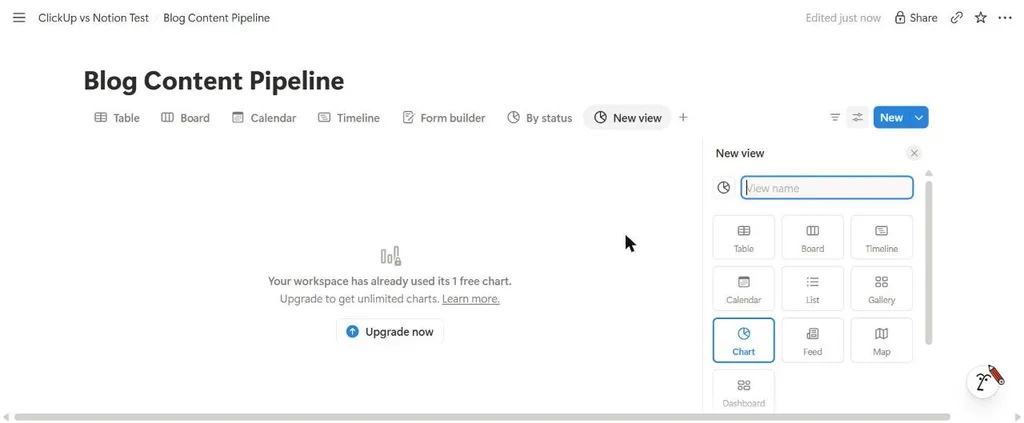
要するに ClickUp’s free plan fits a whole team until storage or Spaces run out. Notion’s free plan fits one person well, and a team reaches the block limit, file cap, or automation gate first.
Using ClickUp and Notion together
A common split puts tasks, deadlines, and time tracking in ClickUp, and the wiki, specs, and meeting notes in Notion.
You link between them with page and task URLs, connect them through an automation platform such as Zapier or Make, or use each tool’s API.
For a 10-person team on yearly billing, ClickUp Unlimited plus Notion Plus costs $170 a month, or $190 with ClickUp Core.
ClickUp Unlimited with Brain AI costs $160, ClickUp’s new Business plan costs $170, and Notion Business costs $200. Two tools also mean two places to search and two permission models to manage.
Switching between ClickUp and Notion
From Notion to ClickUp
ClickUp’s help center describes a built-in Notion importer. It brings Notion workspaces in as Lists inside one Folder, puts Notion docs into a single ClickUp Doc as subpages, and imports Notion fields as Text Custom Fields.
The importer creates a new Space, so a free ClickUp workspace at its 5-Space limit needs a free slot first.
Notion’s export dialog offers Markdown & CSV, current or all database views, and an option to include subpages.
From ClickUp to Notion
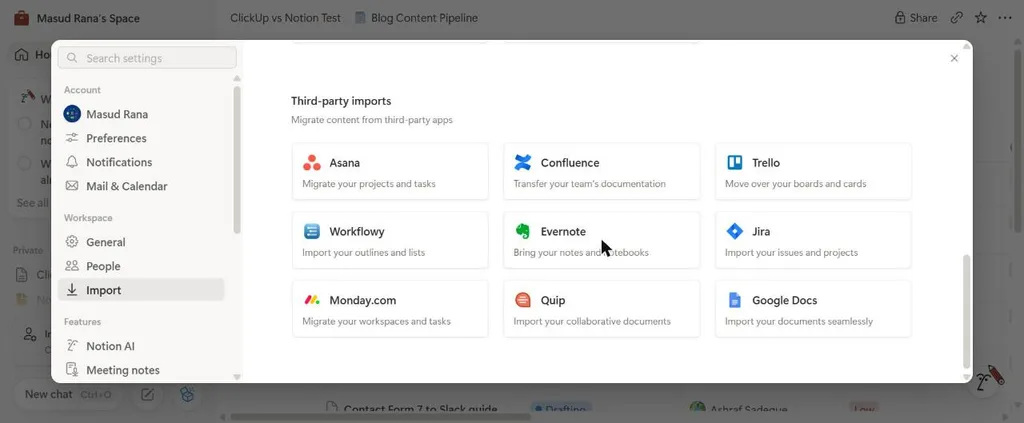
Notion’s import menu in our workspace listed Asana, Confluence, Trello, Workflowy, Evernote, Jira, Monday.com, Quip, and Google Docs, along with file imports for CSV, PDF, text and Markdown, HTML, and Word.
ClickUp didn’t appear, so a move from ClickUp to Notion runs through an export file such as CSV. In both of ClickUp’s price lists, full table or custom exports start on Business.
Which should you choose? Eight scenarios
ClickUp vs Notion for solo creators and students
You manage your own projects, notes, and plans. Notion Free has no block limit for one person, and Notion offers Plus free to students and educators. ClickUp Free also covers solo work within 60MB of storage.
Best fit: Notion if your system runs on notes and pages. ClickUp if it runs on tasks with deadlines.
ClickUp vs Notion for startups
A small team needs a wiki, a roadmap, and a task list without buying three tools. Notion handles the wiki and roadmap as pages and databases.
ClickUp handles tasks, sprints, and time tracking, with Docs alongside them.
Best fit: Notion if the company’s knowledge is the bigger problem. ClickUp if shipping on schedule is.
ClickUp vs Notion for agencies
You run client projects, track billable time, and share progress with clients.
ClickUp Unlimited or Core adds time tracking and guest permissions, and Business adds timesheets.
Notion offers free guests on shared pages and doesn’t list built-in time tracking.
Best fit: ClickUp for delivery and billable hours. Notion for client-facing documentation.
ClickUp vs Notion for content teams
Articles move from idea to published, with briefs and guidelines alongside. Notion keeps briefs, guidelines, and the pipeline in connected pages, as our test showed.
ClickUp gives you the pipeline, Gantt, and calendar, with Docs next to the tasks.
Best fit: Notion if briefs and editorial guidelines drive the work. ClickUp if deadlines and workload do.
ClickUp vs Notion for product and engineering teams
Engineers plan sprints, track bugs, and write specs. ClickUp includes sprints on every plan and sprint points from Business.
Notion offers a projects, tasks, and sprints template, and specs live as long-form pages.
Best fit: ClickUp for sprint execution. Notion for specs and product documentation.
ClickUp vs Notion for operations teams
You run recurring processes with owners, checklists, and reporting.
ClickUp’s automations, dashboards, and workload views come built in. Notion needs Plus for rule-based database automations.
Best fit: ClickUp for process execution. Notion for SOPs and policies.
ClickUp vs Notion for knowledge-heavy teams
Support, HR, and research teams maintain large bodies of written knowledge. Notion’s nested pages, linked views, and relations suit that work, with no wiki limit, and Business adds page verification and private teamspaces.
Best fit: Notion, with ClickUp added if the team also manages tracked projects.
ClickUp vs Notion for WordPress CMS based businesses
Orders, enrollments, and form entries start on your site. Neither tool reacts to WordPress events on its own, so you need an integration layer either way.
Best fit: Choose the tool that fits your team’s work; the WordPress connection works with both.
Connecting ClickUp & Notion to WordPress
Form submissions, WooCommerce orders, and course enrollments happen on your WordPress site, outside both tools.
To turn them into tasks or database items, you can use a WordPress integration plugin, a form plugin’s own add-on (WPForms, for example, offers a Notion integration), or an automation platform.
We tested Bit Integrations, the WordPress integration plugin behind this blog, with WPForms free version test submissions:
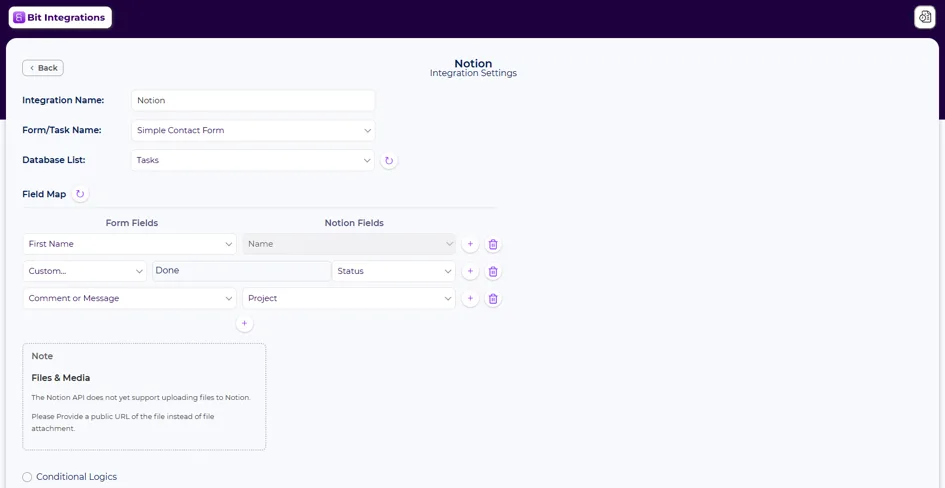
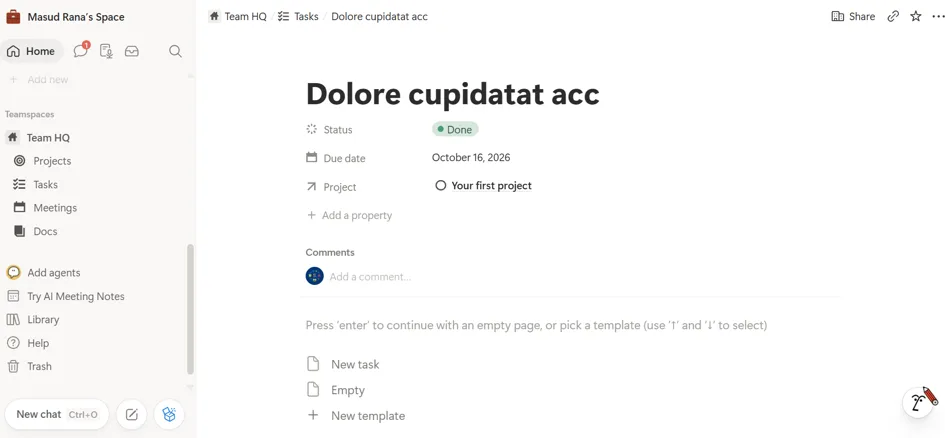
- Notion: Bit Integrations’ Notion integration has one action, Create task. You pick the form and the Notion database, then map form fields, or fixed values, to Notion properties. We mapped the name field to the task Name and set Status to a fixed value of Done. The action offers conditional logic, and for files, it asks for a public file URL.
- ClickUp: the Create Task action asks for the Team, Space, Folder, and List, then maps form fields to the task name, description, and custom fields. Setup steps are in the ClickUp integration guide.
- Results: The Notion task arrived in our Tasks database with the submitted name and the Done status. The ClickUp task arrived in its List.
Bit Integrations sends data one way, from WordPress to ClickUp or Notion, and it doesn’t replace the automations inside either tool. Our WordPress用ClickUpおよびAsana連携 article covers more trigger ideas for forms, stores, and courses.
最終評決
Neither tool fits every team, because they start from different units of work.
ClickUp fits teams whose work starts as tasks: requests with owners, deadlines, dependencies, and time to track.
Its project features come ready, its free plan admits the whole team, and Unlimited ($7 per user/month billed yearly) or the new Core plan ($9) adds time tracking, Gantt charts, and unlimited storage.
Notion fits teams whose work starts as pages: briefs, specs, wikis, and connected records.
You build the project layer from databases, and the same workspace holds your documentation. Plus, at $10 per user/month billed yearly ($12 monthly), it removes the team block limit and upload cap.
If your team needs both a large wiki and tracked delivery, running both tools is a reasonable choice. If Asana or Trello is also on your list, see our ClickUp vs Asana そして ClickUp vs Trello comparisons, or our test of five Notion alternatives.
よくある質問
Is ClickUp better than Notion?
Neither is better for every team. ClickUp suits task-first work with deadlines, time tracking, and dashboards. Notion suits page-first work with docs, wikis, and linked databases.
Can Notion replace ClickUp for project management?
For many teams, yes. Notion offers board, timeline, and calendar views, sub-items, dependencies, and a sprint template, all built from databases. Its plans don’t list built-in time tracking or a workload view.
Can ClickUp replace Notion for docs and wikis?
ClickUp includes unlimited Docs with nested pages on every plan, and a Doc wiki below Enterprise. Teams with large, interlinked documentation often prefer Notion’s nested pages and linked database views.
Is Notion free for teams?
Notion Free has no block limit for one person. A workspace with 2 or more members gets a block limit, uploads are capped at 5MB per file, and up to 10 guests can join. Plus removes the block and upload limits.
Is ClickUp free for teams?
Yes. ClickUp Free Forever allows unlimited members, with 60MB of storage, 5 Spaces, 1 form, and 100 automation runs per month.
Does Notion have time tracking?
Notion’s plans don’t list built-in time tracking, and its property types don’t include a time tracker. ClickUp includes time tracking in Unlimited or Core, with a trial on Free.
Does Notion have Gantt charts?
Notion has a Timeline view, which we used on the free plan, along with dependencies that shift dependent dates when you move a blocking item. ClickUp offers Gantt charts as a trial on Free and includes them in Unlimited or Core.
Do ClickUp and Notion include AI?
Both offer limited AI or an AI trial on their free plans. On ClickUp’s Unlimited and Business plans, AI is an add-on, with Brain AI at $9 per user/month billed yearly; ClickUp’s new plans include AI credits. Notion includes Notion Agent on Business at $20 per user/month billed yearly.
Can I use ClickUp and Notion together?
Yes. A common setup keeps tasks in ClickUp and the wiki in Notion, linked by URLs or connected through an automation platform or the tools’ APIs.
Can ClickUp or Notion connect to WordPress?
Neither reacts to WordPress events on its own. A WordPress integration plugin, a form plugin add-on, or an automation platform can turn form entries or orders into tasks or database items.
Do ClickUp and Notion work with ChatGPT or Claude?
Both publish official MCP servers that connect AI assistants to your workspace. On its new plans, ClickUp limits MCP calls per day, from 100 on Free to 1,000 on Business.

関連ブログ
Bit Connect: A Hands-On Test of the WordPress Community, Feedback, and Roadmap Plugin

ClickUp vs. Trello in 2026: We Ran the Same Workflows in Both