JA
JA  EN
EN  ES
ES  DE
DE  NL
NL  FR
FR  PT
PT  IT
IT 
Let’s say you sell handmade candles on Instagram. Someone sees your post and asks, “How do I buy this?” You could send them your bank account number. You could ask them to PayPal you and hope for the best. Or you could send them a clean, professional checkout link that handles the whole thing, payment, confirmation email, and all.
That’s the basic idea behind paymentform.io. It’s a tool that lets you create payment forms for almost anything, including selling products, collecting donations, running fundraisers, ticketing events, and sharing them as a link, without ever needing to build a website.
長文要約
paymentform.io is a form-based checkout page for collecting payments online without a website. It supports 4 live modules: Single Product E-commerce, Multi-Product E-commerce, Donation, and Fundraising. Connects to Stripe, PayPal, Razorpay, Mollie, and Square. Charges 0% platform fees. Free to start; Pro plan at $5/month after a 12-month early access period. Best for small businesses, freelancers, nonprofits, and event organizers.
What is Paymentform.io?
At its core, paymentform.io is a payment form builder. You create a form, share the link, and people pay you through it.
It’s built for situations where setting up a full website feels excessive. Say you’re selling a product on Facebook, or collecting donations for a local cause, or ticketing a small event. You don’t necessarily need a website for any of that. You just need a way to collect money without it being awkward. That’s where paymentform.io comes in.
It’s not a payment gateway. It doesn’t process your payments or hold your money. What it does is connect to the gateway you already use, Stripe, PayPal, Razorpay, Mollie, Square, whatever, and gives your buyers a proper checkout experience. Every payment goes straight to your connected account.
The setup is easy, too. Pick a module that matches what you’re doing, customize the form, paste in your gateway API keys, and share the link. No developer needed, no website required.
What Can You Build with paymentform.io Right Now?
paymentform.io is organized around modules, each of which is a purpose-built form for a specific payment use case. Right now, four modules are live and ready to use.
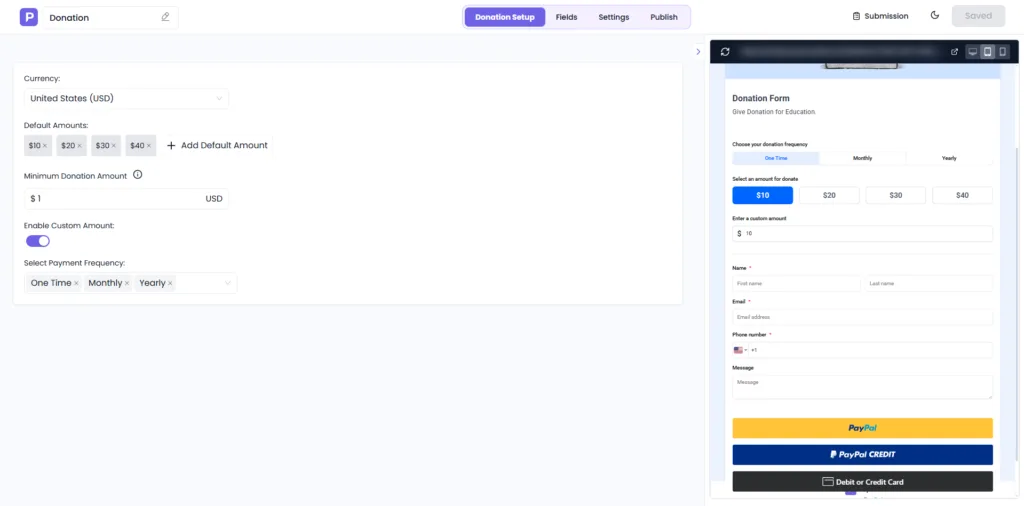
Donation Form
Accepts both one-time and recurring donations. You can set fixed amounts or let donors enter their own, collect custom details through form fields, and automatically send receipts after each donation. Works well for nonprofits, charities, religious organizations, or any individual collecting community support.
Fundraising Form
Similar to the donation module, but built around a campaign. You set a goal, a deadline, and a progress bar shows donors how close you are in real time. Once the deadline hits, the campaign closes automatically. Good for medical emergencies, education funds, or any cause with a specific target.

E-commerce Product Multiple
Think of this as a lightweight storefront. You can add multiple products, organize them into categories, manage inventory, and handle shipping, all from one shareable link. If you’re selling a small range of products on Instagram or WhatsApp and need something more structured than a DM, this is the module for it.

E-commerce Product Single
If you sell one specific item, a handmade product, a piece of merchandise, anything, this module gives it a dedicated checkout page. You can add product variants like size or color, set inventory limits, offer discounts, and let the form calculate shipping automatically. Clean and focused.

Coming Soon
Three additional modules are currently in development:
- Event Tickets: sell tickets, manage registrations, and generate QR codes for check-in
- Membership: create subscription plans with flexible billing cycles
- Digital Product: sell and auto-deliver downloadable files like eBooks, templates, or software
These aren’t live yet, so if any of these are your primary use cases, it’s worth checking the paymentform.io site directly for the latest rollout status.
How Payments Actually Reach You
paymentform.io connects to your existing payment gateway via API. You link your account, and from that point, all payments go directly from the buyer to your connected gateway account. paymentform.io itself doesn’t hold your money or take a cut; the only fees are whatever your payment gateway charges.
The supported gateways are:
- Stripe: widely used globally, supports cards, wallets, and more
- PayPal: familiar to buyers, works in most countries
- Razorpay: popular in India and South Asia
- Mollie: popular in Europe, supports local payment methods
- Square: good fit for US-based businesses
The gateway coverage is decent, especially if your customers are in the US, Europe, India, or Latin America. The API setup does require a few steps; you’ll need to grab API keys from your gateway account and paste them in. But it’s a one-time process, and the documentation covers it.
A Few Features Worth Knowing About
Beyond the modules and payment connections, there are a handful of features that stand out:
- Embeddable Forms You’re not limited to sharing a link. Any form you create can be embedded directly into a website using a simple embed code. So if you do have a site, a blog, a portfolio, or a landing page, you can drop the form right into it without any extra setup.
- Invoice builder: Auto-generates invoices with itemized breakdowns after each transaction.
- Client portal: Let buyers track their orders and payments on their own, reducing support requests.
- Analytics dashboard: Tracks monthly sales, submissions, and a basic sales funnel overview.
- Custom email templates: Set up personalized confirmation and notification emails for both you and your buyers.
- QR code generator: Generate a QR code for any form link, useful for in-person events or printed materials.
- Multi-currency support: Set your preferred currency and accept payments in it.
- Custom Domain Instead of sharing a paymentform.io subdomain link, you can connect your own domain to give your forms a more branded, professional appearance.
- Custom Thank You Page: Once a payment is completed, you can redirect buyers or donors to a personalized thank you page instead of a generic confirmation screen.
- Custom Tax Rules: Set up tax rules based on your location or product type so the right tax amount gets applied automatically at checkout.
- Form Fields: You’re not locked into a fixed form layout. Add, remove, or rearrange fields to collect exactly the information you need from your buyers or donors.
- Password-Protected Forms: Restrict access to a form by adding a password, useful for exclusive offers, private sales, or member-only campaigns.
- Coupon Generator: Create discount coupons and attach them to your forms. Useful for running promotions or rewarding repeat buyers.
- Multi-Language Support: Forms can be presented in multiple languages, which matters if your audience isn’t limited to English speakers.
- Webhook Support: paymentform.io supports webhooks with five events: Submission Created, Submission Failed, Payment Succeeded, Payment Failed, and Payment Abandoned. This lets you push form data to external platforms automatically whenever one of these events is triggered.
Who Should Use paymentform.io?
paymentform.io is aimed at people who need a simple way to collect money online but don’t have a website or don’t want the hassle of setting one up just to sell a few things. That covers a pretty wide range:
- Small business owners selling physical or digital products on social media
- Freelancers who want to send a payment link instead of chasing invoices
- Nonprofits and community groups running donation drives or fundraising campaigns
- Event organizers selling tickets and managing registrations
It’s fully no-code, so you don’t need a developer or any technical background. You pick a module, customize the form, connect your payment account, and share the link.
価格設定
paymentform.io is currently offering an early access deal; the first 1,000 users get 12 months of full Pro access completely free, no credit card required. After that period, any forms you created under Pro keep their features. New forms after the 12 months would either run on the Free plan, or you can upgrade to Pro at $5/month.
Either way, paymentform.io itself charges 0% transaction fees. The only fees you’ll pay are your payment gateway’s standard processing charges; for example, Stripe charges 2.9% + $0.30 per transaction, but that goes to Stripe, not paymentform.io.
For anyone just getting started, the free entry point with no hidden fees makes it a low-risk tool to try out.
Final Thoughts
paymentform.io fills a specific gap, the space between “I need to collect payment” and “I need to build an entire website.”
If you’re selling on social media, running a donation drive, or organizing a ticketed event, having a shareable payment form that handles checkout, confirmations, and invoices is genuinely useful.
It’s not trying to replace Shopify or a full payment processor. It’s a middle layer that makes getting paid online less of a headache for people who don’t want to deal with website infrastructure.
The free plan with no transaction fees makes it worth trying out before committing to anything.
よくある質問
Is paymentform.io a payment gateway?
No. It doesn’t process payments or hold your money. It’s the form layer that sits in front of your payment gateway. You connect your own Stripe, PayPal, or other supported gateway, and all payments go directly to that account.
Do I really need a website to use paymentform.io?
No. That’s actually the whole point of it. You create a form, get a shareable link, and send it to whoever needs to pay you through Instagram, WhatsApp, email, or anywhere else. No website, no hosting, no domain required.
Which payment gateways does paymentform.io support?
paymentform.io currently supports five payment gateways: Stripe, PayPal, Razorpay, Mollie, and Square. Users connect their preferred gateway via API keys. Multiple gateways can be connected to a single account.
Does paymentform.io charge transaction fees?
No. paymentform.io charges 0% platform transaction fees. Users only pay the standard processing fees charged by their connected payment gateway, such as Stripe’s 2.9% + $0.30 per transaction. paymentform.io does not take any additional percentage or flat fee on top of that.
What is the difference between paymentform.io’s Donation module and Fundraising module?
The Donation module is designed for open-ended, ongoing giving with no time limit or goal. The Fundraising module is campaign-based; it includes a target goal, a visible progress bar, and a deadline. The campaign automatically closes once the deadline is reached and displays a custom closed message to visitors.
What webhook events does paymentform.io support?
paymentform.io supports five webhook trigger events: Submission Created, Submission Failed, Payment Succeeded, Payment Failed, and Payment Abandoned. These webhooks allow users to automatically send form and payment data to external platforms and tools when any of these events occur.
Can paymentform.io integrate with third-party tools like Mailchimp or Google Sheets?
Yes, through webhook support. When a trigger event fires, such as a completed payment or an abandoned form, paymentform.io can send that data to external platforms. Common integrations include sending buyer or donor details to Mailchimp for automated email follow-ups or logging transaction records in Google Sheets.
Can paymentform.io forms be embedded on a website?
Yes. Every form created in paymentform.io comes with an embed code that can be placed on any website, blog, or landing page.
Can I accept payments in different currencies?
Yes. You can set your preferred currency on the form, so buyers see prices in that currency at checkout. Useful if your audience is spread across different countries.
What happens if someone starts filling out my form but doesn’t complete the payment?
paymentform.io tracks those as abandoned forms. You can follow up with those users, which is useful for recovering dropped checkouts or incomplete donations. If you want to go further, like sending them an automated discount coupon via Mailchimp, that’s possible through webhook integrations.

関連ブログ
2026年、ClickUp 対 Asana:両者を実際のワークフローでテストしました