

 DE
DE  EN
EN  ES
ES  NL
NL  FR
FR  PT
PT  IT
IT  JA
JA Gravity Forms CRM-Integrationen ohne das Pro-Upgrade?
Auf der Suche nach Gravity Forms CRM-Integrationen bedeutet nicht, dass Sie Ihren Gravity Forms-Tarif aufrüsten müssen, nur um ein paar CRM-Add-ons freizuschalten. Wenn Sie Gravity Forms Basic verwenden, kann das Upgrade nur für die Verbindung Ihrer Formulare mit einem CRM wie zutreffend mehr kosten, als Sie tatsächlich benötigen, insbesondere wenn es eine flexiblere und günstigere Möglichkeit gibt, dies zu tun.
Mit Bit Integrations, Sie können Gravity Forms verbinden mit 30+ CRMs und weit über CRM-Automatisierung hinausgehen. Sie können auch Gravity Forms-Daten an E-Mail-Marketing-Tools senden, LMS-Plattformen, Google Sheets, Projektmanagement-Apps, Webhooks und mehr, alles von einem einfachen Automatisierungs-Plugin aus.
Bevor Sie Gravity Forms nur für den CRM-Zugang upgraden, sollten Sie eine intelligentere Option in Betracht ziehen: Nutzen Sie ein Automatisierungs-Plugin, um Ihre Gravity Forms CRM-Integrationen und viele weitere Integrationen zu geringeren Kosten.
TL;DR
Du Sie müssen nicht auf Gravity Forms Pro (Version $159) upgraden, nur um Ihre Formulare mit einem CRM zu verknüpfen.. Mit Bit Integrations, Mit Gravity Forms Basic können Sie sich zu einem viel niedrigeren Preis mit über 30 CRMs wie Hubspot, Zoho CRM, Pipedrive, Salesforce und vielen anderen Plattformen wie E-Mail-Plattformen, Google Sheets und mehr verbinden, beginnend bei $35/Jahr für einen Standort, mit unbegrenzten Seiten und lebenslangen Optionen.
Welche CRM-Integrationen unterstützt Gravity Forms nativ?
Gravity Forms verbindet sich mit CRMs über seine Offizielle Erweiterungen. Jedes Add-on ist für ein bestimmtes CRM konzipiert und in bestimmten Tarifen gebündelt. So sieht die native Unterstützung aus:
- Agile CRM (in einigen Versionen als Agiled aufgeführt)
- Capsule CRM
- Zoho CRM
- Salesforce
- ActiveCampaign
- Brevo (ehemals Sendinblue)
- HubSpot
Diese Liste deckt die häufigsten Anwendungsfälle für viele Teams ab. Aber wenn Ihr Unternehmen auf Pipedrive, GoHighLevel, Freshsales, Copper CRM, oder irgendetwas außerhalb dieser Optionen, wirst du kein natives Gravity Forms Add-on dafür finden. Und genau an dieser Stelle beginnen die meisten Nutzer, nach Alternativen zu suchen. Eine solche Alternative könnte Bit Integrations sein – ein zuverlässiges Integrations- und Automatisierungs-Plugin mit über 150 Fünf-Sterne-Bewertungen und mehr als 25.000 aktiven Nutzern.
Was ist Bit Integrations?
Bit Integrations ist eine WordPress Automatisierungs-Plugin das Ihre bestehenden Plugins und Tools vernetzt, ohne dass Sie Ihre aktuelle Einrichtung ändern müssen. Es funktioniert als ein Verbindung zwischen Gravity Forms und Hunderten externer Apps, einschließlich über 30 CRMs.
Sie installieren es auf Ihrer WordPress-Site zusammen mit Gravity Forms. Es erfasst Formularübermittlungen als Auslöser und sendet die Daten an jedes von Ihnen konfigurierte CRM. Kein Programmieren erforderlich, und keine Änderungen an Ihrem Gravity Forms-Plan.
Bit Integrations unterstützt mehr als 374 Integrationen mit CRMs, E-Mail-Marketing-Tools, Projektmanagement-Apps, Tabellenkalkulationsprogrammen, WordPress-Formular-Plugins und vielem mehr. In diesem Blogbeitrag konzentrieren wir uns speziell auf dessen CRM-Integrationen mit Gravity Forms.
Alle CRM-Integrationen für Gravity Forms sind über Bit Integrations verfügbar
Hier ist die vollständige Liste der CRMs, die Sie mit Gravity Forms verbinden können über Bit Integrations, nach Kategorien geordnet, damit Sie das Gesuchte leichter finden können.
Beliebte und Enterprise CRMs
Dies sind weit verbreitete CRMs, die größere Teams und wachsende Unternehmen typischerweise nutzen:
- HubSpot
- Salesforce
- Zoho CRM
- Zoho Bigin
Vertriebsorientierte CRMs
Hauptsächlich für Vertriebs-Pipelines und die Deal-Verfolgung entwickelt:
- Pipedrive
- Freshsales
- Vertriebsmitarbeiter
- Salesflare
- Kupfer-CRM
- Nutshell CRM
- LionDesk
- ClinchPad
All-in-One Business- und Agentur-CRMs
Diese kombinieren CRM-Funktionen mit Rechnungsstellung, Kundenportalen oder Projektmanagement:
- GoHighLevel
- SuiteDash
- Agiles CRM
- Propovoice CRM
- CompanyHub
- MoxieCRM
- Perfex CRM
- OneHash CRM
WordPress-native CRMs
Diese laufen direkt in deinem WordPress-Dashboard, sodass alles an einem Ort bleibt:
- FluentCRM
- Murmeltier
- Jetpack CRM
Deal- und Beziehungsmanagement
Diese Werkzeuge gehen über das reine Kontaktmanagement hinaus und konzentrieren sich auf Beziehungen und projektbezogene Deals:
- Einsichtsvoll
- Flowlu
Fußnote: Alle CRM-Listen finden Sie im Alle Integrationen Liste von Bit Integrations.
So verbinden Sie Gravity Forms mithilfe von Bit Integrations mit einem beliebigen CRM-System
Die Einrichtung der Gravity Forms-Integration ist unkompliziert. So funktioniert der Prozess von Anfang bis Ende.
- Bit Integrations installieren: Laden Sie das Plugin von der WordPress-Repository, installieren Sie es und aktivieren Sie es auf Ihrer Website.

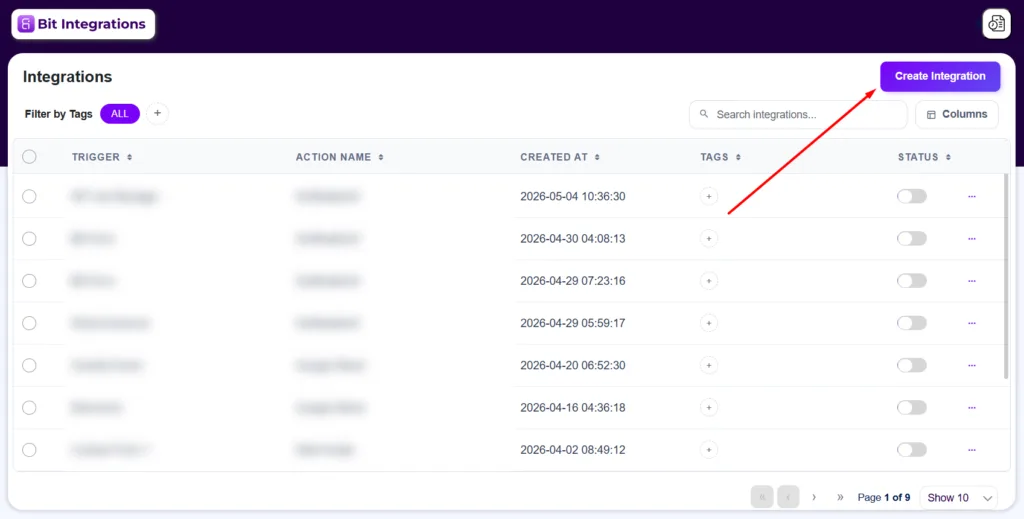
- Neue Integration erstellen: Gehen Sie in Ihrem WordPress-Dashboard zu Bit Integrations und klicken Sie auf “Integration erstellen”.”
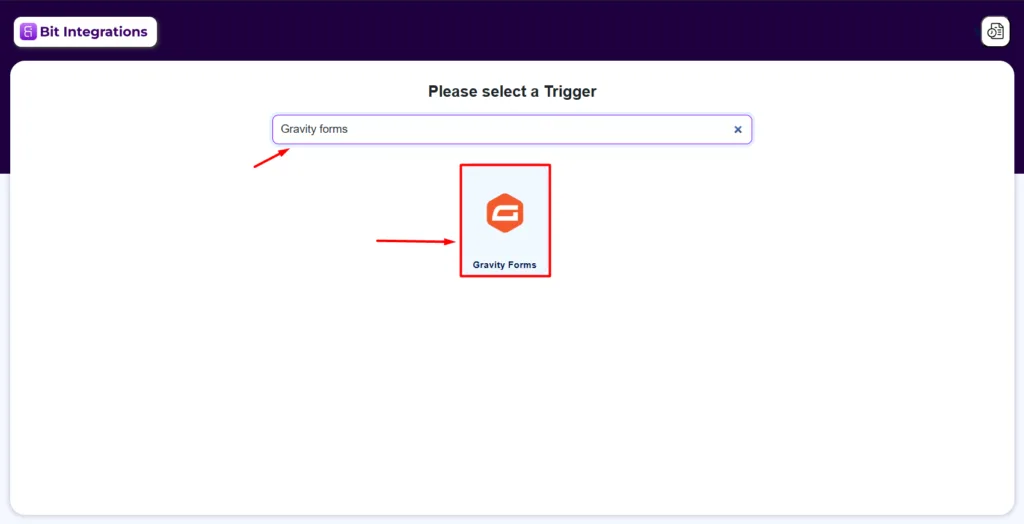
- Gravity Forms als Trigger festlegen: Suche und wähle Gravity Forms aus der Trigger-Liste aus und wähle dann das spezifische Formular aus, das du verbinden möchtest.
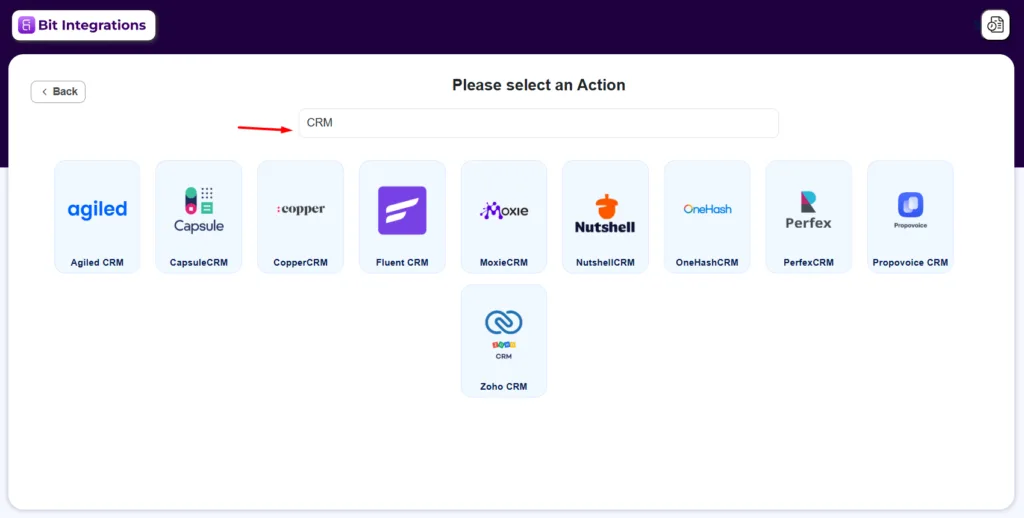
- Wählen Sie Ihren CRM als Aktion: Wählen Sie Ihr CRM aus der Aktionsliste. Möglicherweise müssen Sie Ihr CRM-Konto mithilfe eines API-Schlüssels oder OAuth verbinden, je nach Plattform.
Schritt-für-Schritt-Anleitungen zur Einrichtung aller CRM-Integrationen finden Sie im Bit Integrations Dokumentation.
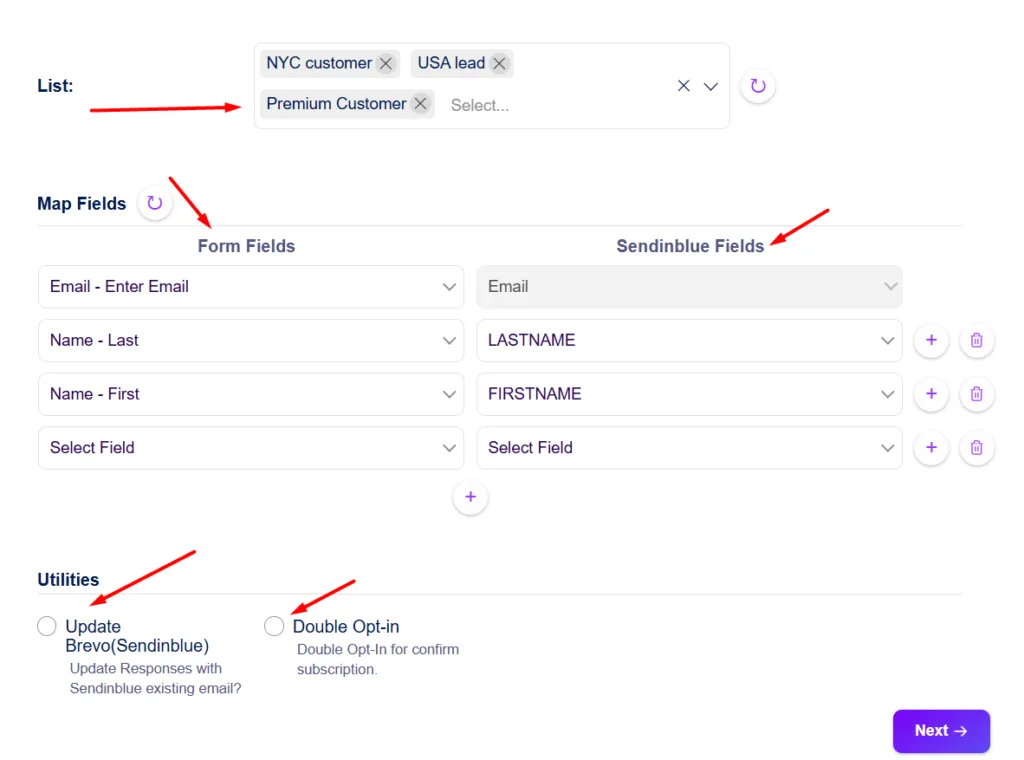
- Felder Ihrer Formularzuordnung: Ordnen Sie jedes Gravity Forms-Feld dem entsprechenden CRM-Feld zu. Ordnen Sie beispielsweise das Formularfeld “E-Mail” dem Feld “Kontakt-E-Mail” in Ihrem CRM zu.
Manche CRMs bieten in diesem Stadium auch zusätzliche Optionen an, wie zum Beispiel Double-Opt-in, das eine Bestätigungs-E-Mail an den Kontakt sendet, bevor dieser zu Ihrer Liste hinzugefügt wird.
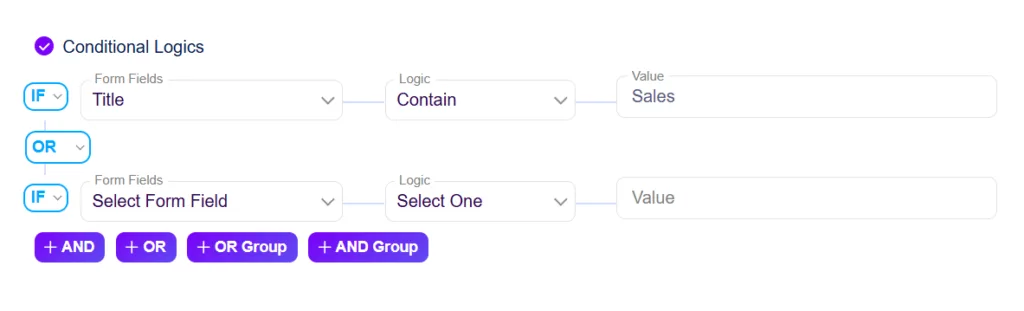
- Hinzufügen Bedingte Logik (Optional): Wenn Sie nur bestimmte Einreichungen in Ihrem CRM erfassen möchten, legen Sie Bedingungen fest. Senden Sie zum Beispiel nur Einträge, bei denen der Anfragetyp “Vertrieb” lautet, an Ihre CRM-Pipeline.
- Speichern und Testen: Speichern Sie die Integration und senden Sie einen Testdatensatz über Ihr Formular. Überprüfen Sie Ihr CRM, um zu bestätigen, dass die Daten korrekt übernommen wurden.
Anwendungsfälle in der Praxis
Hier sind einige praktische Beispiele, wie verschiedene Teams dieses Setup nutzen:
Marketingagentur: Gravity Forms + GoHighLevel
Eine Marketingagentur nutzt Gravity Forms auf den Websites von Kunden zur Lead-Erfassung. Jede Einreichung automatisch erstellt einen neuen Kontakt in GoHighLevel und platziert es in der richtigen Pipeline-Phase, sodass das Vertriebsteam ohne manuelle Dateneingabe nachfassen kann.
SaaS-Unternehmen: Gravity Forms + Pipedrive
Ein SaaS-Unternehmen verwendet auf seiner Preisseite ein Demobestellformular von Gravity Forms. Jede Einreichung Erstellt ein neues Geschäft in Pipedrive mit den Kontaktdaten und dem ausgewählten Produktplan, der direkt in die Verkaufspipeline geleitet wird.
HR-Team: Gravity Forms + Freshsales
Ein Personalteam sammelt Bewerbungen über ein Gravity Forms-Erfassungsformular. Bit Integrations leitet jede eingereichte Bewerbung weiter an Freshsales als neuer Kontakt, getaggt nach der Rolle, für die sie sich beworben haben, was die Nachverfolgung und Bearbeitung erleichtert.
Coach oder Berater: Gravity Forms + FluentCRM
Ein Business Coach verwendet ein Kundenaufnahmeformular, das mit Gravity Forms erstellt wurde. Nach der Einreichung, Bit Integrations fügt die Person zu FluentCRM hinzu, weist ihnen basierend auf ihrem Serviceinteresse ein Tag zu und löst automatisch eine Willkommens-E-Mail-Sequenz aus.
Native CRM-Add-ons für Gravity Forms im Vergleich zu Bit Integrations: Ein kurzer Vergleich
Hier sind die beiden Ansätze nebeneinander im Vergleich:
| Eigenschaften | Gravity Forms Native | Mit Bit Integrations |
| Unterstützte CRM-Systeme | 6 spezifische CRMs | 30+ CRMs |
| CRM-Add-on-Kosten | In Pro Plan -$159 | Alles im Basis-Tarif enthalten: $35. Verbinden Sie jetzt CRM, E-Mail, LMS, Google Sheets und mehr. |
| Einrichtung erforderlich | Zur Add-on-Installation | Einzelnes Plugin für alle CRMs |
| Nicht-CRM-Integrationen | Werkzeuge über separate Add-ons auswählen | 374+ Werkzeuge in einem Plugin |
| Daten bleiben auf Ihrem Server | JA | JA |
Schlussfolgerung
Am Ende des Tages sollten Ihr Formular-Tool und Ihr CRM-System reibungslos zusammenarbeiten, ohne dass Sie sich mit komplizierten Schritten herumschlagen müssen.
Wenn Gravity Forms Ihr Formularersteller ist und Ihr CRM wird nicht nativ unterstützt, Bit Integrations ist einen Blick wert. Installieren Sie es, ordnen Sie Ihre Felder zu, und Ihre nächste Formularübermittlung gelangt direkt dorthin, wo Ihr Team tatsächlich arbeitet.
Häufig gestellte Fragen
Funktioniert Bit Integrations mit allen Gravity Forms-Tarifen?
Ja. Bit Integrations funktioniert als eigenständiges WordPress-Plugin. Es ist unabhängig von Ihrer Gravity Forms-Tarifstufe und funktioniert daher bei den Tarifen „Basic“, „Pro“ und „Elite“ auf dieselbe Weise.
Wird dies die nativen CRM-Add-ons von Gravity Forms ersetzen?
Nicht unbedingt. Wenn Sie bereits ein natives Add-on eingerichtet haben und dieses einwandfrei funktioniert, müssen Sie es nicht entfernen. Bit Integrations kann parallel zu bestehenden Add-ons verwendet werden, oder Sie können es als Ersatz nutzen, wenn Sie es vorziehen, alles an einem Ort zu verwalten.
Ist Bit Integrations ein cloudbasiertes Tool?
Nr. Bit Integrations ist ein selbst gehostetes WordPress-Plugin. Ihre Formulardaten werden auf Ihrem eigenen Server verarbeitet und direkt an Ihr CRM gesendet. Sie werden nicht über einen Cloud-Dienst eines Drittanbieters weitergeleitet, was viele Teams aus Datenschutzgründen bevorzugen.
Kann ich ein Formular an mehrere CRMs gleichzeitig senden?
Ja. Sie können mehrere Integrationen für denselben Gravity Forms-Trigger erstellen. Beispielsweise kann eine einzelne Formulareingabe gleichzeitig einen Kontakt in HubSpot erstellen und ein Geschäft in Pipedrive hinzufügen, sofern Ihr Workflow dies erfordert.
Was passiert, wenn die Feldnamen meiner Gravity Forms nicht mit meinen CRM-Feldnamen übereinstimmen?
Das ist kein Problem. Im Schritt “Feldzuordnung” in Bit Integrations können Sie jedes Formularfeld manuell dem entsprechenden CRM-Feld zuordnen, unabhängig davon, wie diese benannt sind. Wenn Ihr Formular also das Feld “Telefonnummer” enthält und Ihr CRM es „Mobil“ nennt, ordnen Sie die beiden Felder bei der Einrichtung einfach einander zu.
Kann ich filtern, welche Formularübermittlungen an mein CRM gesendet werden?
Ja. Bit Integrations verfügt über eine Funktion zur bedingten Logik, mit der Sie Regeln auf Integrationsebene festlegen können.

Verwandter Blog
Gravity Forms-Trello-Integration ohne Gravity Forms Pro (Sparen Sie $100+)

Top 10 ClickUp- & Asana-Integrationen für WordPress + Einrichtungsanleitung


