EN
EN  ES
ES  DE
DE  NL
NL  FR
FR  PT
PT  IT
IT  JA
JA 8 Best WordPress Automation Plugins for Maximum Efficiency in 2026
Understand the Core Concepts Quickly


Manual WordPress work piles up fast, from submissions, WooCommerce orders, CRM updates, and notifications. The right automation plugin lets you connect these once and run them for you, freeing hours every week.
The hard part is choosing: the eight tools below all automate WordPress, but they win at different jobs, and the wrong fit means paying for power you never use or hitting limits you didn’t expect.
In 2026, there are some really solid options out there for WordPress users. So in this blog, we’ll take a closer look at the 8 best WordPress Automation Plugins in 2026. We’ll explore their key features and how they can simplify your website management.
TL;DR: Which one should you pick?
There is no single winner. The right pick depends on where your workflow starts and how you want to be billed.
- Most affordable flat-rate WordPress-to-app automation: Bit Integrations
- Multi-step branching and AI steps on your own server: Bit Flows
- Largest catalogue of external apps: Zapier
- Cloud workflows with client workspaces: OttoKit
- CRM Integration with personalization: WP Fusion
- WordPress-native recipes: Uncanny Automator
- Precise, secured webhook control: WP Webhooks
- Bulk operations across all users or all posts: AutomatorWP
The billing split matters more than any feature list. Zapier and OttoKit meter every action you run. The other six charge a flat licence and execute on your own server.
How we tested
One WordPress staging site. All eight plugins installed at once, so every result below comes from the same environment rather than eight separate ones.
Where each plugin allowed it, we built the same shape of automation: a WPForms submission feeding a Google Sheets row plus one external app.
Several tools would not accept that exact shape, which is itself a finding, so the steps differ per tool, and we say how in each section.
We tested on free tiers plus the accounts we already hold. That leaves real gaps, and we would rather name them than paper over them:
- WP Webhooks keeps request logs and data mapping behind its paid plans, so we could not run either.
- AutomatorWP asks for an automation type up front and offers only Logged-in, Anonymous, All users, and All posts. The choice cannot be changed afterwards.
- Uncanny Automator gates advanced log filters behind Pro.
Anything marked untested below is something we did not have access to. We have not guessed at it.
Quick Comparision
WordPress automation plugins can revolutionize the way you manage your website, saving you time and improving efficiency. The following comparison highlights the top 8 plugins to help you smooth your workflow.
| Plugin | Free version | Entry paid plan (list) | How you are billed | Runs on |
|---|---|---|---|---|
| Bit Integrations | Yes | $35/yr, 1 site (or $99 lifetime) | Flat licence, no task limit | Your server |
| Bit Flows | Yes | $59/yr, 1 site (or $129 lifetime) | Flat licence, no task limit | Your server |
| Zapier | 100 tasks/mo, 2-step Zaps | $239.88/yr, 750 tasks/mo | Per action executed | Zapier cloud |
| OttoKit | 250 tasks/mo, 20 workflows | $108/yr, 5,000 tasks/mo, 1 workspace | Per action executed | OttoKit cloud |
| Uncanny Automator | Yes | $199/yr legacy, or $180/yr with AI | Flat licence, no per-task fees | Your server |
| WP Fusion | Lite, free | $297/yr, 1 site plus subdomains | Flat licence | Your server |
| WP Webhooks | Yes | $149/yr, 1 site | Flat licence | Your server |
| AutomatorWP | Yes | $149/yr Personal Pass, 2 sites | Flat licence, or per add-on | Your server |
These plugins offer a variety of features tailored to different automation needs. Let’s break down each option to understand its unique strengths and help you choose the right fit for your WordPress site.
1️⃣ Bit Integrations
Bit Integrations is a point-to-point WordPress automation plugin. One trigger in a WordPress plugin fires one action in an external app: pick a trigger, pick an action, map the fields.
What sets it apart
- Extensive Integration library inside WordPress
- Flat licence with no cap on runs, executing entirely on your own server
- Per-execution logs with a re-execute control on every row
- Failure alerts sent by email, enabled by default
What we saw in testing
The integration log lists every execution with its status, record type, and raw API response, and each row carries its own Re-execute button. Replaying a single failed run without rebuilding the automation is uncommon at this price point.

When a Google Sheets token expired on one of our live WooCommerce flows, the alert email arrived carrying the integration ID, the trigger, the action, the timestamp, and the verbatim API error, a 401 UNAUTHENTICATED returned by Google. That is enough to diagnose the problem without opening WordPress at all.

Where it loses
It is deliberately one trigger to one action. Branching, loops, delays, and AI steps are not in this plugin. If your process has to make decisions partway through, this plugin may not fit your requirement, and we would point you elsewhere.
Suitable for: Sites running many simple, predictable WordPress-to-app connections on a flat budget.
2️⃣ Zapier
Zapier connects WordPress to a far larger catalogue of outside apps than any WordPress-native plugin here, through a polished cloud builder.
What sets it apart
- The largest external app catalogue of the eight
- Run history exposing per-step data in and data out
- Cloud execution, so nothing runs on your own server
What we saw in testing
The cost signal appeared before the Zap even ran. Building a form to Sheets to Mailchimp flow with a Lead Router and two conditional paths, the editor flagged that the workflow was using two Pro features. Paths and Lead Router are both gated, and every action step consumes a task from your monthly allowance.

Debugging is where the cloud model pays off. Our WPForms trigger resolved every field cleanly, and the run detail view shows each step’s data in and data out with a local timestamp, so a mismatched field is obvious in seconds.

Where it loses
It is comfortably the most expensive of the eight once volume grows, because you pay per action rather than per licence. Your automations also live in Zapier’s cloud rather than on your site.
Suitable for: Connecting WordPress to a long tail of outside apps, at volumes low enough that per-task billing stays affordable.
3️⃣ Bit Flows
Bit Flows is the multi-step counterpart to Bit Integrations: a visual canvas with routers, conditions, iterators, delays, and AI agent steps, all running on your own server.
What sets it apart
- Visual canvas with routers and condition branches
- AI agent steps with a chat model, memory, and tool connections
- Per-step logs reporting both duration and payload size
What we saw in testing
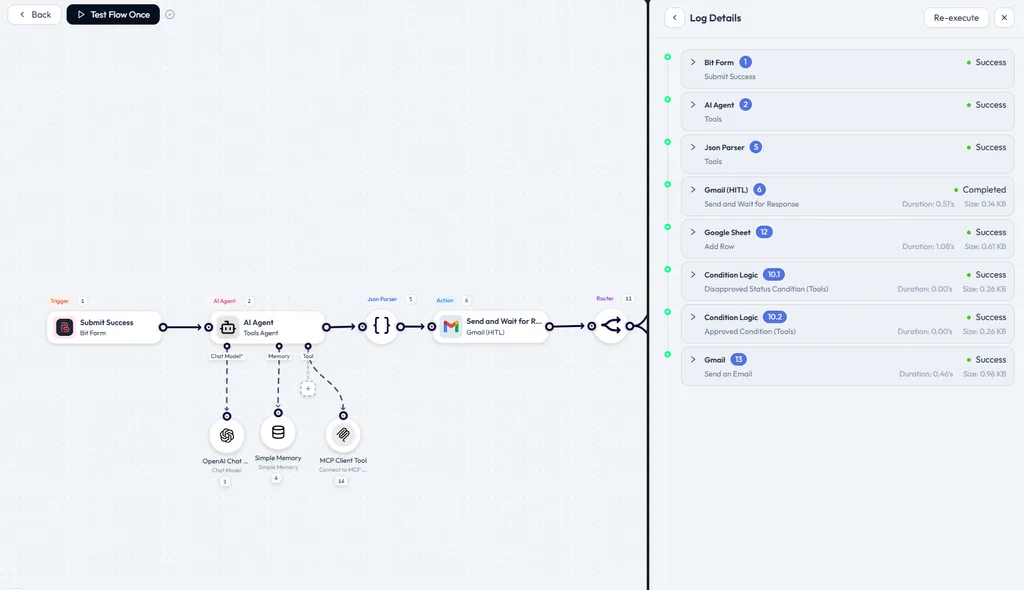
We ran a flow that starts on a form submission, passes through an AI agent wired to an OpenAI chat model, a memory store, and an MCP client tool, parses the resulting JSON, sends a Gmail approval request that waits for a human response, then routes on that answer to either a Google Sheets row or one of two emails.

The log panel timed every step. The Google Sheets row took 1.08 seconds at 0.61 KB, the approval email 0.51 seconds at 0.14 KB, and both condition checks resolved in under a hundredth of a second. Per-step payload sizes are rare in this category and genuinely useful when a flow starts running slow.
Where it loses
The canvas, routers, and conditions all have to be configured, and each one is somewhere a workflow can go wrong. For a simple trigger-to-action job, Bit Integrations will get you there faster.
Suitable for: Branching, AI-assisted processes you want kept on your own infrastructure.
4️⃣ Ottokit
OttoKit is a cloud automation platform with a WordPress connector plugin, a visual builder, AI agents, and client workspaces.
What sets it apart
- A task counter shown per run in the history view
- Workspaces for separating client projects
- Human-in-the-loop approvals and MCP support on paid plans
What we saw in testing

The most useful number of the whole test came out of the history panel. That four-step run reported two tasks consumed. Triggers are not billed, and neither was the delay, so only the two external actions counted against the allowance.

That is worth doing the arithmetic on. At two tasks per run, the $108 Pro plan’s 5,000 monthly tasks cover roughly 2,500 submissions a month. Swap the delay for a third external action and the same allowance covers closer to 1,600.
Where it loses
Branch, Path, Loop, and the API module are not on the Pro tier, so conditional routing pushes you to the Business plan. Run history retention on Pro is 15 days.
Suitable for: Agencies running client automations in the cloud who need separate workspaces and replayable logs.
5️⃣ WP Fusion
WP Fusion is not a general automation plugin, and it does not pretend to be. It syncs WordPress users to a CRM and drives everything else from tags.
What sets it apart
- Bi-directional field sync between WordPress user meta and CRM fields
- Tag-based content access, memberships and course gating
- Support for more than sixty CRMs
What we saw in testing
Setup is a mapping table, not a workflow builder. Under Contact Fields, each WordPress meta field sits in its own row with a sync checkbox and a dropdown pointing at the matching CRM field.
We mapped first name, last name, and email to Brevo and left everything else unsynced. After that, the sync simply happens. There is no per-workflow configuration because there are no workflows.

Error handling is deliberately quiet. Logging is off until you switch it on in the advanced settings, optionally narrowed to errors only, with raw HTTP API logging as a separate toggle.
Our log surfaced two API warnings with a source listed as unknown, which was less specific than we wanted. Alerting on API failures is a separate paid product, promoted inside the log screen itself.

Where it loses
Nothing here connects a form to a spreadsheet. If a CRM is not the centre of your stack, this is the wrong shape of tool, and it carries the highest entry price of the eight.
Suitable for: Membership sites, course platforms and stores whose business logic already lives in CRM tags. In that lane, it is better than the generalists here, including ours.
6️⃣ Uncanny Automator
Uncanny Automator builds recipes: one trigger plus a chain of actions, with a library of native WordPress plugin integrations.
What sets it apart
- A very useful library of native WordPress plugin triggers and actions
- Delays, schedules, conditions, and loops on paid plans
- Flat licence with no per-task fees
What we saw in testing
Our recipe fired on a WPForms submission and ran three actions: a Google Sheets row, an outgoing webhook, and a WordPress data erasure request. The builder notes at the trigger that this recipe type supports one trigger per recipe, which is worth knowing before you design around multiple entry points.

The error handling is unusually specific. The third action failed, and the run was marked Completed with errors rather than simply failing, so the two successful actions were not rolled back.
Opening the failed action gave a plain-English reason: it could not find a user matching the email address supplied. Per-action status, rather than per-run status, is what saves you time.

Where it loses
Advanced log filtering is Pro-gated, so the free log is a flat list. Pricing also restructured during 2026, and the entry price moved up substantially.
Suitable for: WordPress-native automation across many installed plugins, especially membership stacks.
7️⃣ WP Webhooks
WP Webhooks treats webhooks as the product rather than as one feature among many, and the interface is organised around that.
What sets it apart
- Every integration ships inside the plugin, with nothing to install separately
- Reusable authentication templates for outbound calls
- Generated inbound action URLs, each with its own API key
What we saw in testing
Receiving data is unusually clean. Create an action URL and WP Webhooks issues both the endpoint and a matching API key for it, per endpoint rather than per site.

Authentication is handled separately as reusable templates, with API Key, Bearer Token, and Basic Auth available on the free plugin and Digest Auth reserved for Pro.
Sending data works the other way round: pick a trigger such as User created, attach a webhook URL, and inspect the outgoing payload before anything fires.
Untested: request logs and data mapping are both paid features. On the free plugin, the Logs screen is a description of what the paid tier would give you, so we could not evaluate either.

Where it loses
Debugging without logs is genuinely hard, and logs sit behind the $149 tier. This is a tool for people who are comfortable reading request payloads.
Suitable for: Developers who need secured, precisely controlled webhooks in both directions.
8️⃣AutomatorWP
AutomatorWP uses the same trigger-and-action model as Uncanny Automator. It comes from the GamiPress team, with a free core and a large paid add-on catalogue.
What sets it apart
- Loop automations that run across all users or all posts
- Scheduled and recurring execution built into the core
- Add-ons purchasable individually or bundled into a pass
What we saw in testing
The distinguishing feature shows up in the very first dialog. Creating an automation asks you to choose a type: Logged-in, Anonymous, All users, or All posts.
Those last two loop types are the real reason to pick this plugin, because bulk operations across an existing user base or post archive are awkward in most of the other seven.
The dialog also warns that the automation type cannot be changed later, so a wrong choice means starting over.

The free action library is narrower than the headline integration count suggests. Building an All users loop that subscribes people to a Mailchimp audience, the action picker offered nineteen integrations, with everything else sitting behind a link to the add-on catalogue.
The run itself completed, and the log recorded the trigger, the action, and the automation as three separate entries.

Where it loses
The paid model is add-on by add-on, so your real cost depends entirely on which integrations you need rather than on a single headline price.
Suitable for: Bulk operations across existing users or posts, and sites already running GamiPress-style gamification.
What we could not test
Every roundup has gaps. Here are ours:
- WP Webhooks: request logs and data mapping are paid features. We tested send, receive, authentication templates, and the trigger library only.
- AutomatorWP: we ran the free core and the action set it exposes. The wider add-on catalogue is untested.
- Uncanny Automator: advanced log filtering is Pro-gated.
- Zapier: we did not run Paths or Lead Router at volume, since the editor flagged both as Pro features.
- OttoKit: Branch, Path, Loop, and the API module require the Business tier.
Everything above is functional behaviour on a staging site, not throughput under production traffic.
Which Automation Plugin is Right for You?
With so many capable WordPress automation plugins available in 2026. The best fit depends on your site’s specific needs. Such as the number of automations you run, key integrations (forms, CRM, email, etc.), budget, and whether you want features like AI, unlimited tasks, or deep personalization.
Here’s a breakdown by common scenarios to help narrow your options:
- WordPress trigger, flat billing, one action: Bit Integrations. Affordable entry of the eight, runs on your server, no task bill.
- WordPress trigger, but the flow has to branch, wait, or call a model, or AI agent: Bit Flows. Same flat billing, canvas instead of a form.
- Trigger lives in an outside app: Zapier. The largest catalogue here, and the run detail is the easiest to debug. You pay per action.
- Trigger lives outside WordPress, and you run client work: OttoKit. Workspaces separate the accounts. Also per action, though our four-step run costs two.
- The logic already lives in CRM tags: WP Fusion. It does that job better than we do, and there is no workflow builder to learn because there are no workflows.
- Many actions chained off one WordPress event: Uncanny Automator. Flat licence, and failures are reported per action rather than per run.
- You need control over the request itself, in both directions: WP Webhooks. Per-endpoint API keys and reusable auth templates. Budget for the paid tier, because logs sit behind it.
- Bulk work across every existing user or post: AutomatorWP. The loop automation types are the reason to pick it, and nothing else here does that as directly.
Most of these offer free or lite versions. Install the one or two that match your main goal, connect your actual plugins, and run a couple of test automations. An hour of hands-on use tells you more than any spec sheet.
Wrapping Up
Automating repetitive WordPress tasks frees up hours every week. There’s no universal winner; the right tool depends on whether your priority is the lowest cost, the deepest CRM personalisation, the widest app reach, or self-hosted AI workflows.
Identify your main triggers and actions, test the free or lite version of the one or two plugins that fit your job, and scale from what actually works on your own site.
Frequently Asked Questions
Which WordPress automation plugins have no task limits?
Bit Flows, WP Webhooks, Uncanny Automator, WP Fusion, Bit Integrations, and AutomatorWP all charge a flat licence with no per-run metering. Zapier and OttoKit meter every action a workflow executes.
Do any of these plugins offer AI features?
Yeah, Bit Flows and OttoKit both offer smart agents that handle decisions or generate content using models like OpenAI or Claude.
Which plugin is suitable for beginners?
Bit Integrations! Its super straightforward 3-step setup (pick trigger, choose action, map fields) plus clear documentation makes it a total breeze even if you’re brand new to this stuff.
Do any automation plugins include AI for smarter automations?
A few stand out. Bit Flows has AI agents, letting you call OpenAI or Claude right in flows for content gen or decisions. OttoKit also has AI agents for autonomous tasks, great if basic triggers aren’t enough.
Can I automate WooCommerce order processing?
Yes, you can automate order confirmations, inventory updates, customer notifications, and more with the right automation plugin.
Is automation for WordPress easy to set up?
Yes, most automation plugins offer a no-code interface, making it easy to set up triggers and actions without needing technical skills.
Which WordPress automation plugin is easiest for a beginner?
Bit Integrations, if the job is one trigger firing one action, because the configuration is three steps and nothing else.
Are there free WordPress automation plugins?
Yes, many WordPress automation plugins offer free versions with limited features, which you can try before upgrading to the premium version.

Related Blog

5 Best WordPress Affiliate Marketing Plugins in 2026
ConvertForce Review: Best Gutenberg-Native Popup & CTA Plugin for WordPress