

 EN
EN  ES
ES  DE
DE  NL
NL  FR
FR  PT
PT  IT
IT  JA
JA 


Automate WordPress Easily with Action Hook in Bit Integrations
Use any WordPress plugin’s event as a trigger for automation beyond native integrations
Get Started Now
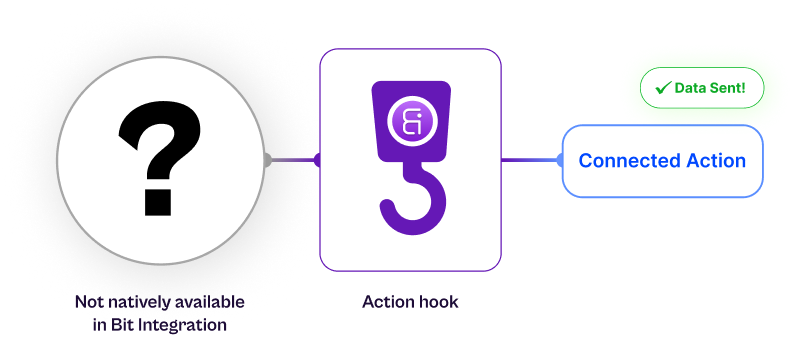

What Is Action Hook in Bit Integrations?
Action Hook is a Bit Integrations feature that listens to a WordPress plugin hooks (like bitform_submit_success, woocommerce_new_order, or user_register). Once the hook fires, Bit Integrations captures the event data and lets you send it to your favorite platforms, no code, no API setup.
How Action Hook Works (At a Glance)
With Bit Integrations, connect any WordPress plugin to any app, even if it’s not in our
195+ actions, using action hook
195+ actions, using action hook
Incoming Webhook WordPress hook
Incoming Webhooks vs. WordPress Hooks: Key Differences and Choosing the Right One
| Features | Incoming Webhook | WP hook |
|---|---|---|
| Data Source | External platforms (SaaS apps) and WordPress plugins that send webhooks (like Bit Form) | Only WordPress plugin and core events |
| Trigger direction | From outside or another plugin → into Bit Integrations | From within WordPress (internal plugin actions) |
| Setup | Requires a webhook sender (external app or WordPress plugin’s webhook feature) | Requires only the hook name of a WordPress plugin events |
| Coding required | No | No |
| Execution time | On receiving a webhook POST, request | Instantly, when the specified WordPress action runs |
| Use Case | Connect external apps or plugins that send webhook payloads | Capture WordPress events like form submissions, new orders, user registration, or custom plugin actions |
What Makes Action Hook Powerful?
With Bit Integrations, connect any WordPress plugin data to your favorite app by using custom WP hoooks
Universal WordPress Support
Works with any WordPress plugin that supports action hooks.
Automatic Data Capture
Captures multiple data parameters from events automatically.
159+ Platform Integrations
Sends WordPress events data to 159+ platforms, such as Google Sheets, Telegram, Zoho CRM, and more.
Instant Execution
Executes instantly with no queue or delay.
Fully No-Code
Fully no-code, developers and non-coders can both use it easily.
Real Word Example with Action Hook
Some WordPress plugins don’t provide incoming webhooks, which limits automation possibilities. Bit Integrations’ Action Hook feature solves this problem by catching any plugin’s internal WP hook and turning it into a trigger you can use for automation, all without writing PHP code.
Example 01
Send Webba Booking Data to Google Sheets and Telegram
The Webba Booking plugin is not natively available in Bit Integrations trigger list and doesn’t provide any webhook option to send booking data to external platforms.
By using the WP hook offered by Webba Booking (for example- wbk_booking_added) with Bit Integrations’ Action Hook, you can catch the booking data the moment it’s created and send it straight to Google Sheets automatically, no PHP coding required.
You get a live, organized record of all bookings in Google Sheets, even though the plugin doesn’t natively support Bit Integrations or offer a webhook.
Integration Flow

Webba Booking

Trigger Action Hook
wbk_booking_added

Action
Google Sheets
This Plugin is not natively available in Bit Integrations
And more 165+ platforms
Webba Booking
Trigger Action Hook
wbk_booking_added

Action
Telegram
Example 02
Send Booking Alerts to Telegram
You want instant notifications for every new Webba Booking appointment, but the plugin can’t push alerts outside WordPress.
Use the same Webba Booking WP hook with Bit Integrations’ Action Hook and choose Telegram as your action. Every time a booking is confirmed, a detailed alert is sent to your Telegram channel or chat, keeping your team informed in real time.
Immediate booking notifications straight to your phone or team chat.
Integration Flow
Webba Booking
Trigger Action Hook
wbk_booking_added
Action
Telegram
And More 165+ platforms
Explore all Integrations
Frequently Ask Questions
You can find your plugin’s hooks by:
- Check its documentation or developer guide.
- Searching the plugin files for do_action (the text inside is the hook name.)
- Use a helper plugin like Simply Show Hooks to view active hooks.
- Ask the plugin developer directly.
Bit Integrations supports both native WordPress hooks (like user_register, wp_login, woocommerce_new_order) and custom hooks created by third-party plugins (like bookly_created_appointment, etc.)
Yes. Once you click Fetch and successfully trigger the event, Bit Integrations automatically displays the captured data structure. You can preview all the available fields before mapping them to your desired app.
Yes. The Action Hook can handle multiple parameters, such as order ID, user ID, meta values, and more. It captures all the available fields passed through the WordPress hook.
No. You can’t create or rename hooks directly inside Bit Integrations. You must use existing WordPress hooks or custom hooks already defined in your plugin’s code.
Incoming Webhook: Receives data from external platforms (e.g., SaaS form builders, external apps, or WordPress plugins that send webhooks).
Action Hook: Captures data from WordPress plugins only; it listens for internal WordPress add_action events.
No. Bit Integrations processes Action Hook events instantly with no rate limits or queue delays. The moment the hook fires, the data is captured and sent to your connected app in real time.


