
Running a WooCommerce store sounds exciting. But doing the same work again and again is boring, like copy-pasting. You have to add manual orders, send emails, update stock, and do many more things. It’s time-wasting; It drives you to slow work.
But imagine what? You don’t need to do all of that manually. You can create your store to do those jobs on its own. And you don’t need coding knowledge. All you need to do is select the right automator tool to Automate WooCommerce Store.
In this guide, I will show you how to do it. Step by step, it’s simple. It saves your time. And it helps your store grow securely. Let’s begin.
No-code means you don’t need to write any code to get any output. You don’t have to be a developer. You just click, drag, and set up an action with your mouse in a few clicks. It’s like using building bricks. Easy and fast.
Now, what about WooCommerce? It’s the tool that helps run your eCommerce store. You can use it to sell products, take orders, and manage customers’ details. But doing the same task every day, like sending emails or updating product stock, can take too long. Like: time-consuming.
That’s where no-code WooCommerce automation arrives. It helps your e-Commerce store do these jobs automatically. You just say what it should do and when. For example, if someone makes a purchase, it can send them a thank-you email completely automatically.
No-code ecommerce automation tools work like automated personal assistants. They connect with WooCommerce and do the boring work for you. You set rules like “if order is paid, then update the Google Sheet” or “when someone buys, send email.” And that’s it. You don’t need any coding knowledge; just choose from the options.
It saves time, reduces mistakes, and lets you focus on growing your WooCommerce store; no manual copy-pasting every day.
If you want your WooCommerce store to work faster and smarter without coding, these tools are for you. They’re easy, powerful, and don’t need technological skills. Just set them up and let them do the job.
Bit integrations is one of the top WooCommerce automation plugin. It connects WooCommerce with over 320+ platforms like Google Sheets, CRMs, email tools, affiliate management, and many more. Other WooCommerce automation tools can’t connect to 300+ platforms. No coding knowledge required. Just choose what you want it to do, and it works automatically.
For those searching for reliable WooCommerce automation vendors with no coding, Bit Integrations stands out as a user-friendly option that simplifies complex workflows.
Running a WooCommerce store for your small business or large business sounds cool, right? But it’s not always easy. There is so much to do: sending offer emails, checking orders, updating product stock, and more. If you do all this manually, it can get really boring and difficult.
You might even forget some important tasks. That’s why many people now use no-code WooCommerce tools for reliable work. But if you don’t, things can get complex. Let’s look at what problems you might face when you don’t use no-code WooCommerce automation:
When you don’t use no-code WooCommerce automation, you have to do every task manually. That means sending emails after every order. Checking and updating your product stock and copying order details into Google Sheets step by step. It’s like doing a task for every customer. Over and over again. After a while, it gets boring and feels like a never-ending job.
Doing the same task every day gets boring. You click the same buttons and type the same messages again and again. It takes up a lot of your time. You could use that time to fix your store. Add new products. Just take a short break. But instead, you’re stuck doing small tasks.
When you do everything manually, it’s easy to make a mistake. You might forget to send an email or type the wrong number in your stock list without noticing. And that one small mistake can ruin your whole day. A customer might get upset. An order could go to the wrong destination. And then you’ll have to spend more time fixing it. It’s not just too much trouble; It takes more time and makes your work feel heavy.
You can’t sit and watch your store 24/7. So if an order comes in while you’re out of internet or stock is running low, you might not know about it until it’s too late. That means you could lose a sale or upset a customer just because you didn’t see it in time.
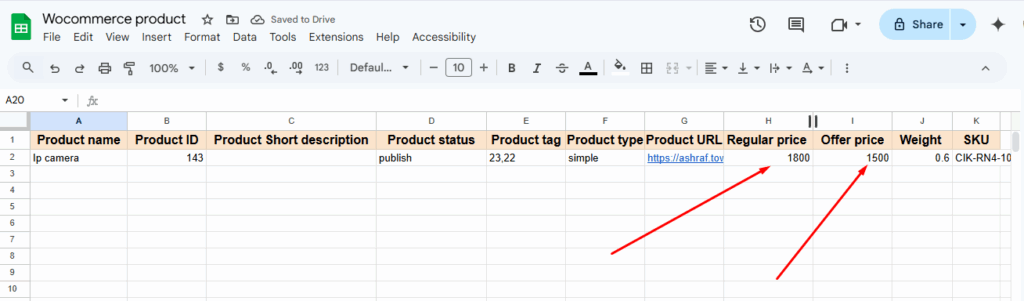
Imagine if every time you added a product to your WooCommerce store. It was automatically added to a Google Sheet. Without you doing anything manually. Sounds cool. Right? That’s exactly what Bit Integrations helps you do!
In this example, we are showing how Bit Integrations connects WooCommerce to Google Sheets. On one side, you see the product added in WordPress (with name, price, SKU, and tags). On the other side, you see all that info instantly appear in a Google Sheet, without typing a single word!
This is called no-code WooCommerce automation. And Bit Integrations makes it simple to integrate hundreds of plugins and automate the process of syncing WooCommerce data with other tools like Google Sheets, email marketing platforms, CRMs, and more, all without writing a single line of code.
If you want to automate a WooCommerce store, like sending customer data to Google Sheets or emails, without doing any coding. So, you can use an automation tool called Bit Integrations. How can you do this step by step?
Not only WooCommerce, but you can also automate anything like CRM data, form data, LMS data, and more with Bit Integrations. Plus, Bit Integrations offers 5 free triggers, and you can connect those triggers to all action platforms for free.
 Note
Note
Check the Free version of Bit Integrations
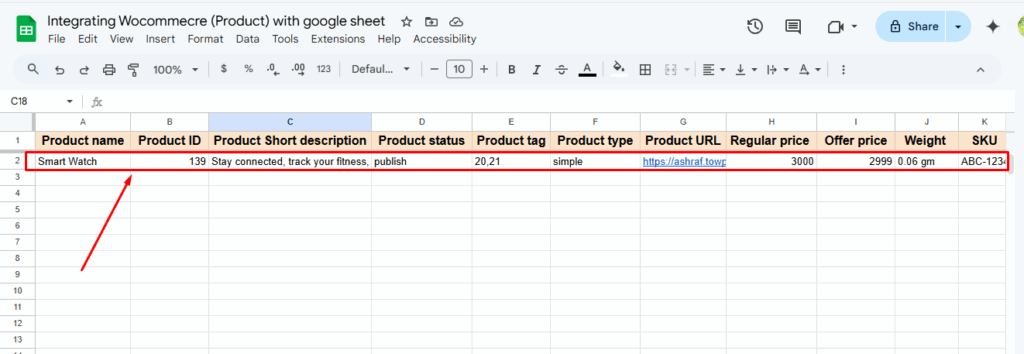
When I create a new product in the WooCommerce store, and like magic, all the info goes straight into my Google Sheet. I didn’t have to copy or paste anything. Bit Integrations did it all by itself!

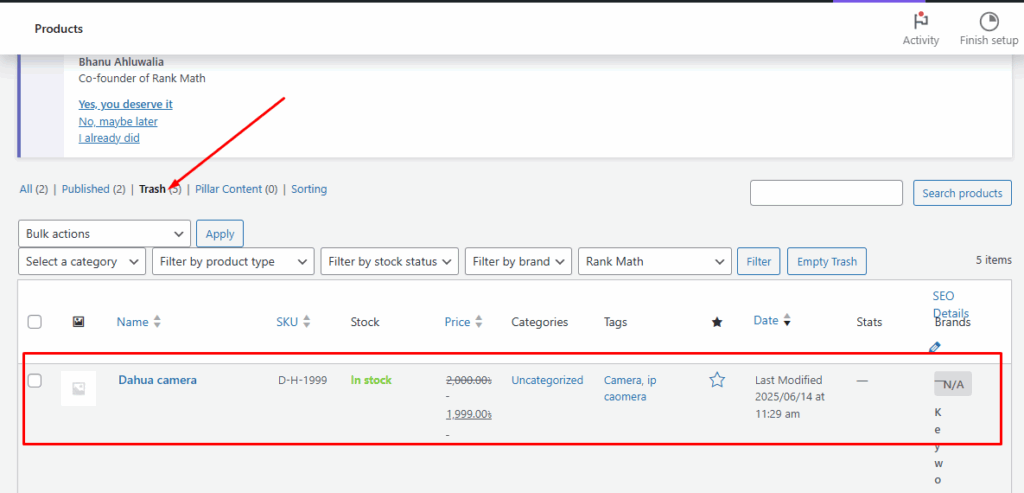
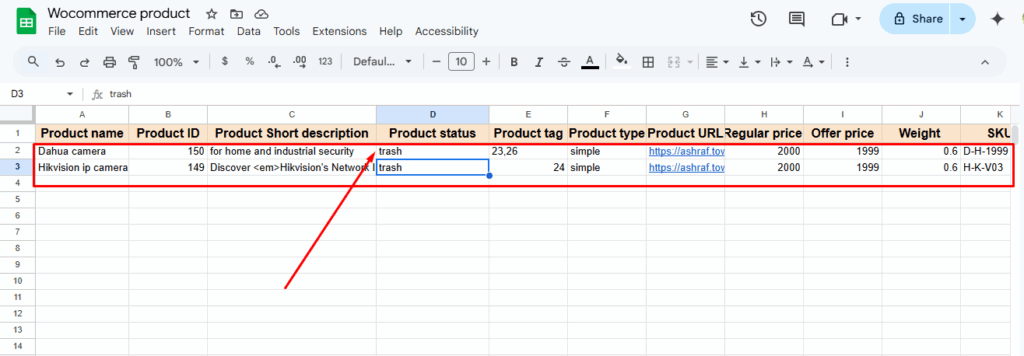
I moved a product to the trash in WooCommerce; It showed up in my Google Sheet with “trash” as the status. I didn’t do anything extra. Bit Integrations noticed it and added the record all by itself! Super smart, right?
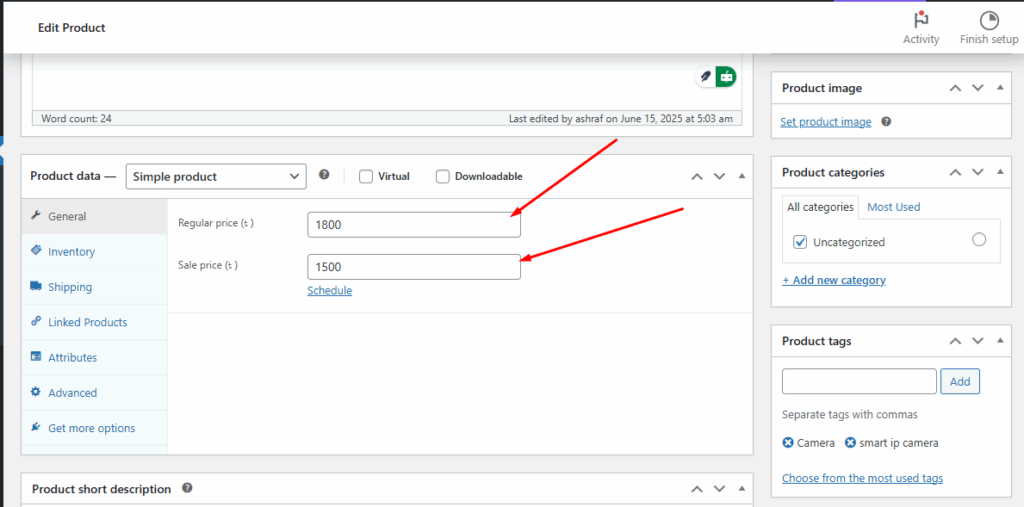
I changed the price of a product in my WooCommerce store, and Bit Integrations quickly sent the new info to my Google Sheet. Now the sheet shows the updated price, without me doing anything extra. It’s like having a smart helper who never sleeps!
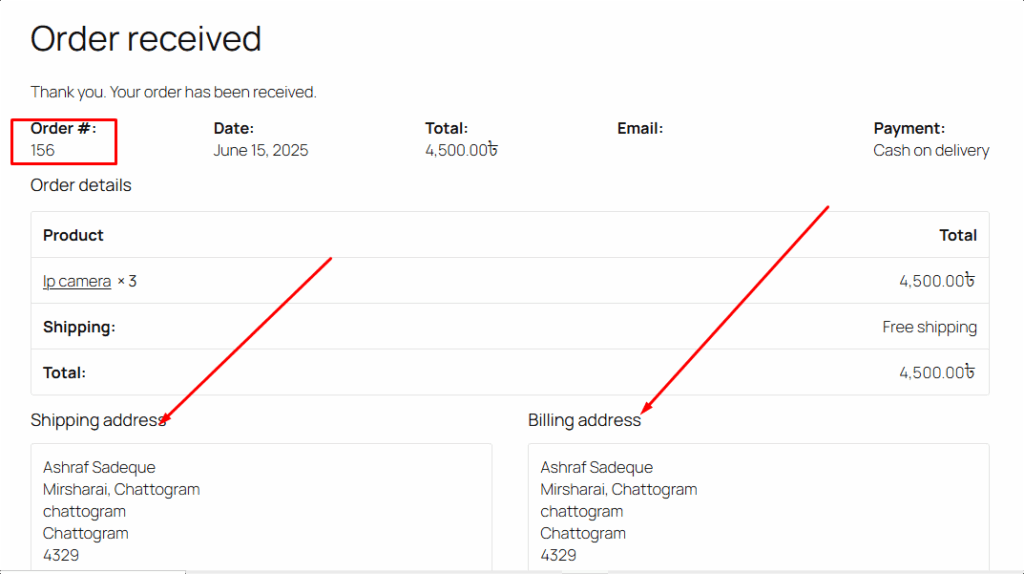
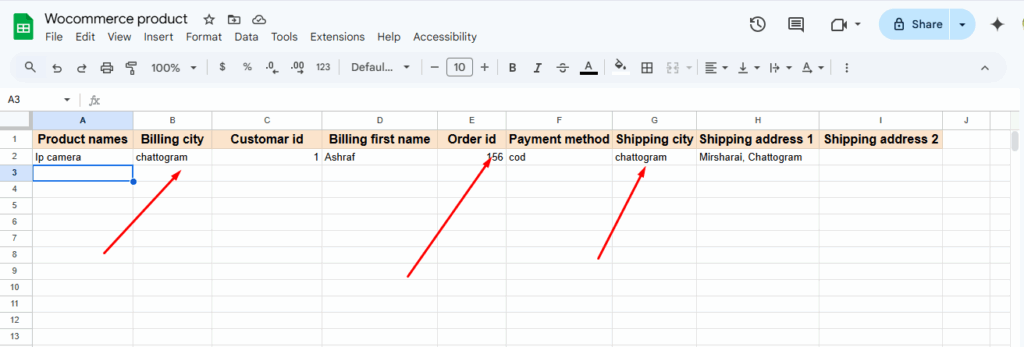
When someone ordered a specific product from my WooCommerce store (like the IP camera), Bit Integrations saw it and quickly wrote all the order details. Like name, address, order ID, and payment method, into my Google Sheet. I didn’t do anything. It just did it all by itself! Super cool!
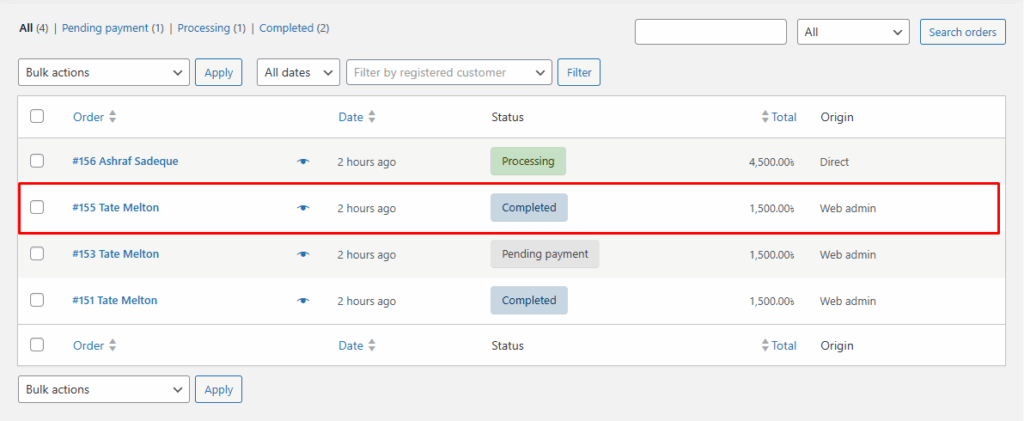
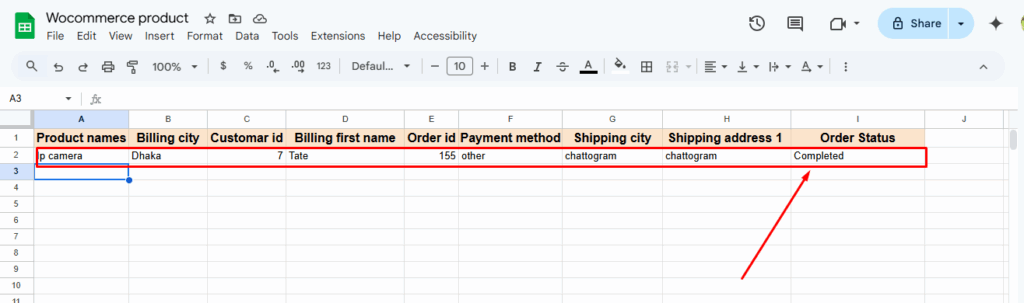
I changed the order status to “Completed” in WooCommerce, and right away, Bit Integrations wrote it down in my Google Sheet. It added the product, order number, customer name, order status, everything! I didn’t even have to touch the sheet. It’s like it just knows what to do! This is a perfect example of WooCommerce order automation in action.
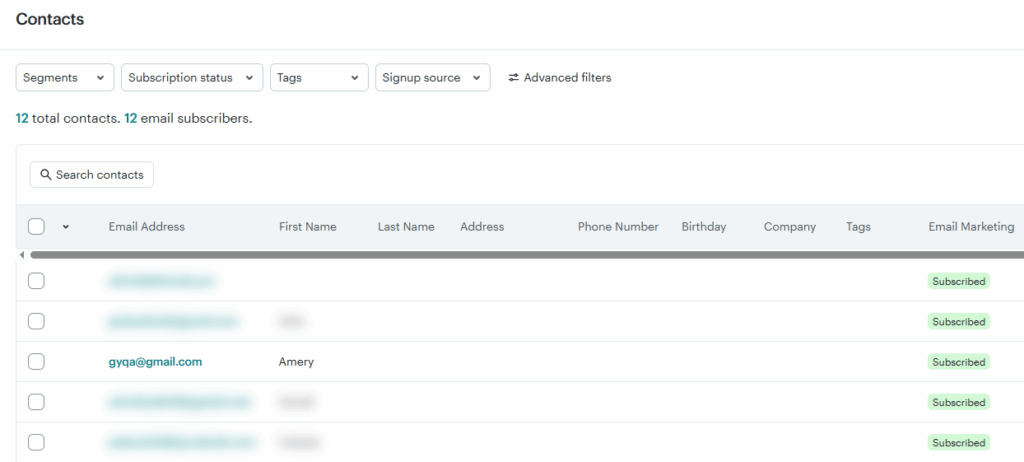
When a customer adds a product to their cart but doesn’t complete the purchase. Bit Integration can automatically add them as a subscriber to your MailChimp or MailerLite account. You can use any other email marketing tool. You can then create an email campaign inside your email tool to send a reminder message after 2 days. This setup is ideal for marketing automation for WooCommerce, helping recover abandoned carts easily.

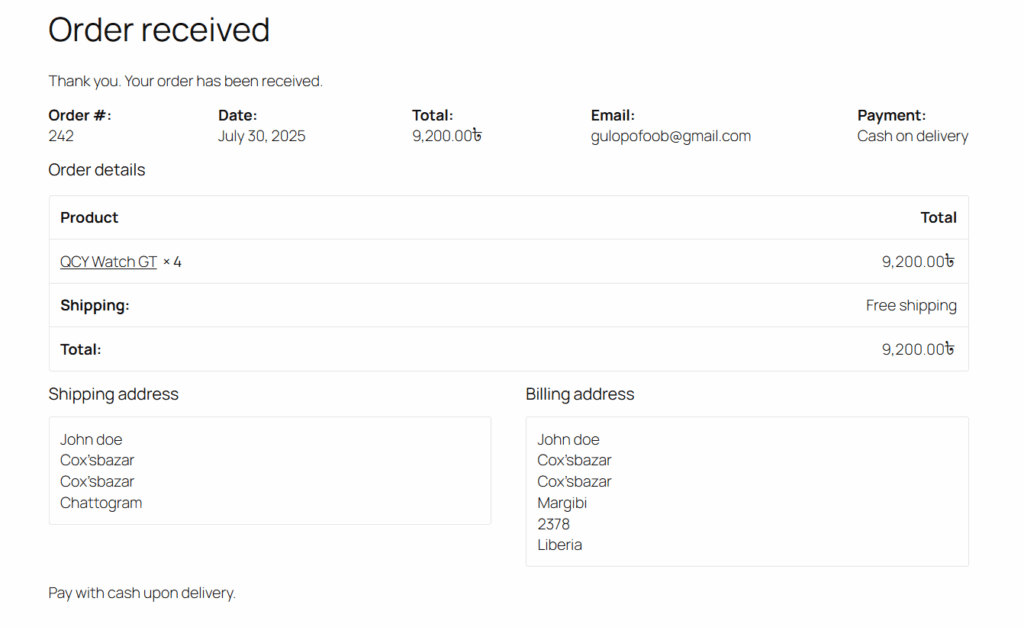
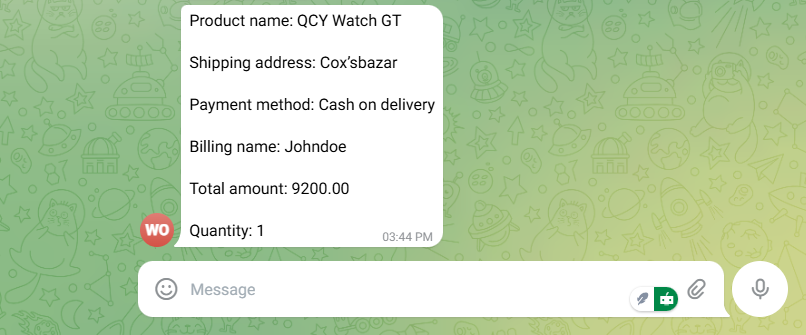
With Bit Integration, you can receive an instant order alert on Telegram whenever someone purchases through WooCommerce. This message will include key order details, like product name, customer info, shipping address, and payment method. So you can stay updated in real-time without checking your WooCommerce dashboard. You can also set up order alerts on WhatsApp or Slack by using Bit Integration. This feature enhances WooCommerce order automation by keeping you informed on the go.
Doing everything manually in your WooCommerce store is just too time-consuming. It’s slow, boring, and easy to mess up. But with Bit Integrations, the WooCommerce store gets way better. You don’t need to know coding.
Just set it up, and it does the work for you, like sending emails, updating sheets, order alerts, and more. It feels like you have a helper working in the background. To save time, eliminate small mistakes and ensure your store runs smoothly. Bit Integrations is the smartest tool to start with, especially for WooCommerce marketing automation that improves customer experience.
You can automate multiple WooCommerce tasks by using Bit Integration. Click here to see full details.
No! You don’t need any coding knowledge. Bit Integration is a pure no-code WordPress automation tool.
Bit Integration updates data instantly. Just like plug and play.
Yes! You can use advanced conditional logic to define rules and filter the data that is sent.
You can find your Google client ID and client secret from the Google API console.
No! Bit Integration has a pro plan. But Bit Integration offers five free triggers, including WooCommerce, Bit Form, WPForms, Contact Form 7, and Elementor Form.
To find a no-code integration vendor for WooCommerce, look for tools like Bit Integrations that offer easy setup and simple step-by-step WooCommerce workflow builders. Bit Integrations is specifically designed to automate WooCommerce workflows without needing any coding skills, making it ideal for syncing with tools like Google Sheets, CRMs, and more.





 EN
EN  ES
ES  DE
DE  NL
NL  FR
FR