
Perhaps you’re unaware, but in 2026, you can do a lot with your WordPress site without writing a single line of code. All you have to do is integrate WordPress with an automation plugin, and yes, you can integrate hundreds of plugins at once with the right tool.
In today’s fast-paced digital world, plugin overload is a real issue for many WordPress users. With so many plugins offering automation from one platform to another, it can get costly and complicated. But in 2026, things have changed. Bit Integrations is here to revolutionize how you automate data between platforms easily.
Bit Integrations, your all-in-one WordPress integration and automation plugin. Bit Integrations has over 326 native integrations in a single plugin. This all-in-one integration plugin lets you connect over 157 plugins and 169+ apps from one place, no extra add-ons, no site bloat, no endless subscriptions. Just one plugin, one dashboard, and total automation freedom.
Gone are the days when you needed to install different plugins for each integration, like WPForms to Zoho CRM or a dedicated WooCommerce to Mailchimp plugin. With so many plugins running on your site, performance can suffer, leading to slower load times and potential conflicts.
Bit Integrations offers you a single solution with 326+ native integrations, enabling you to automate data across any platform, anytime, without the extra cost or performance hit of installing multiple plugins.
By using Bit Integrations, you can even take it a step further: customer or lead data can be sorted by country and automatically pushed into different Google Sheets for regional teams, or segmented inside your CRM based on location, interest, or purchase history.
That means no more manual copy-pasting or messy spreadsheets; your data stays clean, organized, and ready for action.
Here’s the cool part: you don’t have to touch a single line of code. With Bit Integrations, you can send your WordPress form entries exactly where they need to go with simple field mapping. Your customer data stays neat, organized, and ready to use, no more messy spreadsheets or endless copy-pasting.
Why clutter your WordPress site with multiple plugins when one powerful tool can do it all? With Bit Integrations, you can easily connect all your essential apps, streamline your workflows, and drastically reduce overhead costs.
That means no need to install dozens of automation plugins to automate an individual platform. With Bit Integrations, you can automate any platform with just 3 simple steps.
When you choose Bit Integrations, you’re not just purchasing a plugin; you’re making a smart investment for the long term.
For just $39/year for a single site, you’ll get access to an ever-expanding library of integrations. No extra cost for extra integrations and task completion, unlike other automation plugins.
But why stop there? Take your investment even further with a Lifetime Deal for just $110. Pay once, and get unlimited access to future updates and integrations, no recurring fees, no limit. With Bit Integrations, you’re future-proofing your WordPress site at an unbeatable value.
Once installed and activated, Bit Integrations allows you to easily connect 326+ platforms with just a few clicks. Whether you’re syncing WooCommerce with Shopify or automating email marketing with Mailchimp, the possibilities are endless.
Bit Integrations is a pure no-code WordPress automation tool. It lets you integrate hundreds of WordPress plugins like LMS, CRM, Form Builder, to your favorite apps, like Google Sheets, CRMs, email marketing platforms, messaging apps, and more. It supports a wide range of form builder plugins, e-commerce plugins, LMS plugins, Spreadsheet software, messaging apps, CRMs, and email marketing tools in 326 native integrations.
And if your desired trigger isn’t on the list, you can still use your desired trigger by using Bit Integrations’ Custom Trigger option. It provides a code snippet you can embed into any platform or form, allowing you to capture leads, orders, or submissions, even from sources not officially integrated yet.
This flexibility is one reason why Bit Integrations is gaining attention as one of the best n8n alternatives for WordPress users.
Bit Integrations working processes are simple and intuitive. Anyone can build a workflow by using Bit Integrations. No-coding required. Here is how it works:
Here is the simple guide to integrate hundreds of plugins using Bit Integrations
Install and activate the Bit Integrations plugin on your WordPress site.
After installing the Bit Integrations plugin, open the Bit Integrations dashboard and select the WordPress plugin you want to integrate. For example: Bit form, WooCommerce, SureCart, etc.
After choosing your favorite plugin, choose the app you want to send your WordPress plugin data to, such as Google Sheets, your CRM, or an email marketing tool.
In this step, now provide your favorite app details, such as Google Sheets API keys, email marketing API keys, etc.
Match the fields from your WordPress plugin (like Name, Email, Phone) with the fields in your chosen app. And done!
Let’s break down why the WordPress Integration Plugin is a revolution for agencies and small businesses.

Here are some WordPress integrations ideas you can set up today using Bit Integrations:
Many businesses lose valuable leads simply because contact details aren’t captured or organized properly. That’s where Bit Integrations changes the game.
With Bit Integrations, you can integrate hundreds of plugins and 169+ external apps to create more powerful automation. This ensures you can automate lead capture so that every contact flows directly into your CRM, Google Sheets, or email platform without you lifting a finger.
Bit Integrations also makes it simple to automate Google Sheets updates, so your data is always accurate and instantly available.
What’s even better? With conditional logic in Bit Integrations, you can automatically route location-based leads into different Google Sheets. For instance, leads from the USA can be sent to one sheet, while leads from the United Kingdom flow into another. This way, your data stays organized, segmented, and ready for action, without any manual effort.

At the same time, that lead information can be pushed directly into your email marketing tool, where it’s automatically added to the right location-based campaign. This makes segmentation effortless, whether you’re running separate campaigns for different regions or tailoring offers to local audiences; every new lead is instantly placed in the right group without manual sorting. For example:


Running a WooCommerce store means juggling a lot of tasks, orders, inventory, account management, and customer communication. But the problem is doing all that manually? It’s time-consuming, error-prone, and slows down your growth.
With Bit Integrations, you can automate your WooCommerce store to the tools you already use, like Telegram, Google Sheets, and even automate customer communication to keep buyers engaged at every step. This creates an ecosystem that works in the background while you focus on sales.
Using Conditional Logic in Bit Integrations, you can even route data based on location. For example:

Here is how it works:


This ensures better customer management, real-time updates, zero manual entry, and a more professional experience that keeps buyers coming back.
Managing student enrollments manually can quickly become overwhelming, especially when you’re running multiple courses at once. Tracking who joined which course, exporting details, and keeping everything organized in spreadsheets often eats up valuable time and creates room for mistakes.
With Bit Integrations, you can automate this entire process using the conditional logic feature. When a student enrolls in a course, their details are automatically added to a Google Sheet dedicated to that course, while their information is also synced to the relevant course-specific contact list in your CRM.
For example, you can connect the WordPress LMS Plugin with Perfex CRM to refine student management and keep all records updated in real time.
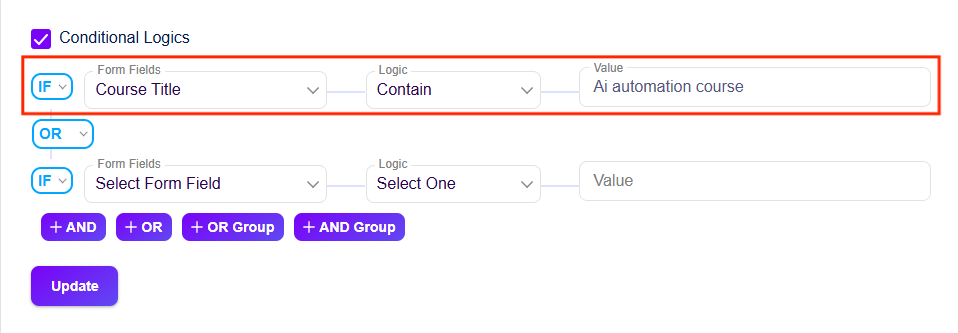
This means each course has its own dedicated sheet where you can neatly store and manage all student information, organized, accurate, and always up to date.
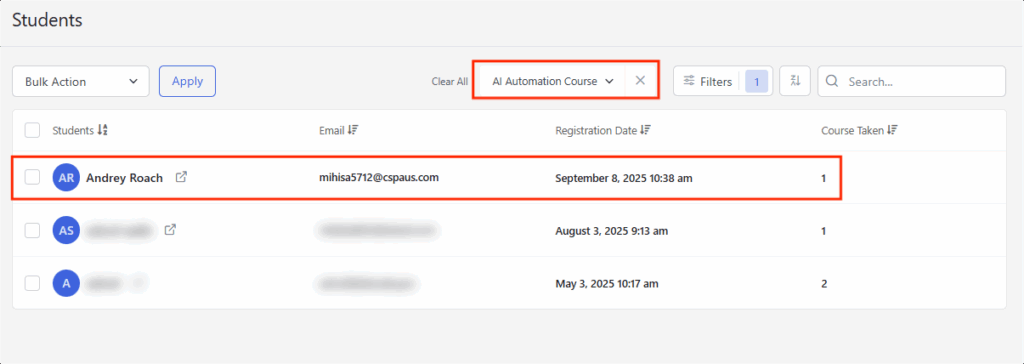

No more manual exports, no missed records, just clean, course-wise data management that keeps your LMS running smoothly while you focus on teaching and growth.
When it comes to automation, there’s no shortage of tools out there. But most are built as general-purpose platforms, often leaving WordPress struggling with complex setup, extra costs, or features they don’t really need.
Bit Integrations is different; it’s designed exclusively for WordPress. No complex setup, no coding hassle, making automation simple, powerful, and accessible to everyone, from small business owners to agencies.
The truth is, your time is far too valuable to be lost in spreadsheets, manual data entry, or chasing leads that slip through the cracks. By integrating WordPress plugins with tools like Bit Integrations, you can integrate WordPress plugins with external apps that run smoothly in the background, giving you back the freedom to focus on growth, strategy, and serving your customers better.
Automation isn’t about replacing the human touch; it’s about empowering you and your team to work smarter, faster, and more efficiently. With the right workflows in place, you’ll not only save hours every week but also create a stronger foundation to scale your business without added stress.
So, don’t let messy processes slow you down. Start small, automate one workflow today, and watch how quickly the benefits compound. Before long, you’ll wonder how you ever managed without it.
Ready to supercharge your WordPress workflow? Connect and automate WordPress plugins with Bit Integrations and watch your workflow transform.
Yes! Bit Integrations offers a Custom App and Webhook option, which lets you push data from your WordPress plugins to virtually any platform with an API, even if it’s not listed in the integration library.
Yes! Bit Integrations offers a free WordPress automation solution that includes 5 triggers, WooCommerce, Elementor Form, Contact Form 7, WPForms, and Bit Form. So you can start automating right away without paying any money. You can then upgrade for access to advanced features and 326+ app integrations.
Yes! You can connect all your form entries to a single Google Sheets or CRM list. Bit Integrations lets you map fields consistently across different plugins, so all your leads land in one place without duplicates or confusion.
Most CRMs automatically block duplicate contacts from being added to the same list, so you don’t have to worry about multiple entries there. For Google Sheets, you can prevent duplicate data by setting up a simple filter. Here’s how:
→ Open your Google Sheet where the data is flowing.
→ Select the column you want to check for duplicates (usually the email column).
→ From the menu, click Data → Data cleanup → Remove duplicates to clean existing entries.
To stop duplicates as new data comes in, apply
→ Data → Data validation → Add rule.
→ Under Criteria, choose Custom formula (choose your desired column)
→ Enter this formula =COUNTIF(A:A,A1)=1 (for the desired column like “A”):
→ And choose “Reject input” if the value already exists in that column. Click done
Yes! You can connect WordPress plugins to messaging apps like Telegram or Slack. Every time a new form submission, lead, or WooCommerce order comes in, you’ll get an instant notification so you can respond quickly.
Yes! With Bit Integrations, you can use conditional logic to automatically route data into different Google Sheets based on location (or any other field you choose). However, you’ll need to set up separate integrations for each Google Sheet.
Definitely. When a student enrolls in LearnDash, Tutor LMS, or another LMS plugin, their details can automatically be added to a course-specific Google Sheet or CRM list. This keeps enrollments organized without manual exports.




 EN
EN  ES
ES  DE
DE  NL
NL  FR
FR