Are you tired of struggling to integrate Elementor forms with Omnisend? As an Elementor user, you’ve probably noticed the lack of a simple, built-in solution for syncing your forms with Omnisend.
While other form builders offer easy integrations, Elementor users often face challenges when trying to connect their forms with Omnisend. You might find yourself juggling multiple plugins and navigating complex workarounds.
But don’t worry. Bit Integrations makes it easier than ever to connect your forms to Omnisend.
The best part? It’s free, and you don’t need any coding skills. Ready to simplify your workflow? Let’s dive in!
As a WordPress user, you likely want a smooth way to integrate Elementor forms with Omnisend.
With Elementor, the process can be a bit more challenging. Field mapping, user segmentation, and sending form data to the right Omnisend contact may require a little extra effort. But it’s all manageable with the Bit Integrations plugin.
Omnisend does offer add-ons for Gravity Forms, Ninja Forms, and Contact Form 7. But each of those comes with its own limitation. In most cases, you need to install a separate plugin for every form type.
And if you want advanced features, you usually have to pay for premium plans one by one.
Now, if you’re using Elementor forms, the situation gets worse. There’s no official Omnisend add-on made specifically for Elementor. That means users either abandon the idea or start stacking extra tools just to make things work.
Another challenge comes with field mapping. When you’re trying to send data from your form to Omnisend, the process isn’t always intuitive.
Without a proper integration tool, mapping fields can be cumbersome and confusing. It often results in mixed-up data, which is far from ideal for creating well-targeted mail campaigns.
Without proper user segmentation, all form data gets jumped into one Omnisend contact. So, when you want to target specific user behaviors or interests, you end up sending the same generic emails to everyone. Not great for engagement or conversion.
This is where Bit Integrations stands out. Unlike most Omnisend add-ons, Bit Integrations lets you integrate Elementor forms to Omnisend for free.
You don’t need a paid add-on just to send form submissions. You don’t need separate plugins for different form builders.
Bit Integrations’ free version already covers the most important part: sending Elementor form data to Omnisend with proper field mapping.
With the free version of Bit Integrations, you can:
This alone solves a problem that Elementor users have been dealing with for years.
With Bit Integrations, conditional logic is your secret weapon. This powerful feature enables you to send form submissions to the correct Omnisend segments based on the information users enter in the form.
If a user fills out a contact form, their data can be sent to a “Contact Us” segment. If they request a product demo, they go to a different segment. It’s that simple to target your audience correctly.
This makes it much easier to integrate Elementor Forms with Omnisend in a way that matches real user intent.
One of the most frustrating issues users face is mapping form fields to Omnisend. But with Bit Integrations, this is a breeze. Bit Integrations makes field mapping straightforward and ensures that your data is sent to the right place, with no more jumbled information.
Bit Integrations doesn’t just work with Elementor forms. It also supports Contact Form 7, Gravity Forms, Ninja Forms, Bit Form, and over 45 popular WordPress form plugins. This means you can smooth your entire WordPress ecosystem, no matter which form tool you use.
Imagine you’re running an e-commerce store using Elementor for product inquiries. With Bit Integrations, every inquiry gets sent to Omnisend and placed into a product-specific segment.
That way, your email campaigns can be highly targeted. So, whether it’s a general inquiry or a question about a specific product, you know exactly who to reach out to.
Suppose you’re using Elementor to generate leads for your business. With Bit Integrations, each form submission can be categorized based on the user’s interest, whether it’s a newsletter sign-up, an inquiry, or a product demo request.
This segmentation allows you to follow up with personalized emails, improving conversion rates.
For LMS or course-based sites, Elementor forms are often used before enrollment for course inquiries, syllabus requests, or demo access.
With Bit Integrations, these submissions can be sent to Omnisend and segmented based on course interest or user queries. This allows you to send course-specific emails, reminders, or offers without interfering with the LMS’s built-in signup system.
Bit Integrations not only helps you integrate Elementor Forms with Omnisend, but it also integrates with 150+ other external apps.
In case you’re connecting Elementor Form to Google Sheets, HubSpot, WhatsApp, or Omnisend, Bit Integrations makes sure your form data flows seamlessly to wherever you need it. No need to keep multiple plugins for different apps.
Once you’ve set up your forms, you don’t have to worry about manual data entry or follow-ups. Bit Integrations handles the automation for you. Form data is automatically sent to Omnisend and other apps, saving you time and reducing human error.
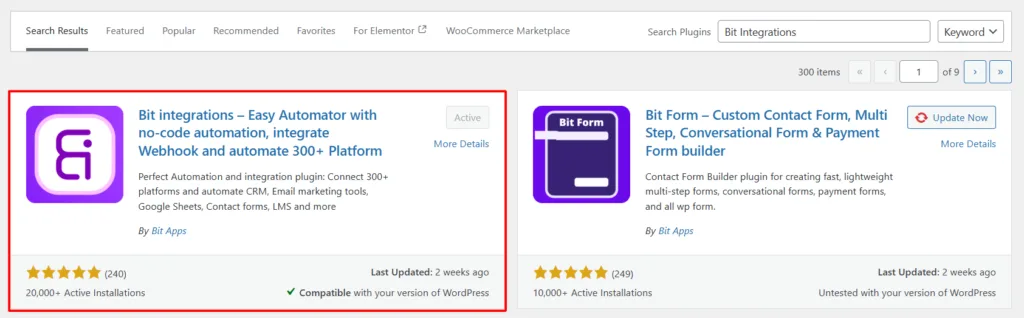
Install the Bit Integrations plugin from your WordPress dashboard and activate it on your site.
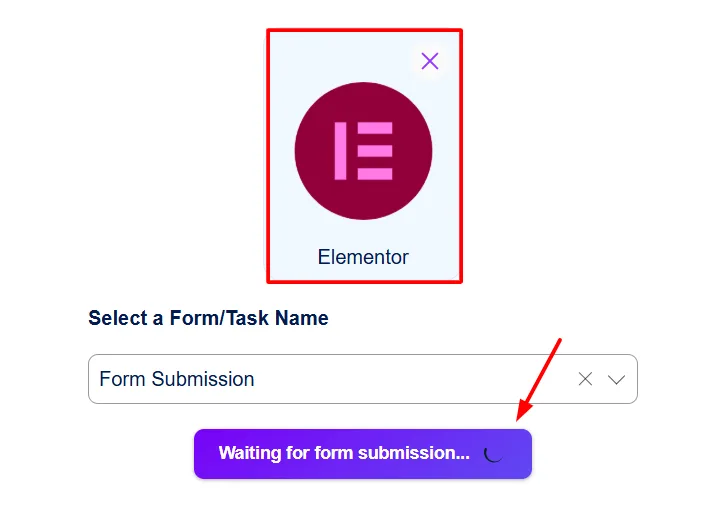
Navigate to the Bit Integrations dashboard, click on Create integration, and choose Elementor Form as the trigger for your integration.
Next, select the specific Elementor form you want to connect and click the Fetch button. Once the status shows “Waiting for form submission”, submit a test form from your Elementor page.
After the form data is successfully fetched, click Next to proceed to the following step.
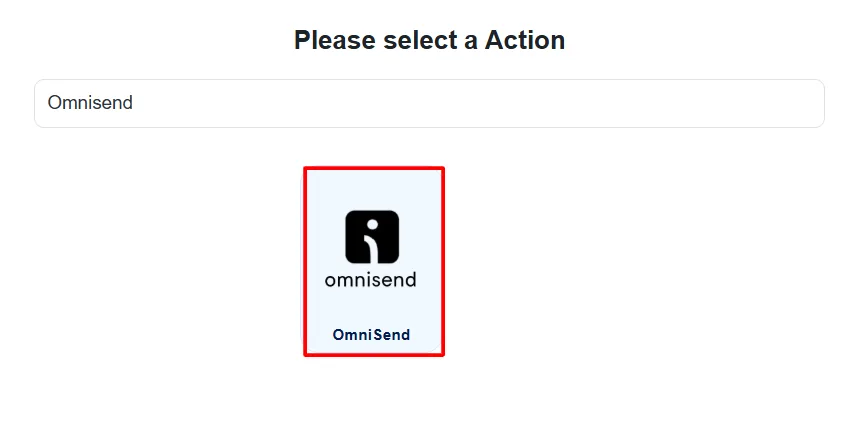
After choosing the Elementor form, now search and pick Omnisend as the action platform where your form data will be sent.
Provide your Omnisend API token and authorize it. After successfully authorizing, click onthe next button.
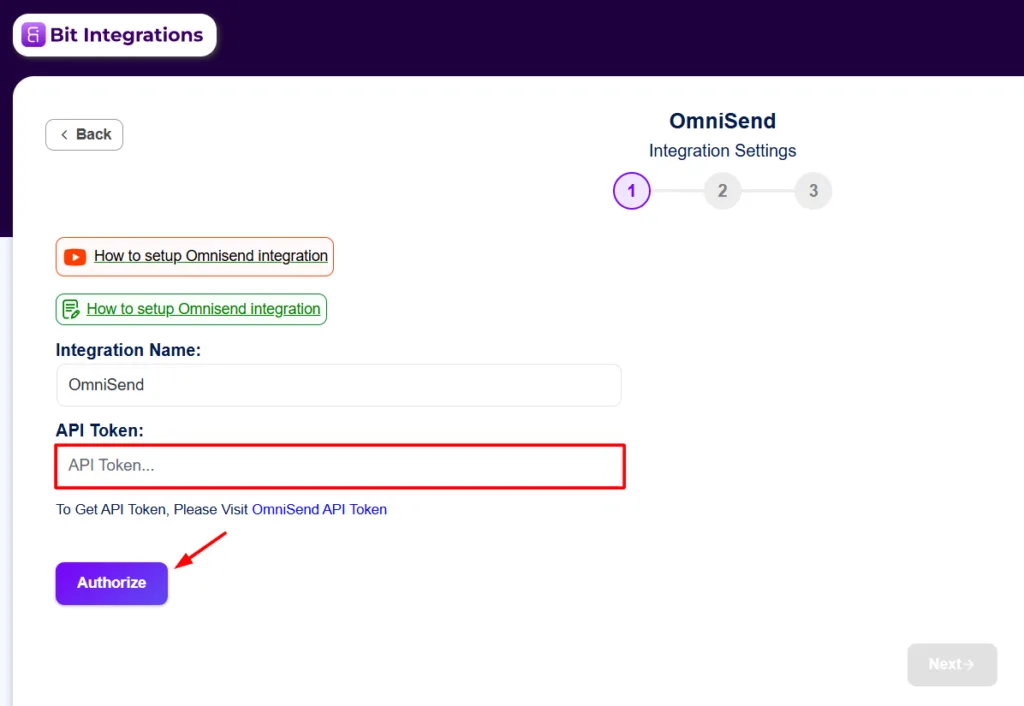
 Note
Note
If you ever get stuck while setting things up, don’t worry, it happens to the best of us. Take a look at our official documentation on Omnisend integrations for clear, step-by-step guidance.
After authorizing your Omnisend now, choose the Omnisend Channel and Email status. Match your Elementor form fields with the corresponding Omnisend contact fields to ensure accurate data flow.
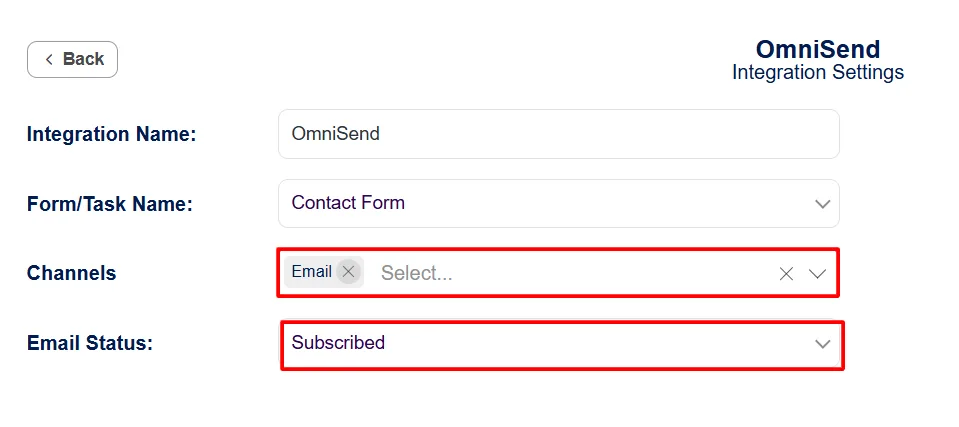
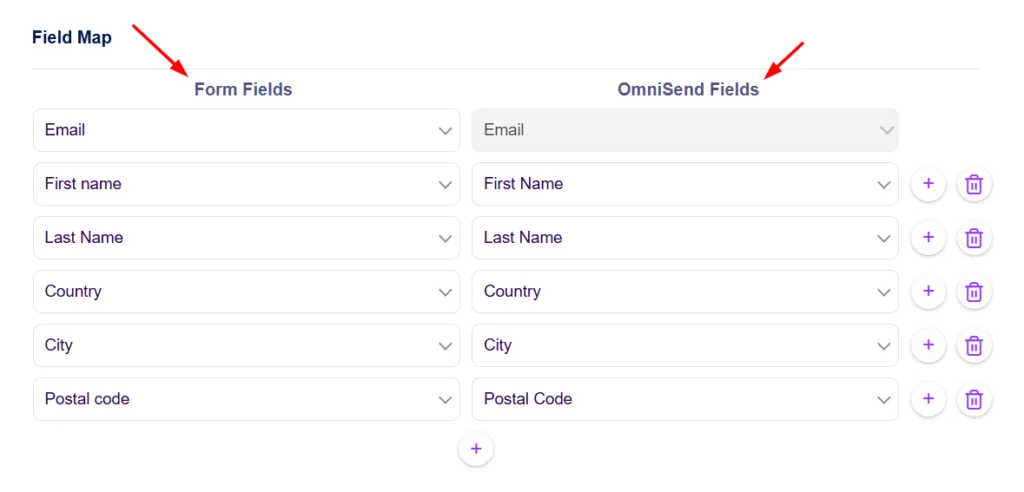
Save the integration and complete the setup. Your Elementor form is now connected to Omnisend.
If you want a clean, no-code way to integrate Elementor Forms with Omnisend, Bit Integrations offers a practical solution.
No unnecessary plugins. No broken field mapping. Just a reliable setup that works with Elementor and grows with your site.
Don’t let your form data get lost in the shuffle. Try Bit Integrations today and make your Elementor form integration with Omnisend smarter, more efficient, and more powerful than ever.
Yes. With Bit Integrations, you can connect Elementor Forms to Omnisend for free. The free version allows you to send form submissions, map fields correctly, and push contacts directly into Omnisend without paying for an extra add-on.
No. Omnisend currently provides integrations for WooCommerce and some popular form plugins like Gravity Forms and Contact Form 7. Elementor Forms does not have a dedicated or native Omnisend integration, which is why users need a third-party solution.
No. Bit Integrations removes the need for installing separate Omnisend plugins for different form builders. One plugin can handle Elementor Forms along with other WordPress forms and data sources.
Yes. Bit Integrations lets you map Elementor form fields to Omnisend contact fields clearly. This helps prevent incorrect or mixed data and ensures your Omnisend contacts stay organized.
No. Bit Integrations works alongside your existing Omnisend setup. It does not interfere with WooCommerce data or other Omnisend integrations you may already be using.
Besides Elementor Forms, Bit Integrations supports Contact Form 7, Gravity Forms, Ninja Forms, Bit Form, and more than 45 popular WordPress form plugins. so you can automate Contact Form 7 entries and manage data from all your forms in one unified workflow, even when multiple form builders are active on the same site.
No. The entire setup is no-code. You can create the integration, authorize Omnisend, map fields, and apply conditions directly from the Bit Integrations dashboard.






 EN
EN  ES
ES  DE
DE  NL
NL  FR
FR