

 EN
EN  ES
ES  DE
DE  NL
NL  FR
FR 



| Features | Incoming Webhook | WP hook |
|---|---|---|
| Data Source | External platforms (SaaS apps) and WordPress plugins that send webhooks (like Bit Form) | Only WordPress plugin and core events |
| Trigger direction | From outside or another plugin → into Bit Integrations | From within WordPress (internal plugin actions) |
| Setup | Requires a webhook sender (external app or WordPress plugin’s webhook feature) | Requires only the hook name of a WordPress plugin events |
| Coding required | No | No |
| Execution time | On receiving a webhook POST, request | Instantly, when the specified WordPress action runs |
| Use Case | Connect external apps or plugins that send webhook payloads | Capture WordPress events like form submissions, new orders, user registration, or custom plugin actions |

Webba Booking

Trigger Action Hook

Action
Webba Booking
Trigger Action Hook

Action
Webba Booking
Trigger Action Hook
Action
You can find your plugin’s hooks by:
Bit Integrations supports both native WordPress hooks (like user_register, wp_login, woocommerce_new_order) and custom hooks created by third-party plugins (like bookly_created_appointment, etc.)
Yes. Once you click Fetch and successfully trigger the event, Bit Integrations automatically displays the captured data structure. You can preview all the available fields before mapping them to your desired app.
Yes. The Action Hook can handle multiple parameters, such as order ID, user ID, meta values, and more. It captures all the available fields passed through the WordPress hook.
No. You can’t create or rename hooks directly inside Bit Integrations. You must use existing WordPress hooks or custom hooks already defined in your plugin’s code.
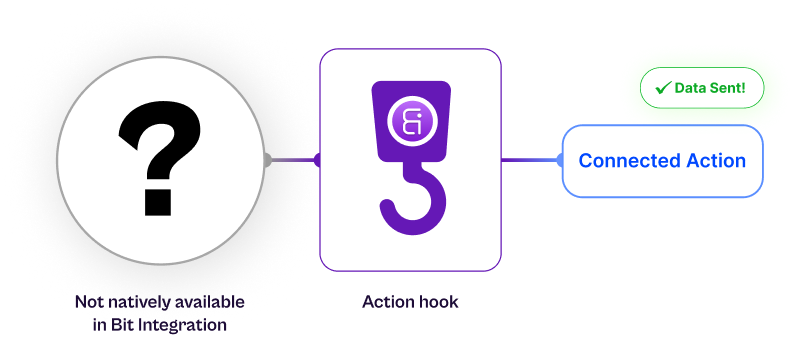
Incoming Webhook: Receives data from external platforms (e.g., SaaS form builders, external apps, or WordPress plugins that send webhooks).
Action Hook: Captures data from WordPress plugins only; it listens for internal WordPress add_action events.
No. Bit Integrations processes Action Hook events instantly with no rate limits or queue delays. The moment the hook fires, the data is captured and sent to your connected app in real time.