EN
EN  ES
ES  DE
DE  NL
NL  FR
FR  PT
PT  IT
IT  JA
JA Gravity Forms Airtable Integration: Which Option Is Best?
DIRECT ANSWER
Gravity Forms does not build an Airtable add-on for any license tier. Connecting the two takes a third-party tool: a single-purpose add-on, a WordPress automation plugin, or a hosted sync service.
The Bit Integrations plugin, a third-party tool, not only connects Gravity Forms to Airtable but also connects other platforms, such as email marketing tools, Google Sheets, LMS, e-commerce, SaaS, and more, at a really affordable price.
On one site, Bit Integrations is affordable at $35 a year, and that license covers every platform it supports instead of one connection. WP Connect charges $50 a year for Airtable alone, Gravity Wiz charges $59 for one connection, and Outfunnel basic works out to roughly $348 a year.
If you went looking for an Airtable option in your Gravity Forms settings and came up empty, you did not miss it. It is not there. This guide compares the four realistic ways to connect the two, shows what each one actually costs, and walks through a full setup with screenshots.
Table of Contents
Does Gravity Forms connect to Airtable natively?
No. Gravity Forms does not build or maintain an Airtable add-on, and there is no switch to flip.
You will find an Airtable listing in the Gravity Forms add-on directory, which trips people up.
Read the note on that page. It is a third-party community add-on built by WP Connect, and Gravity Forms states plainly that it does not support or endorse it. The Outfunnel listing carries the same disclaimer.
One official route reaches Airtable the long way around. The Gravity Forms Zapier add-on can pass entries through Zapier into Airtable. That add-on ships with the Pro, Elite, and Nonprofit licenses only, so Basic users cannot install it without upgrading first.
If that describes you, it is worth reading how to integrate Gravity Forms without upgrading your plan before you spend anything.
Gravity Forms Airtable integration: 4 methods compared cost
Prices checked in July 2026. So confirm the pricing before you buy.
| Tool | What the price covers | One site, per year | Multiple sites | Difference vs Bit Integrations |
| Bit Integrations | 378+ platforms, all included in every tier | $35 | $99 a year, unlimited sites or single site lifetime | Baseline |
| WP Connect, Gravity Forms to Airtable | Airtable only | $50 | $150 for 5 sites, $200 for 10 | $15 a year |
| Gravity Connect Airtable, by Gravity Wiz | Airtable, 1 of 8 available connections | $59 | $169 for 3 connections on 3 sites, $349 unlimited | $24 a year, or $250 at unlimited sites |
| Outfunnel | Airtable, plus CRM and email platform syncing | About $299 | Priced on contacts, not sites | About $257 a year |
On a single site, the gap is small in cash terms: fifteen dollars against WP Connect and twenty-four against Gravity Connect. The difference shows up in two other places.
The first is scale. Unlimited site coverage costs $99 a year, or lifetime coverage for a single site at $99 only, with Bit Integrations Agency, against $349 with Gravity Connect Pro.
The second is scope. The affordable option here is also the only one not limited to Airtable, so a second destination, whether that is a project board or an email marketing platform, costs nothing extra rather than another annual fee.
How the one-time licenses work out
The one-time licenses change the picture over a longer run:
- Starter Lifetime at $99 against WP Connect at $50 a year breaks even early in year two.
- Starter Lifetime at $99 against Gravity Connect Basic at $59 a year breaks even during the second year.
- Starter Lifetime at $99 against Outfunnel at roughly $299 a year breaks even in about four months.
Agency Lifetime at $299 against Gravity Connect Pro at $349 a year breaks even in about ten months and costs nothing after that.
Four ways to send Gravity Forms entries to Airtable
1. Bit Integrations
Bit Integrations is a WordPress automation plugin built around triggers and actions. Gravity Forms works as a trigger and Airtable as an action, so the whole flow lives in your WordPress dashboard. The only outside account you need is Airtable.
Pricing works per site rather than per integration or per task, meaning no extra cost for per seats and per flows. The Starter Annual is $35 a year for one site. Starter Lifetime is $99 once.
Bit Integrations Agency Annual covers unlimited sites at $99 a year, and Agency Lifetime is only $299 once. Every tier includes all integrations and unlimited data transfers and incoming and outgoing webhook facilities with conditional logic.
The practical effect is that the same license that sends Gravity Forms entries to Airtable also covers 378 platforms. The same form can create a Trello card or add a row to Google Sheets or Gravity Forms Copper integration without another purchase. You build one integration per destination, and they all fire from the same form.
2. WP Connect Gravity Forms to Airtable add-on
WP Connect sells a single-purpose add-on that does one job. It costs $50 a year for one site, $150 for five, and $200 for ten. You configure it in an Airtable Feeds panel inside your form settings, with field mapping and conditional filters included.
Doing one job makes it dependable for that job. It also means anything else is a separate purchase. WP Connect sells five other Gravity Forms add-ons for Notion, Brevo, SendGrid, Odoo, and TimeTonic, and the annual costs stack.
3. Gravity Connect Airtable, by Gravity Wiz
Gravity Wiz builds Gravity Connect, a suite of eight integration plugins. Airtable is one, alongside Google Sheets, Notion, OpenAI, Drip, MailPoet, Google Calendar, and a generic API connector called API Alchemist. You set it up as a feed inside the Gravity Forms editor, so it will feel familiar if you already use official add-ons.
Pricing is per connection. Basic at $59 a year gives you one connection on one site, so Airtable would use up your whole allowance. Advanced at $169 covers three connections across three sites. Pro at $349 is unlimited on both counts. None of the tiers meter your data.
Gravity Wiz is a certified Gravity Forms developer, and this plugin was built for Gravity Forms specifically rather than adapted from a general-purpose tool. It shows in how closely it matches the native interface.
4. Outfunnel
Outfunnel is a hosted service rather than a WordPress plugin. It treats Gravity Forms as a lead source and creates Airtable records from submissions. It also does contact sync, engagement tracking, lead scoring, and website visitor tracking, which is a lot more than a form-to-database handoff needs.
Pricing runs on active contacts, not sites. Basic starts at $29 a month for 100 active contacts and reaches $99 a month at 3,000. Professional starts at $99 a month for 1,000. Annual billing takes 16 percent off, so the entry tier lands at roughly $299 a year.
Watch how a contact becomes active. Being part of a sync counts. So does having engagement recorded, visiting your site, or holding a lead score. The number moves faster than the plan names suggest.
Outfunnel makes sense if you want Airtable kept in step with a CRM and an email platform. It is expensive if all you want is form entries landing in a table, and there are affordable routes if what you really need is a Gravity Forms CRM integration.
How to connect Gravity Forms to Airtable with Bit Integrations
Budget about ten minutes, most of which is creating the Airtable token. The integration itself takes roughly three.
What you need before you start:
- Gravity Forms installed with at least one form built, on any license tier
- An Airtable base and table with columns ready to receive the data
- An Airtable personal access token, covered in the next section
Step 1: Create a new integration
Install and activate Bit Integrations, open it from your WordPress dashboard, and click Create Integration.

Step 2: Choose Gravity Forms as the trigger
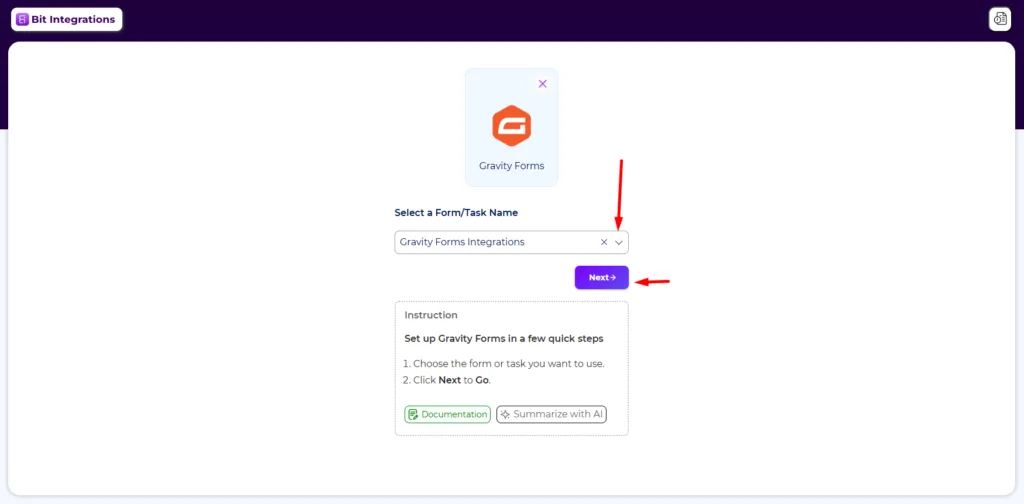
Type Gravity Forms into the trigger search and select it.

Now pick the form you want to connect from the Select a Form/Task Name dropdown, then click Next. Only the form you choose fires this integration, so if several forms need to feed different tables, build one integration per form.
Step 3: Choose Airtable as the action
Search for Airtable on the action screen and select it.

Step 4: Authorize your Airtable account
Name the integration, paste your Airtable personal access token into the field, and click Authorize. The Next button stays greyed out until authorization succeeds, so it doubles as a status light. If it fails, a missing scope on the token is nearly always why.
To create an Airtable personal access token, just follow this Airtable integration doc.

Step 5: Select your base and table, then map the fields
Choose your Airtable base, then the table inside it. If either dropdown comes up empty, click the refresh icon beside it.
Then map your fields. The left column lists Gravity Forms fields and the right lists Airtable columns. One thing to watch: Gravity Forms splits compound fields, so a Name field shows up as Name – First and Name – Last, and each one maps to its own Airtable column.
Conditional Logic at the bottom is optional. Switch it on if only certain submissions should reach Airtable, for example, entries above a budget threshold or from a particular region. The same conditional logic rules work across every Bit Integrations action, not just this one.

Step 6: Test with a real submission
Submit an entry through the form on your live site.

Then open your Airtable table. The entry should appear as a new row with your mapped fields filled in.

If nothing shows up, the integration timeline inside Bit Integrations logs a success or error status for every attempt. Start there rather than guessing.

Common problems and how to fix them
Authorization fails, or the Next button stays greyed out
Check the scopes first. Then confirm the token actually has access to the base you want, not just to your account in general. Those two account for nearly every case.
The base or table dropdown is empty
Click the refresh icon next to the dropdown. If it is still empty, the token is missing schema.bases:read. Create a new token with the right scopes.
Records arrive, but some fields are blank
Almost always a field type mismatch. Check the list in the section above, starting with single-select columns.
Nothing arrives at all
Confirm the integration is switched on and that the form you selected is the same one you are actually submitting. Then check the timeline log. An empty log means the trigger never fired, which points back at the form selection rather than at Airtable.
Name or address values land in the wrong column
Compound fields map per sub field. Map Name – First and Name – Last separately instead of hunting for a single Name field, and do the same for the parts of an address.
One more thing to keep in mind on busy forms. Airtable’s API allows five requests per second per base. A single form submission is nowhere near that, but if you run several integrations off the same form and the form gets hammered, requests can queue.
Verdict: Which option should you choose?
- One site, Airtable, and nothing else, ever. WP Connect at $50 a year does the job cleanly. Bit Integrations at $35 is affordable and leave room to add destinations later.
- One site, with more destinations likely. Bit Integrations, since extra platforms cost nothing on the same license.
- Several client sites. Bit Integrations Agency, at $99 a year, is the affordable unlimited site option here. Gravity Connect Pro at $349 also covers unlimited sites while keeping you inside the Gravity Forms interface.
- Already invested in Gravity Wiz. Gravity Connect, because the interface, licensing, and support all match what your team already uses.
- You need two-way sync with a CRM. Outfunnel, since none of the plugin options do that at all.
Two numbers settle this more reliably than the headline prices. How many sites do you need to cover, and how many destinations do the formed data eventually feed? Work those out first.
Frequently Asked Questions about Gravity Forms Airtable Integration
Does Gravity Forms have an official Airtable add-on?
No. Gravity Forms does not build one for the Basic, Pro, or Elite license. The Airtable listing in its add-on directory is a third-party plugin that Gravity Forms does not support. The closest official route is the Zapier add-on, which needs a Pro, Elite, or Nonprofit license and still requires a paid Zapier account for anything beyond very low volume.
What is the most affordable way to connect Gravity Forms to Airtable?
Bit Integrations at $35 a year for a single site is the lowest annual price among the tools compared here, followed by WP Connect at $50 and Gravity Connect at $59. For unlimited sites, Bit Integrations Agency at $99 a year is the affordable option.
Does this integration work with a free Airtable account?
Yes. Free Airtable plans can create personal access tokens, which is all any of these tools need in order to write records.
Can I send only some submissions to Airtable?
Yes. Conditional logic is available in Bit Integrations, Gravity Connect, and WP Connect. You set a rule, and only the entries that match it create an Airtable record.
Can one form send data to Airtable and other platforms at the same time?
Yes. In Bit Integrations, you create a separate integration for each destination using the same Gravity Forms trigger, and the form fires all of them on submission. Single-purpose add-ons cannot do this, because each one only knows about its own platform.
Will my existing Gravity Forms entries be sent to Airtable?
No. These integrations fire on new submissions only. To move historical entries, go to Forms, then Import/Export, then Export Entries, download the CSV, and import that file into your Airtable table.


Related Blog
Best Gravity Forms Copper CRM Integration tools in 2026
Gravity Forms Trello Integration Without Gravity Forms Pro (Save $100+)