
 EN
EN  ES
ES  DE
DE  NL
NL  FR
FR  PT
PT  IT
IT  JA
JA Top 5 CRM Integrations For Small Businesses (Almost Free)
Running a small business in 2026 without a CRM is like juggling customers blindfolded. Research shows that the majority of leads never convert due to poor follow-ups, while manual data entry wastes over 5 hours a week per employee. That’s time and money small businesses can’t afford to waste.
CRMs solve this by keeping all your leads, customers, and conversations in one place. But here’s the real game-changer: you can integrate your CRM directly with your website. That means every form submission, purchase, or signup goes straight into your CRM, no copy-pasting, no missed leads.
In this guide, we’ll explore the Top 5 CRM integrations for small businesses that you should try in 2026 and how they can transform your sales and customer relationships.
We’ll also touch on key topics like the best crm integrations for e-commerce businesses, crm integration tools, and affordable crm custom integration to help you make informed choices.
TL;DR
The five best CRM integrations for small businesses in 2026 are Zoho CRM, HubSpot, Salesforce, Brevo, and Flowlu. Each connects to WordPress, so form entries and WooCommerce orders sync into your CRM automatically.
- Zoho CRM: lowest cost. Free for up to 3 users.
- HubSpot: best for inbound marketing. Free plan covers contact management, forms, and basic email.
- Salesforce: best if you plan to scale, but its free tier has no API access, so integration needs a paid edition.
- Brevo: best for email volume. Free plan sends 300 emails a day and stores up to 100,000 contacts.
- Flowlu: best for agencies running sales and projects together. Free for 2 users and 100 contacts.
A no-code plugin like Bit Integrations connects all five to WordPress with field mapping and conditional logic.
Everything You Need to Know About CRM Integration
CRM integration is the process of connecting your Customer Relationship Management (CRM) software with other tools, apps, or platforms your business uses, such as your website, WordPress forms, email marketing tools, e-commerce platform, or support desk.
By using a CRM integration API, your website can automatically capture and send key customer data, such as form submissions, purchases, and user registrations, directly into your CRM.
CRM integration ensures that all relevant data is captured in real-time, eliminating the need for manual data entry, reducing errors, and improving the efficiency of customer management processes. This is exactly why modern crm integration tool have become essential for growing businesses.
For example, when a user fills out a contact form or makes a purchase on a website, the website automatically pushes that information into the CRM system, where it can be organized, tracked, and acted upon by sales or customer support teams.
CRM integration efficiently manages business operations and ensures that customer data is consistently updated and easily accessible for future interactions. If you’re searching for reliable CRM integration software, options like Bit Integrations stand out for their no-code approach and broad compatibility.
Is CRM Software Essential for Small Businesses?
When it comes to small business growth, for small businesses, CRM software integration isn’t just “nice-to-have”; it’s a survival tool. Let’s break down why.
Centralizing Customer Data
Every lead, purchase, and support ticket goes into one place. You’ll always know who your customers are, what they bought, and when to follow up, without digging through scattered files.
Stop wasting time on manual entry
With CRM automation tools, your WordPress forms, WooCommerce store, or email lists send data straight into your CRM. No double work, no typos, just clean, ready-to-use data.
Make your sales team more productive
Use CRM workflow automation to assign leads instantly, trigger follow-up emails, and set reminders. Your team spends less time on admin and more time closing deals. This is where the best crm integration tools for business communication really shine, keeping conversations, follow-ups, and handoffs organized.
Saving Costs with Affordable CRM Software
Unlike enterprise tools that eat up budgets, today’s CRMs for small businesses are affordable and scalable. Integrating them means you can automate more while spending less on extra staff or expensive software. For those seeking affordable crm custom integration, many of these platforms offer flexible plans that allow tailored setups without high costs.
Make CRM Integrations Simple with a Single Integration Tool
Most popular CRMs already offer their own WordPress plugins, and at first glance, that seems like the easiest solution. You install the official plugin, connect your site, and just like that, data starts flowing into your CRM.
But here’s the catch: these official plugins often come with limitations. You’re usually locked into a very basic, one-size-fits-all connection, not a data mapping option. That means you might not be able to send contacts to a specific list or segment, filter leads based on location or behavior, or trigger advanced workflows that matter to your business.
This is where an automation and integrations tool like Bit Integrations can make a huge difference. Unlike the basic CRM plugins, Bit Integrations allows you to connect your WordPress site to over 327+ external apps, including popular CRMs, spreadsheet tools, email marketing platforms, and more. This gives you unparalleled flexibility in how your data flows. Instead of being restricted by default settings, you can:
- Map leads to specific lists or pipelines instead of dumping them all in one place.
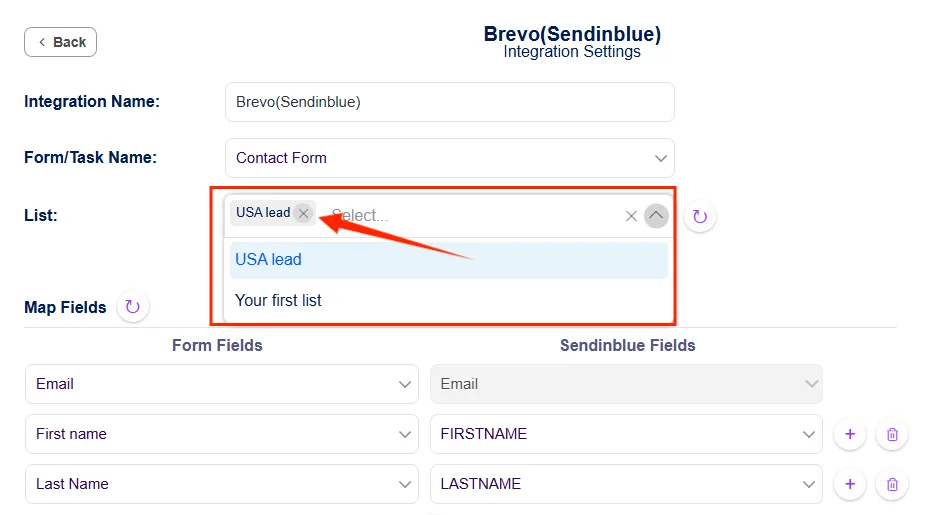
- Apply conditional logic to filter leads based on location, form responses, or source.

- Trigger custom workflows that match your business processes, not just the defaults
In short, you’re not just connecting your CRM; you’re creating a smarter, more flexible integration that works for your business.
5 Best CRM Integrations for Small Businesses in 2026
In today’s fast-paced digital world, integrating your CRM with other tools is crucial for refining processes, improving efficiency, and fostering growth. Here are five of the best CRM integrations for small businesses in 2026, each optimized to enhance your business operations through seamless integrations with platforms like WordPress.
If you’re focused on online sales, these also rank among the best crm integrations for e-commerce businesses.
Zoho CRM Integration with WordPress
Zoho CRM integration with WordPress is a top choice for small businesses. Zoho CRM offers an affordable, all-in-one solution for small businesses looking to manage customer relationships and drive growth.
You can easily connect any WordPress forms to Zoho CRM, as well as integrate popular eCommerce plugins like WooCommerce and SureCart, LMS plugins, subscription plugins, and more, enabling smooth data flow, capturing leads, and automating various workflows without breaking the bank. Here’s why it’s such a great fit for small business owners, especially when considering the best crm integrations for e-commerce businesses:
Cost-Effective and Scalable
Zoho CRM offers an affordable solution that scales with your business. The free plan is a fantastic option for startups or small businesses just getting started. It supports up to 3 users, allowing small teams to manage customer relationships without incurring additional costs.
Each user can send up to 50 emails per day, totaling 150 emails per day for the organization (3 users × 50 emails), making it a great entry-level option for small businesses looking to stay within budget while still benefiting from powerful CRM features.
Easy Lead Capture and Follow-ups
Automatically capture leads from contact forms, e-commerce customers, and landing pages on your WordPress site and track them in Zoho CRM. This ensures no lead is left behind and follow-ups are timely and efficient.
Improved Customer Support
With integrated customer data, small businesses can offer personalized and responsive support, ensuring a better customer experience and stronger loyalty.
How Small Businesses Use It
A WooCommerce store owner selling their handmade craft on their Woo store. Every time a customer places an order, the order details are automatically pushed into Zoho CRM, creating a new contact and logging the purchase information. From there, the system assigns the lead to a sales rep and sends a personalized follow-up email through Zoho Campaigns. What once required hours of manual entry now happens instantly, ensuring faster responses and stronger customer relationships that lead to repeat sales.
 Note
Note
Setting up Zoho CRM integration with WordPress using Bit Integrations is straightforward and doesn’t require advanced technical skills. Whether you’re using contact forms, e-commerce checkout forms, or custom WordPress forms, you can quickly connect them to Zoho CRM and automate lead management, saving time and reducing manual data entry.
HubSpot Integration with WordPress
HubSpot integration with WordPress is a way for small businesses to boost their inbound marketing strategy. With this integration, you can easily integrate HubSpot with any WordPress Forms, as well as WooCommerce, an LMS platform, and over 327 platforms, ensuring leads are captured and sent directly into your CRM.
It offers a range of features designed to help businesses attract, engage, and delight customers, all from within one platform. Here is why HubSpot is the best tool for small businesses:
Best for Inbound Marketing and Email Automation
HubSpot is renowned for its inbound marketing tools, which are perfect for small businesses aiming to grow their online presence. With its seamless integration with WordPress, businesses can automate email marketing campaigns, track visitor behavior, and nurture leads through personalized workflows.
Free Features for Small Businesses
HubSpot offers a free plan with valuable features ideal for small businesses. These include basic email marketing, contact management, lead capture forms, and reporting tools. It also includes email automation for sending targeted messages, helping businesses engage with leads and customers efficiently. The free plan allows businesses to start using HubSpot without an upfront investment, while still benefiting from powerful inbound marketing tools.
Practical Scenario
Think of a coaching business that promotes free webinars. When a visitor registers via a WordPress form, the entry is sent to HubSpot immediately. Instead of just collecting names, Emails, and HubSpot segments, these leads are categorized by interest, whether it’s SEO, social media, or automation. Once inside, HubSpot begins nurturing them with personalized drip emails, guiding attendees toward becoming paying clients. This simple integration turns basic signups into a reliable sales funnel powered by inbound marketing.
Note
Want a step-by-step guide to get started? Check out the official Bit Integrations documentation for HubSpot integration. It walks you through how to connect your WordPress HubSpot in just a few clicks, no coding required. This ensures leads flow seamlessly into your HubSpot CRM, helping you automate follow-ups and grow your business more efficiently.
Salesforce Integration for Small Businesses
Salesforce integration with WordPress is a robust solution for small businesses looking to grow and scale efficiently. As one of the most widely used customer relationship management (CRM) platforms, Salesforce provides powerful tools to efficiently manage sales, marketing, and customer service, all of which are essential for small businesses looking to scale.
Salesforce Free Suite Features for Small Businesses
Salesforce retired the old Essentials edition. The entry point today is the Free Suite, a free-forever plan with no contract and no credit card required, capped at 2 user licenses.
The Free Suite covers CRM basics: lead, contact, account, and opportunity management, a simple sales pipeline, basic service case management, standard reports and dashboards, the Salesforce mobile app, Gmail and Outlook activity sync, and a connected Slack workspace. Marketing is deliberately light, with around 100 marketing emails per month rather than a full campaign tool.
Paid plans begin with Starter Suite at $25 per user per month, which lifts the 2-user cap and adds out-of-the-box automations for email, tasks, and follow-ups. Pro Suite at $100 per user per month adds custom objects, flows, and AppExchange access.
Great for Small Businesses Planning to Scale
Salesforce is an ideal choice for small businesses that are planning to expand. Its scalability means that businesses can start with the Essentials plan and upgrade as they grow, accessing more advanced features like workflow automation, custom reporting, and advanced analytics. As your business grows, Salesforce can grow with you, providing deeper insights and greater control over your customer relationships and sales processes.
Real-Life Example
Consider a growing digital agency that relies on Elementor forms to generate client inquiries. With Salesforce connected, every new submission instantly becomes a lead in the system, complete with the prospect’s details. Salesforce then assigns the lead to the right account manager, logs the activity, and tracks progress as the conversation develops. When WooCommerce is also linked, invoices and deal values sync in real time, giving the team full visibility of the sales cycle without juggling multiple tools.
Note
Setting up Salesforce integration with WordPress doesn’t have to be complicated. Tools like Bit Integrations make it easy to connect your WordPress forms, WooCommerce store, and other plugins directly to Salesforce, without writing a single line of code. This ensures leads flow automatically into your CRM, follow-ups are never missed, and your team stays focused on closing deals instead of managing data manually.
Brevo Integration with WordPress: Ideal for Small Businesses Seeking Simplicity and Visual Pipelines
Brevo integration with WordPress offers small businesses a straightforward solution for managing customer relationships and automating marketing efforts. Known for its user-friendly interface and visual pipelines, Brevo seamlessly integrates with WordPress to enhance your business operations.
With Bit Integrations, you can easily connect WordPress forms with Brevo, as well as eCommerce plugins like WooCommerce, LMS platforms, and over 327 other external platforms. This allows you to capture leads, sync customer data, and automate workflows with just a few clicks.
Free Features Beneficial for Small Businesses
Brevo’s free plan gives small businesses a workable starting point, with a few limits worth knowing upfront:
- Email sending limit: 300 emails per day, covering both marketing and transactional email. This is a daily cap rather than a monthly pool, so a large one-time send has to be split across several days.
- Contact storage: up to 100,000 contacts, which is well above what most competitors allow on a free tier.
- Automation: marketing automation workflows are included, with up to 2,000 unique contacts able to enter your active automations. Contacts already inside a workflow keep moving through it after that point.
- Segmentation: segment your contact list to send targeted campaigns and improve relevance.
- Sales CRM: basic deal tracking with a limit of 50 open deals.
- Users: the free plan covers one user, the account owner. Adding teammates requires a paid plan.
- Branding: emails on the free plan include a “Sent with Brevo” tag that cannot be removed until you upgrade.
Practical Use
Picture an online clothing store running on WooCommerce. Each time a buyer completes a purchase, their information is sent directly to Brevo. Instead of being stored as a generic contact, the buyer is tagged according to their product category, such as “summer collection” or “formal wear.” Brevo then kicks off an automation that sends styling tips, care instructions, and exclusive offers tailored to the purchase. What could have been a simple receipt email turns into an ongoing conversation that drives repeat sales.
Note
For easy integrations, read our official document about Brevo integration.
Flowlu CRM Integration with WordPress: Perfect for Managing Leads & Projects
Flowlu CRM integration with WordPress gives small businesses a simple yet easy way to capture leads from a WordPress site, manage sales pipelines, and keep projects moving, all in one platform. Its clean interface and unlimited contact management make it a cost-effective solution for growing teams.
Free Features That Small Businesses Love
Flowlu’s free plan is a two-user workspace with no expiration. Here’s what it includes:
- CRM contacts: store up to 100 contacts, with lead capture forms included.
- Visual sales pipeline: track deals in Kanban-style boards for a clear view of your sales process. The free plan covers one pipeline, and multiple pipelines unlock on paid plans.
- Projects & tasks: create projects and tasks without a count limit, using Kanban and list views with milestones. Automation is limited to one workflow.
- Task & collaboration tools: assign tasks to teammates, manage deadlines, and work together through private chat, comments and mentions, a basic wiki, and mind maps.
- Invoicing: send invoices and estimates, track payments and expenses, and manage a product catalog.
The 100 contact ceiling and the 2 user cap are what most small businesses hit first. Once you cross either one, the paid Essential plan is the next step.
Real Life Example
Now imagine a creative agency handling multiple projects at once. When a potential client fills out a “Request a Quote” form on their WordPress site, the data flows straight into Flowlu, automatically creating a deal card in the sales pipeline. Once the client signs on, the same system launches a new project board with tasks and deadlines assigned to the team, this integration eliminates the usual back-and-forth between sales and project management, allowing the agency to move seamlessly from prospecting to delivery.
Note
The free plan doesn’t specify daily email sending limits.
How to Set Up a WordPress CRM Integration Without Coding: Let’s End with an Automation Example
If you’re looking for a simple way to integrate your WordPress forms or other plugins with CRM without touching a single line of code, Bit Integrations is the perfect solution. Bit Integrations is a pure no-code WordPress integration and automation tool that supports over 327 platforms, which lets you connect your favorite form builder or WooCommerce store to a wide range of popular CRMs without writing a single line of code.
If you’re using Elementor Form, Contact Form 7, WPForms, Bit Form, or WooCommerce? Bit Integrations, a free WordPress automation solution, helps you send form submissions, orders, and customer data directly to your CRM.
Popular CRMs you can integrate with WordPress include: HubSpot, Zoho CRM, Brevo CRM, Salesforce, Freshsales, Flowlu, and over 30+ CRMs. This means you can build a seamless workflow: capture leads on your WordPress website and sync them into your CRM.
Note
Getting started with Flowlu integration is easier than you think. With Bit Integrations, you can connect Flowlu to your WordPress forms, WooCommerce store, LMS plugins, and more, with zero coding required. This means your leads, orders, and customer data flow seamlessly into Flowlu, helping your team stay organized and focused on growing your business.
Integrate your WooCommerce with CRM using Bit Integrations: Step-by-step guide
CRM integration with Bit Integrations in WordPress is easier than you think. Here’s how easy it is to set up:
- Step 1: Install and activate the Bit Integrations plugin on your WordPress site.
- Step 2: Under the Bit Integrations dashboard, search and select your desired plugin, such as WooCommerce, under the trigger option, and select your desired tasks, such as Customer create or Order create.
- Step 3: Now, select your favorite CRM software under the action option. Such as HubSpot, Brevo, Zoho CRM, and many more.
- Step – 4: Provide your CRM api key and authorize it. (You can find your CRM Api key from the CRM integration API section.)
- Step – 5: Next, choose your CRM contact list and match each form field to the correct CRM field.

- Step – 6: Set up conditional logic for lead filtering. When someone places an order from the NYC region, their details are instantly added to your NYC-specific customer list, making it easy to segment contacts and personalize follow-ups.”

- Step 7: Click to save and finish your automation.
Now, when a customer places an order from New York City, their details are automatically added to your NYC-specific contact list, ensuring precise segmentation and targeted communication.


Note
Read our official documentation about WooCommerce integrations
Conclusion:
Integrating a CRM with your WordPress site isn’t just an option; it’s a necessity for staying competitive. From Zoho’s affordability to HubSpot’s marketing power, each CRM offers unique advantages. The right integration ensures that your business runs smoothly, saves time, and enhances customer relationships.
Ready to supercharge your business?
Use Bit Integrations to connect your WordPress site with the best CRM, no coding required. Unlock the full potential of your CRM and transform how you manage customer relationships today
Frequently Asked Questions
My current CRM isn’t listed in Bit Integrations. Can I still integrate it?
Absolutely! You can still integrate your CRM with WordPress by using Bit Integrations outgoing webhook features!
Can CRM integration improve my marketing efforts?
Yes! CRM integrations can significantly enhance your marketing efforts. By syncing your leads directly into your CRM, you can send them to specific contact lists or different segments based on their behavior, interests, or demographics.
Can I integrate CRM with my E-commerce store?
Yes! With Bit Integrations, you can integrate your WooCommerce store, SureCart, Doakn, and EasyCommerce with your favorite CRM.
How can I find the CRM integration API key?
You can find your CRM integration API under the CRM “SMTP and API” section. You can generate your CRM integration Api token from this section.
How to integrate a CRM with an ERP system?
First, Define Objectives: Understand what data needs to flow between the CRM and ERP, such as customer info, sales orders, or inventory.
Choose Integration Method: Select an integration method, either through:
API-based integration: Using pre-built or custom APIs to sync data in real-time.
Middleware: Using integration platforms like Bit Integrations to connect the systems without deep coding.
Custom Development: Developing a custom solution to suit your unique requirements.
Map Data Fields: Identify and match fields between the CRM and ERP, ensuring data consistency.
Test the Integration: Run tests to ensure data syncs correctly and the systems work together seamlessly.
What are the most cost-efficient options with crm integrations?
The most cost‑efficient CRM integrations include HubSpot, Zoho, and Pipedrive. These tools offer powerful features at affordable prices, with Bit Integrations providing an easy, no-code way to sync WooCommerce with these CRMs, automating workflows and saving time without the need for expensive developers.

Related Blog
WPForms HubSpot Integration Without Elite: Connect WPForms to HubSpot for Free
Need WPForms Elite for CRM Integration? The Cost-Saving Alternative Most Users Miss