EN
EN  ES
ES  DE
DE  NL
NL  FR
FR  PT
PT  IT
IT  JA
JA Why WordPress Automation Plugin is a Game-Changer in 2026

Imagine using a WordPress automation plugin that keeps your site running while you sleep, relax, or focus on bigger goals, with no manual work required.
New form submission? Automatically, form entries are added to a spreadsheet. WooCommerce order? Get automatically notified with order details, product details, and customer details in Telegram. Webinar sign-up? Confirmed instantly. No manual work.
That’s the power of WordPress automation. With the rise of no-code automation for WordPress, anyone can create smart workflows that connect forms, LMS, CRM, email tools, e-commerce stores, and more. From automating repetitive tasks in WordPress to efficient lead management, automation turns your site into a productivity machine.
In this blog, we’ll explore how workflow automation in WordPress is changing the game by helping users save time with WordPress automation, reduce errors, and move faster without extra effort.
TL;DR
A WordPress automation plugin lets your site handle repetitive tasks on its own. When a trigger event happens, like a form submission or a WooCommerce order, data flows automatically to the right platform.
No copy-pasting, no manual emails. Common use cases include sending form entries to Google Sheets, getting order alerts on Telegram or Slack, adding buyers to a CRM like Brevo or HubSpot, and syncing course enrollments from LMS plugins.
The blog recommends Bit Integrations, a no-code plugin with 378+ integrations, seven free triggers, real-time syncing, conditional logic, and a lifetime deal with unlimited workflows. If a platform isn’t natively supported, incoming and outgoing webhooks connect it anyway.
What is Automation in WordPress?
Let’s keep it simple! WordPress automation simply means that your website can perform some of the tedious tasks for you automatically. When you trigger an event, an action will automatically occur through the automation plugin.
For example, someone visits your site and fills out a contact form or purchases a product. That action triggers a workflow, and data moves automatically from one platform to another. This is the foundation of automated data management in WordPress, where information flows smoothly without human intervention.
So you don’t need to copy-paste form entries or manually email customers one by one. Everything works quietly in the background. That’s what people mean when they talk about automating repetitive tasks in WordPress or running a hands-free website.
Why Does Manual Work Slow You Down?
So you don’t need to copy-paste form entries or manually email customers one by one. Everything works quietly in the background. That’s what people mean when they talk about automating repetitive tasks in WordPress or running a hands-free website.
Common Tasks You Can Automate in Your WordPress Site
There are lots of daily tasks your WordPress site can do all by itself. For example:
- WooCommerce order alert on your phone
- Adding leads to your email marketing tool
- Sending form submission to Google Sheets
- Updating records in your CRM
- Getting a Telegram or Slack alert when a form is submitted
These are classic examples of automating repetitive tasks in WordPress, tasks that no longer deserve your manual attention.
How Hands-Free Website Automation Saves Time and Improves Productivity
When your WordPress site takes care of these tasks automatically, you gain back hours every week. No more jumping between tools or worrying about missed data.
This is how businesses truly save time with WordPress automation, letting their site work 24/7 even when they’re offline or asleep.
No-Code Automation for WordPress: Is It Possible?
Yes, it’s absolutely possible, and it’s easier than you might think. You don’t need to know how to write code, and you definitely don’t need to pay a developer to build complex workflows for your WordPress site.
With the rise of no-code automation for WordPress, anyone can set up a smart, time-saving automation system in just a few clicks.
This shift has made WordPress plugin automation for small businesses accessible to everyone, not just developers or large companies.
You don’t need to be a developer or hire a developer anymore
Back in the day, automating tasks on your WordPress website meant writing code or hiring a developer to do it for you. That is no longer the case. Now, you can create workflow automation in WordPress using simple, no-code tools. Simply choose the trigger, select a platform, map the fields, and you’re done. No tech skill? No problem.
Visual Workflows and Triggers – How It Works
Let’s say someone places an order on your WooCommerce store. You might want to send them a personalized thank-you email, get an order alert with details on Telegram, and also save the order info in Google Sheets. That’s where Bit Integration helps. You choose a trigger (like “New Order”) and set up what should happen next using a visual workflow. That means you don’t need to write code. Just choose a trigger, pick the platform, and done. It’s super easy to understand.
Bit Integrations: The Game-Changing WordPress Automation Plugin
Looking for a way to automate your favorite WordPress plugins without hiring a developer or writing a single line of code? That’s where Bit Integration helps you. It’s a no-code WordPress automation plugin that helps automate your WordPress tasks and connect your favorite plugins to CRM, email marketing tools, spreadsheets, messaging platforms, and many more, all in just a few clicks.
Bit Integration is a lightweight and affordable WordPress automation plugin. It’s like a smart middleman or bridge between your WordPress website and the tools you already use.
For example, this occurs when a user fills out a form or makes a purchase on your WordPress site. With Bit Integration, you can instantly send data to:
- Google Sheets for tracking
- MailChimp or Brevo for email marketing
- Telegram or Slack for real-time alerts
All without writing a single line of code. Basically, Bit Integration helps you automate WordPress tasks that used to be manual and time-consuming.
Why Bit Integration is loved by Marketers, Store Owners, and developers
For small business owners, automating repetitive tasks is key to saving time, money, and improving business productivity. When it comes to connecting WordPress tools without requiring technical skills, Bit Integration is the top choice. Bit Integration has become a go-to tool for:
- Marketers who want to automate lead capture and follow-up emails.
- WooCommerce store owners who want to automate order details, customer info, product info, or abandoned carts with other platforms.
- Developers appreciate how quickly they can set up workflows without needing to build custom APIs or scripts.
Bit Integration has over 378 integrations. It works with a wide range of WordPress plugins, making it very easy to use, whether you are running a shop or a membership site.
Why This WordPress Automation Plugin Is Damn Useful
If you’re new to WordPress automation, Bit Integration might just be your new best friend. It helps you connect different tools on your WordPress site without touching a single line of code. Let’s break down why it’s such a game-changer for WordPress users:
- No-Code Automation: Just like drag and drop, choose a plugin, pick the platforms, and match the puzzle, and done.
- Free Popular Plugins: Bit Integration offers 7 of the most popular free Triggers (plugins), and all action platforms are completely free. That means you can send data automatically from these 7 trigger platforms to all action platforms at no cost.
- Real-time data syncing: Bit Integration sends data instantly to desired platforms. Like Google Sheets, CRM etc.
- Smart Conditional Logic: Send data only when specific rules match. For example, you can choose to send the data only if someone picks a certain option in the form
- Webhook & Custom API support: Need something for advanced automation? Bit Integration lets you go beyond the default setup with custom connections.
- Secure and lightweight: It’s fast, lightweight, and keeps your data private.
- No Limitation: Bit Integrations supports unlimited integrations and unlimited data flows from one platform to another, unlike other automation plugins. You only need to make a one-time purchase for unlimited flows and integrations, as Bit Integrations offers a lifetime deal (LTD) without any additional costs.
Real-Life Use Cases of Workflow Automation in WordPress
Tired of managing WordPress tasks again and again? With workflow automation in WordPress, you can save time, reduce errors, and save money. Here are some real-world examples of how people automate their repetitive tasks in WordPress using automation tools like Bit Integration.
Send Any WordPress Form Entries to Google Sheets
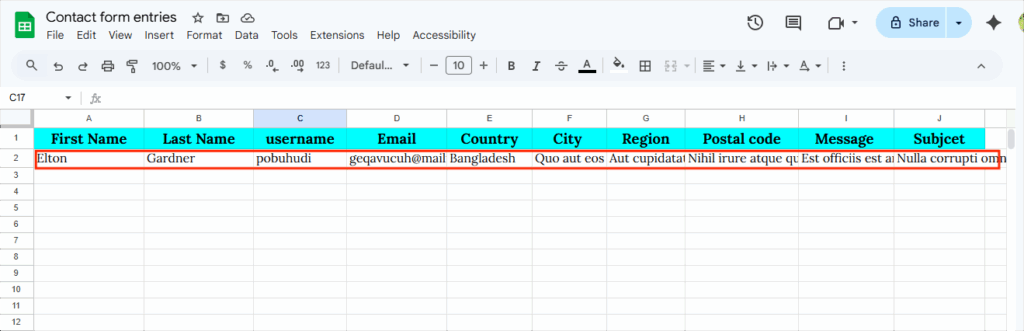
Manually copying and pasting form entries to a Spreadsheet is just a boring job. Whether it’s Bit Forms, WPForms, or Contact Form 7, you can automatically send all form entries straight to Google Sheets using Bit Integration for easy tracking and management.

Get WooCommerce Order Alerts on Telegram, Slack, or WhatsApp
Get notified the moment a new order comes in to the WooCommerce store. Instantly send order details to your team via Telegram, Slack, or WhatsApp. So everyone stays updated without logging into the WordPress site.


When Someone Buys a Digital Product, Add Them to Your CRM
Do you have a subscription-based business? Now, when someone subscribes to your digital service, their info is instantly added to your CRM, like Brevo, Zoho, or Hubspot CRM.


Send New Course Enrollments to Google Sheets, CRM, or over 378+ platforms
When someone enrolls in your course using LearnDash, Tutor LMS, or any other LMS plugin, their information is automatically sent to Google Sheets, your favorite CRM, email marketing tools, or over 378+ other platforms. No copy-paste, no manual work, just hands-free automation.


Can’t find your required platform in Bit Integration? Use webhooks to automate anything in WordPress
If you’re using Bit Integration to automate your WordPress site. Everything is going great. You’re sending form entries to Google Sheets, getting order alerts on Telegram, and saving time like never before.
But one day, you will need to connect a tool that’s not listed inside Bit Integration. Maybe a custom app, a special form, or a tool built just for your business. Now what?
This is where Webhooks come to the rescue. Webhooks let you connect any app to WordPress, even if it’s not officially integrated. It’s like giving Bit Integrations a magic link; it lets your WordPress site receive data from any app. Even if it’s not officially supported, still run your automation just like normal.
For example, you want to send your Form entries to other platforms. Suppose the MailerLite email marketing tool is not available in Bit Integration. Now you want to send your leads to MailerLite. How to do this? Simple! In Bit Integration, you can use outgoing webhooks to send your leads to MailerLite. Let’s see an example:


Additionally, any user can utilize incoming and outgoing webhooks for advanced automation with Bit Integration. Users can utilize webhooks for advanced automation with Bit Integration.
Final Thoughts
Managing a WordPress site doesn’t have to feel like a full-time job. In case you’re running an online store, collecting leads, selling subscription-based products, or managing student course enrollments, there’s a smarter way to handle these repetitive tasks.
With the right WordPress automation plugin, you can save hours every day, avoid human error, and focus on what really matters to growing your business.
Bit Integration makes it easy to automate WordPress tasks without writing a single line of code. From sending Form entries to Google Sheets, getting real-time order alerts, or syncing customer data to 378+ platforms, everything just works.
So why waste time doing WordPress tasks manually when your site can do it for you? Start automating today, and let your WordPress site take care of the boring tasks for you!
Automation Confusion Zone (Solved)
Do I need coding knowledge to use the Bit Integration plugin in WordPress?
No! Bit Integration is a pure no-code WordPress automation plugin. Just choose the trigger, pick the action, and map the puzzle, and you’re done.
Can I automate WooCommerce orders and customer data?
Yes! You can automate WooCommerce order details, product details, and customer details to 378+ platforms.
What if the platform I want to connect to isn’t supported by Bit Integrations?
You can still connect your desired platforms by using Incoming and outgoing webhooks in Bit Integration. Webhooks allow you to send or receive data between WordPress and almost any third-party tool, even if it’s not listed in the plugin’s supported platforms.
Can I filter which data gets sent in the automation?
Absolutely. Bit Integrations includes conditional logic, so you can set rules. For example, only send form data to your CRM if the user selects a certain option or spends more than $100.
Can I send data from external apps into WordPress using Bit Integrations?
Yes! That’s what incoming webhooks are for. For example, you can send data from a chatbot, a payment app, or a mobile form to WordPress and automate actions like adding users or storing entries.


Related Blog

Paymentform.io Review: Collect Payments Online Without a Website

How to Write Product Documentation in WordPress